Loading

Open form follow the instructions

Easily sign the form with your finger

Send filled & signed form or save
How to fill out the Citibank Beneficiary online
This guide provides a clear and supportive walkthrough for users who need to fill out the Citibank Beneficiary Designation Form online. By following the steps outlined here, users can efficiently complete the necessary sections to designate or change beneficiaries for their accounts.
Follow the steps to complete the form accurately and effectively.
- Click ‘Get Form’ button to access the Beneficiary Designation Form in your preferred editor.
- Begin by entering the date and branch information at the top of the form.
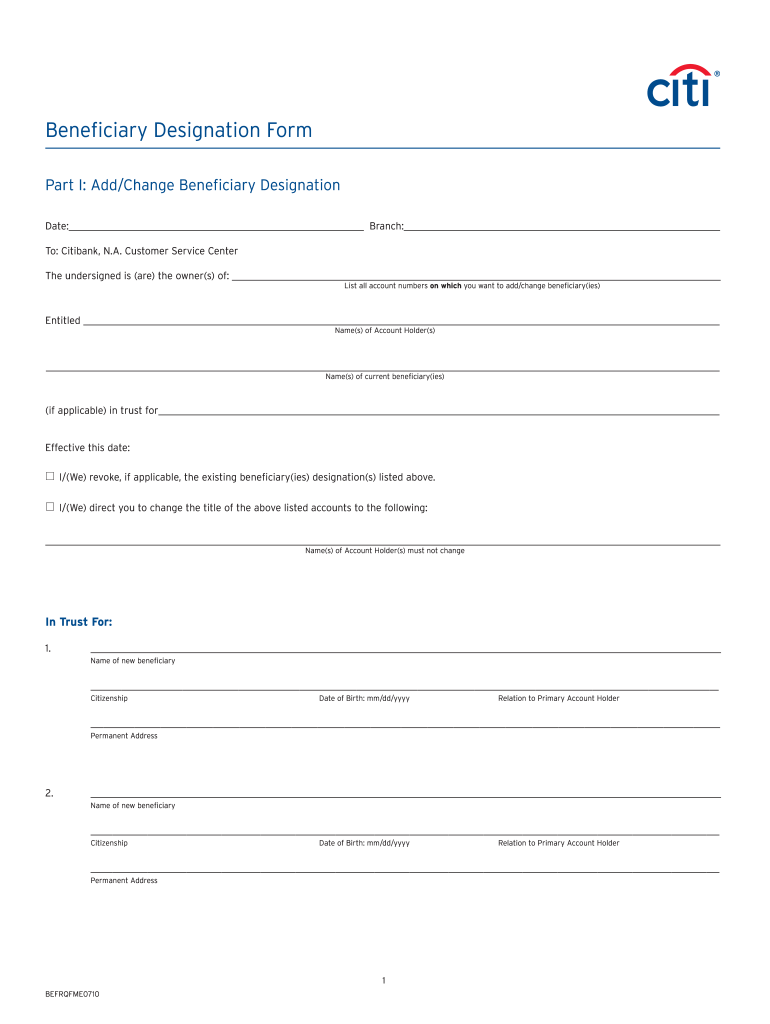
- In Part I, identify yourself as the account owner by providing your name and the account numbers you wish to update.
- List the names of current beneficiaries if applicable and note if you are revoking any existing designations.
- Complete the section to specify the new beneficiaries, including their name, citizenship, date of birth, relationship to the primary account holder, and permanent address.
- Sign and date the document, ensuring all required account holders also provide their signatures and dates.
- Include signature validation, either through a notary, U.S. consul, or bank employee, based on where the form is being executed.
- Finally, ensure all fields are completed correctly before saving your changes, downloading a copy, or printing the form as needed.
Complete your Citibank Beneficiary Designation Form online today for a secure and smooth process.
Experience a faster way to fill out and sign forms on the web. Access the most extensive library of templates available.
Related content
"Beneficiary'' means the person or persons who are entitled to receive benefits under the...
CITIBANK NA. Beneficiary Bank Address. Jose Ortega y Gasset 29, Planta 4,. 28006 - Madrid...
Jan 4, 2017 — Each beneficiary will receive his or her own Form. RRB1099R. If you...
Get answers to your most pressing questions about US Legal Forms API.
Can I name a beneficiary on a bank account?
Yes, you can name a beneficiary on your Citibank account, which can provide numerous advantages. By doing so, you can ensure your assets are transferred directly to the beneficiary upon your demise, avoiding probate delays. This straightforward action offers protection for your loved ones during a difficult time.
How do I add someone as a beneficiary on a bank account?
To add someone as a beneficiary on your Citibank account, you can do so through either the bank's website or mobile app. After logging in, look for the beneficiary section, where you'll find an option to add a new beneficiary. Make sure to provide complete and accurate information to avoid any complications later.
How do I make a beneficiary in my bank account?
Making a beneficiary in your Citibank account involves filling out a beneficiary designation form, either online or at a branch. You'll need to include the name, relationship, and possibly other identifying details of the person you want to designate. This simple step can help ensure that your funds go to the right person when needed.
How do I notify Citibank of a death?
To inform Citibank of a death, you'll need to contact their customer service or visit a local branch in person. Prepare to provide necessary documentation, such as a death certificate and any account details. This notification is a crucial step in managing the deceased's accounts and ensuring the assets are handled according to their wishes.
How to add beneficiary in city bank app?
To add a beneficiary using the Citibank app, start by logging into your account. Navigate to the account management section, where you can find the option for adding a beneficiary. Follow the prompts to enter the relevant information about your Citibank beneficiary. If you encounter any issues, Citibank's customer service is ready to help.
How much time does it take to add a beneficiary in Citibank?
Adding a beneficiary at Citibank is generally a quick process, often completed within the same day. Once you submit the necessary form, Citibank typically updates your account information promptly. Be sure to check your account afterward to confirm that your designated beneficiary is listed correctly.
How do I get a beneficiary on my bank account?
To designate a Citibank beneficiary, you can either visit a local branch or log into your online account. You'll need to fill out a beneficiary designation form, providing the necessary details about the person you want to name. It's a straightforward process, and the staff at Citibank can assist you if you have questions.
Is it a good idea to put a beneficiary on a bank account?
Yes, naming a Citibank beneficiary for your account can simplify the transfer of assets after your passing. When you designate a beneficiary, the funds can bypass the often lengthy probate process, allowing your loved ones to access the funds more quickly. This can provide peace of mind and ensure your assets reach your intended recipient without unnecessary delays.
How do I fill beneficiary details?
To fill in beneficiary details for your Citibank account, ensure that you accurately input their full name, contact information, and relationship to you on the beneficiary designation form. Double-check all provided information for accuracy before submitting the form, as this will prevent any delays or issues in the future.
How do I list beneficiaries on my bank account?
To list beneficiaries on your Citibank account, you typically need to complete a beneficiary designation form. This form allows you to specify who will receive the funds upon your passing. It is recommended to consult Citibank’s guidelines to ensure all requirements are met.
Use professional pre-built templates to fill in and sign documents online faster. Get access to thousands of forms.
If you believe that this page should be taken down, please follow our DMCA take down process here.