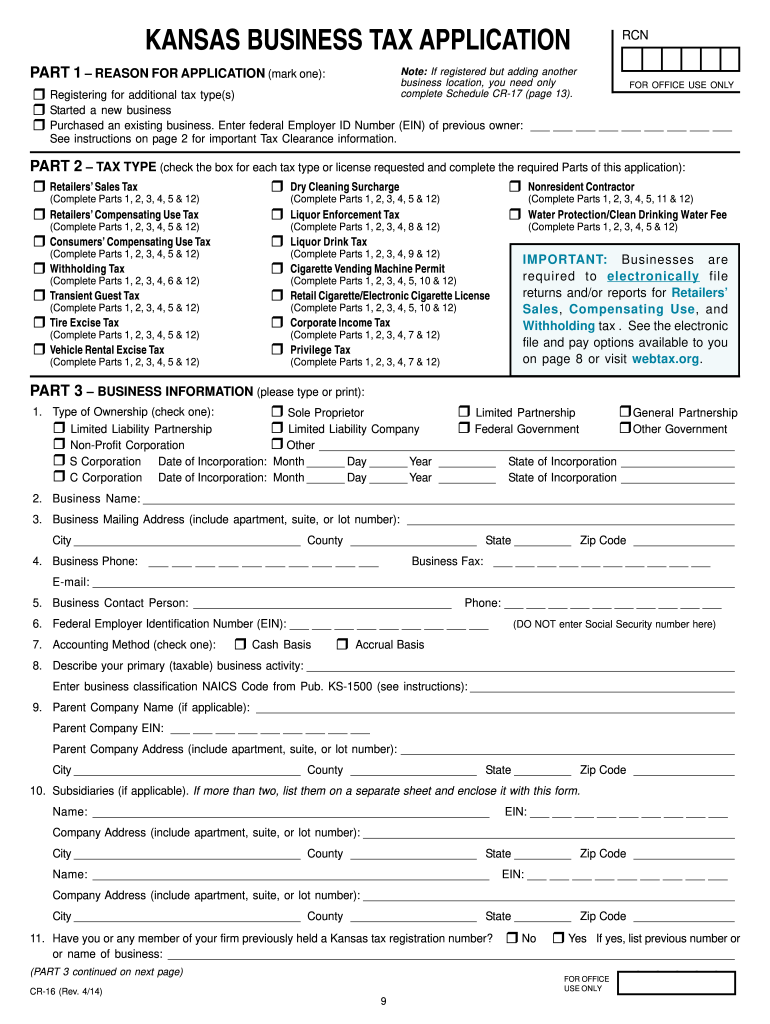
5. Business Contact Person: Phone: 6. Federal Employer Identification Number (EIN): 7. Accounting Method (check one): Cash Basis (DO NOT enter Social Security number here) Accrual Basis 8. Describe your primary (taxable) business activity:.
Loading

Open form follow the instructions

Easily sign the form with your finger

Send filled & signed form or save
How to fill out the KS DoR CR-16 online
The KS DoR CR-16 form is essential for individuals and businesses registering for various tax types in Kansas. This guide provides clear, step-by-step instructions to ensure that you complete the form accurately and efficiently.
Follow the steps to complete the KS DoR CR-16 online.
- Click ‘Get Form’ button to obtain the form and open it in the editor.
- Part 1 requires you to indicate the reason for your application by marking the appropriate box, such as registering for an additional tax type or starting a new business.
- In Part 2, check the boxes for each tax type or license you are requesting. Complete the necessary parts of the application as indicated next to the selected tax type.
- Part 3 collects your business information. Provide your type of ownership, business name, address, contact information, and state-specific details like your Federal Employer Identification Number (EIN).
- Continue with Part 3 by describing your business activities and noting any parent companies or subsidiaries, if applicable.
- If you have multiple business locations, complete Part 4 for each one. Provide the trade name, address, and details about your primary business activities.
- In Part 5, indicate when your retail sales or compensating use will begin and whether you will operate temporary locations or engage in activities such as shipping merchandise to Kansas customers.
- Complete Part 6 if you are registering for withholding tax, describing your reasons for registration and estimating your annual withholding tax.
- Fill out Parts 7 through 10 as applicable, providing details for corporate income tax, liquor enforcement tax, and cigarette and tobacco tax, as needed.
- Complete Part 12 with ownership disclosures, ensuring all owners or partners provide their signatures and necessary information.
- Finally, save any changes you have made to the form. You may download, print, or share it as needed.
Complete the KS DoR CR-16 online today to ensure your business is properly registered.
Experience a faster way to fill out and sign forms on the web. Access the most extensive library of templates available.
Related content
Send this form and any payments to: Kansas Department of Revenue, PO Box 3506, Topeka KS...
Feb 13, 2019 — Importância. As Encefalopatias Espongiformes Transmissíveis (EET) são...
Descarte de pilhas e baterias. Após o uso, as pilhas/baterias podem ser dispostas em lixo...
Get answers to your most pressing questions about US Legal Forms API.
How to get a Kansas tax ID number?
Getting a Kansas tax ID number requires filling out an application form, which is available online or at local offices. You can easily access the KS DoR CR-16 form for this purpose. Ensure all your business details are accurate to facilitate a quick approval process.
How to get a tax clearance certificate in Kansas?
Obtaining a tax clearance certificate in Kansas involves filing your state tax returns and paying any outstanding taxes. Contact the Kansas Department of Revenue for instructions specific to your situation. Utilizing the KS DoR CR-16 form can streamline this process and help you meet compliance requirements.
How to get a Kansas sales tax registration number?
To acquire a Kansas sales tax registration number, complete the application available on the Kansas Department of Revenue website. The KS DoR CR-16 is particularly useful for this task. Make sure to include details about your business activities to ensure a proper registration outcome.
What do I need to do to get a tax ID?
To get a tax ID, first determine the type of entity you plan to establish, such as a sole proprietorship or corporation. Next, gather necessary information, including your Social Security number and business details. Use the KS DoR CR-16 form during the application, ensuring you provide accurate information to avoid delays.
Where can I pick up Kansas tax forms?
Kansas tax forms are available at various locations, including local county treasurer offices and the Kansas Department of Revenue's website. You can also find these forms in tax preparation offices throughout the state. For convenience, access the KS DoR CR-16 form online, which is designed to simplify the tax filing process.
How do I get a tax ID number in Kansas?
To obtain a tax ID number in Kansas, visit the Kansas Department of Revenue (KS DoR) website. You can apply online or submit a paper form, depending on your preference. The KS DoR CR-16 form can assist with processing your application efficiently. Ensure you have your business information ready for a smooth application process.
What is a CR 16 form in Kansas?
The CR 16 form, or Kansas Sales Tax Registration, is essential for businesses that need to collect sales tax in Kansas. This form allows you to register your business for tax purposes with the Kansas Department of Revenue. For guidance on filling out the CR-16 form, uslegalforms offers user-friendly templates and instructions.
What is the correct format for tax ID?
The correct format for a tax ID varies by state, but in many cases, it can be a combination of numbers and letters. For Kansas specifically, ensure adherence to the formats established by the Kansas Department of Revenue, including the KS DoR CR-16 form, which provides detailed instructions for your tax-related identification needs.
What is the format for Kansas tax ID?
A Kansas tax ID number also follows a standardized format, consisting of 10 digits. It generally starts with the digits '48' followed by eight additional numbers. For more details on acquiring and managing your tax ID, the KS DoR CR-16 form serves as an essential resource, available on uslegalforms.
What is the format of EIN for tax ID?
The format of an Employer Identification Number (EIN) for a tax ID is typically nine digits, structured as two digits followed by a dash and then seven digits. For instance, it looks like this: 12-3456789. You can find helpful guidance on understanding tax IDs, including EIN structures, on the uslegalforms website.
Use professional pre-built templates to fill in and sign documents online faster. Get access to thousands of forms.
If you believe that this page should be taken down, please follow our DMCA take down process here.
This form is available in several versions. Select the version you need from the drop-down list below.