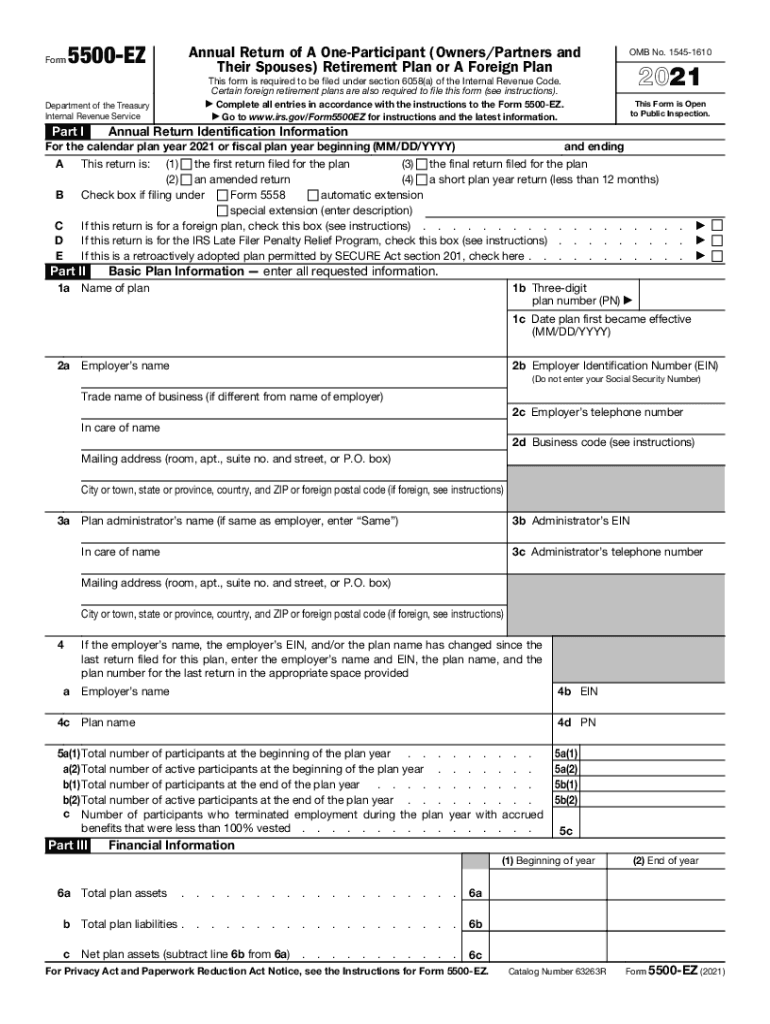
Crued . . . . . . Financial Information 5a(1) 5a(2) 5b(1) 5b(2) 5c (1) Beginning of year 6a . . . . . . . . . . . . . . . . . . . 6a b Total plan liabilities . . . . . . . . . . . . . . . . . . . 6b Net plan assets (subtract line 6b from 6a) . . . . . . . . . . . 6c c Total plan assets For Privacy Act and Paperwork Reduction Act Notice, see the Instructions for Form 5500-EZ. Catalog Number 63263R (2) End of year Form 5500-EZ (2021).
Loading

Open form follow the instructions

Easily sign the form with your finger

Send filled & signed form or save
How to fill out the IRS 5500-EZ online
Filing the IRS 5500-EZ form is an important requirement for one-participant retirement plans and certain foreign plans. This guide provides clear, step-by-step instructions to assist users in completing the form online, ensuring compliance with federal regulations.
Follow the steps to successfully complete your IRS 5500-EZ form online.
- Click ‘Get Form’ button to obtain the form and open it in the editor.
- Fill out Part I by providing the annual return identification information. Indicate the type of return you are filing, whether it is the first, final, amended, or a short plan year return. Additionally, check the relevant boxes for any automatic extensions or if filing for a foreign plan.
- In Part II, enter the basic plan information. This includes the three-digit plan number, the name of the plan, effective date, employer identification number (EIN), and employer's contact details. Ensure to use the appropriate fields to provide accurate and complete information.
- Continue filling out Plan Administrator details in Part II. If the administrator is the same as the employer, simply enter 'Same.' Otherwise, provide the specific details requested in the form.
- In Part III, report financial information. This involves indicating the total assets and liabilities of the plan both at the beginning and the end of the year. Be prepared to list the contributions received from participants and employers.
- Complete Part IV by entering two-character feature codes that represent plan characteristics. Refer to the provided list of codes for guidance.
- Finalizing your form involves answering compliance and funding questions in Part V. These include inquiries about participant loans, and minimum funding requirements. Complete all required sections thoroughly.
- After filling out each section, review the form for accuracy. Once verified, save changes, download, print, or share the completed form as needed.
Start filling out your IRS 5500-EZ form online today to ensure compliance and avoid penalties.
Experience a faster way to fill out and sign forms on the web. Access the most extensive library of templates available.
Related content
Jan 10, 2019 - Use the online, fillable 2018 Form 5500-EZ on the IRS website. Complete and...
Form 990-N filers may choose to file a complete Form 990 or Form 990-EZ instead. ... are...
Publication 4163 Modernized e-File (MeF) Information for Authorized IRS e-File Providers...
Get answers to your most pressing questions about US Legal Forms API.
How long is the extension for Form 5500?
An employer can apply for an automatic 2 ½ month extension of time to file their Form 5500 by filing a Form 5558 (extending the filing deadline to October 15 for calendar-year plans). The Form 5558 must be filed before the due date of the Form 5500.
What is the due date for filing Form 5500?
Form 5500 annual return or report filing is due on the last day of the seventh month after the plan year ends, with an optional two-and-a-half-month extension. For plans that follow a calendar year, Form 5500 for the prior year is due on July 31, with an extension available to Oct. 15.
Is Solo 401k tax deductible?
Contributions made to your Solo 401k plan (except for after-tax contributions) are tax deductible to you as the owner of the employer pursuant to IRC Sec. 404.
What is the maximum Solo 401k contribution for 2019?
Type 1. Elective Deferral (401k) also known as Employee Contributions. The maximum elective deferral is $18,500 in 2018, or $24,500 if age 50 or older. For 2019, the elective deferral increased from $18,500 to $19,000, or $25,000 if age 50 or older.
Does a solo 401k need a TPA?
As a simplified plan, the Solo 401k is simple to manage. It does not require a custodian or a TPA, the plan owner can perform administrative role. This plan owner has the ability to direct his or her own retirement plan. ... Usually, the task of a Solo 401k plan trustee can be quite simple.
Does a solo 401k file a 5500?
A one-participant 401(k) plan is generally required to file an annual report on Form 5500-SF if it has $250,000 or more in assets at the end of the year.
Are Keogh contributions tax deductible?
Contributions are generally tax deductible up to a certain percentage of annual income, with applicable absolute limits in U.S. dollar terms, which the Internal Revenue Service (IRS) can change from year to year.
Who has to file a form 5500?
The employer maintaining the plan or the plan administrator of a Pension or Welfare benefit plan covered by ERISA must generally file the Form 5500 to report information concerning the qualification of the plan, its financial condition, investments and the operations of the plan.
Do Keogh plans file Form 5500?
Keogh plans require a good deal of annual paperwork. IRS Form 5500 must be filed each year, and it requires the help of a tax accountant or a financial professional. It is one of the primary reasons that Keoghs can be complicated for the average self-employed individual.
Do all 401k plans have to file a 5500?
Generally, the Form 5500 version a 401(k) plan must file for a year is based on its participant count. ... Solo 401(k) plans with less than $250,000 in plan assets as of the last day of the plan year don't have to file a Form 5500-EZ (or any Form 5500 at all).
Use professional pre-built templates to fill in and sign documents online faster. Get access to thousands of forms.
If you believe that this page should be taken down, please follow our DMCA take down process here.
This form is available in several versions. Select the version you need from the drop-down list below.