Loading
Get Mn Dor Rev184 2014-2026
How it works
-

Open form follow the instructions
-

Easily sign the form with your finger
-

Send filled & signed form or save
How to fill out the MN DoR REV184 online
This comprehensive guide will walk you through the necessary steps to accurately complete the MN DoR REV184 form online. Whether you are appointing a new power of attorney or making changes, this guide ensures you are well-informed and prepared.
Follow the steps to successfully complete the MN DoR REV184 form
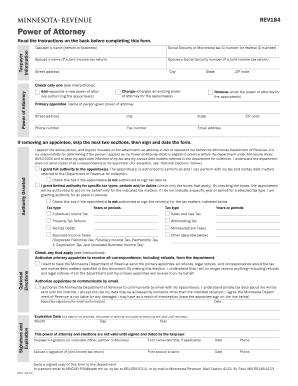
- Click ‘Get Form’ button to obtain the form and open it in the editor.
- Begin by filling out the taxpayer information. Input the taxpayer's name, Social Security or Minnesota tax ID number, as well as the spouse's name and Social Security number, if applicable.
- Indicate the purpose of this form by checking one box: ‘Add’ to appoint a new power of attorney, ‘Change’ to modify an existing one, or ‘Remove’ to terminate a current power of attorney.
- Enter the primary appointee's information, including their name, address, phone number, fax number, and email address if they will be authorized to receive communication from the Department of Revenue.
- If you are removing an appointee, you can skip the next sections and proceed to sign and date the form.
- Choose the authority you wish to grant the appointee(s). You can specify full authority or limited authority for specific tax types and periods by checking the appropriate boxes.
- If applicable, complete the optional elections section by checking the boxes for authorizing the appointee to receive correspondence and communicate by email.
- Enter an expiration date for the power of attorney. If left blank, it will remain in effect until changed or revoked.
- Sign and date the form, ensuring that all required signatures are included. If this is regarding a joint return, the spouse's signature is also necessary.
- Finally, send the signed copy of this form to the department via secure email, fax, or regular mail, as detailed in the form instructions.
Complete your documents online to ensure proper management of your tax and legal responsibilities.
Claimants can check the status of their refund online or by calling DOR at 651-296-4444.