Loading
Get Nj Dot Git/rep-3 2021-2026
How it works
-

Open form follow the instructions
-

Easily sign the form with your finger
-

Send filled & signed form or save
How to fill out the NJ DoT GIT/REP-3 online
Completing the NJ DoT GIT/REP-3 form online is essential for individuals, estates, or trusts selling or transferring property in New Jersey. This guide provides a comprehensive, step-by-step approach to help you navigate the form confidently and correctly.
Follow the steps to fill out the NJ DoT GIT/REP-3 online effectively.
- Press the ‘Get Form’ button to access the NJ DoT GIT/REP-3 form and open it in your preferred online editor.
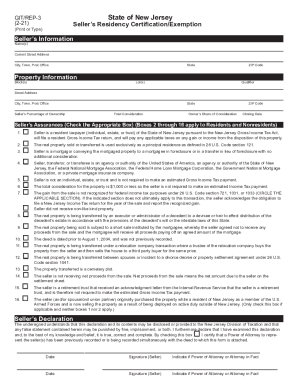
- Begin filling out the 'Seller’s Information' section. Provide the seller's name(s) along with their current street address, city, state, and ZIP code.
- Complete the 'Property Information' section by entering the block(s), lot(s), and street address of the property being sold, along with the closing date and any relevant ZIP codes.
- Indicate the seller’s percentage of ownership and provide the total consideration for the property being sold, as well as the owner’s share of that consideration.
- In the 'Seller’s Assurances' section, check the appropriate box or boxes that apply, ensuring to indicate if one or more of these assurances exempt the seller from making an estimated Income Tax payment.
- Review the 'Seller’s Declaration' carefully. The seller must sign the form, indicate if they are using a Power of Attorney, and date the declaration.
- Once all sections are completed, you can save your changes. Then download, print, or share the filled-out form as needed.
Complete the NJ DoT GIT/REP-3 online today to ensure a smooth property transaction.