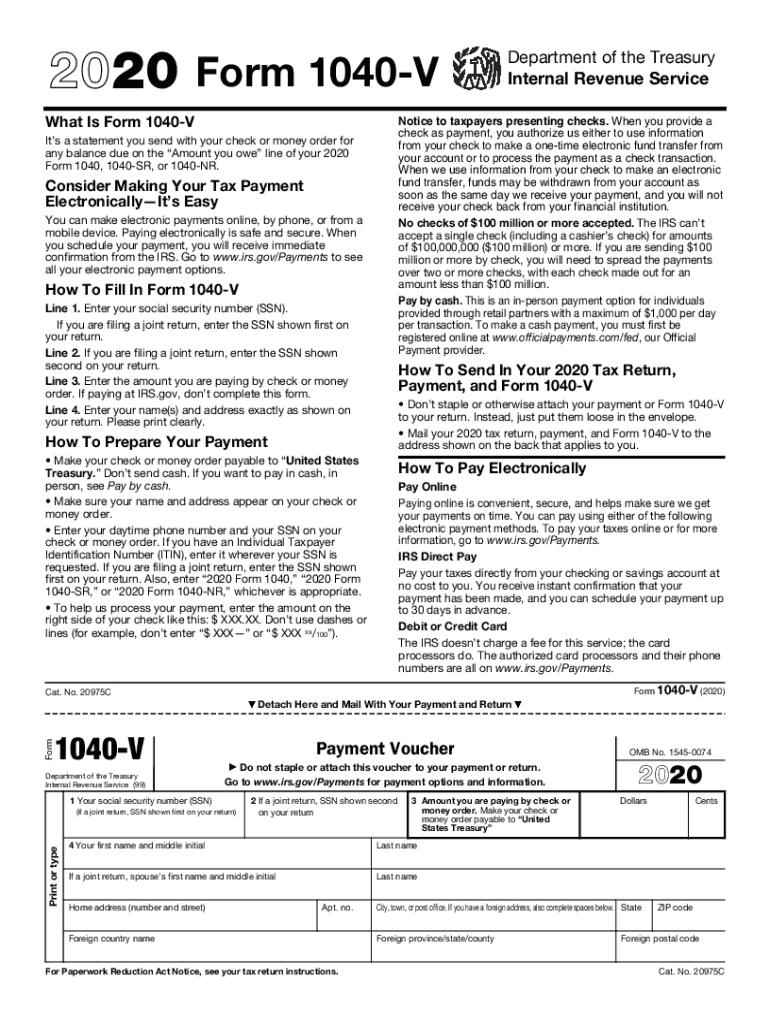
Ation from your check to make a one-time electronic fund transfer from your account or to process the payment as a check transaction. When we use information from your check to make an electronic fund transfer, funds may be withdrawn from your account as soon as the same day we receive your payment, and you will not receive your check back from your financial institution. No checks of $100 million or more accepted. The IRS can t accept a single check (including a cashier s check) for amounts.
Loading

Open form follow the instructions

Easily sign the form with your finger

Send filled & signed form or save
How to fill out the IRS 1040-V online
The IRS 1040-V is a payment voucher that you submit along with your tax payment. Completing this form accurately is important to ensure proper credit to your tax account. This guide will walk you through each step needed to fill out the IRS 1040-V online.
Follow the steps to fill out the IRS 1040-V online.
- Click ‘Get Form’ button to obtain the form and open it in your editor.
- Begin filling out Line 1 by entering your social security number (SSN). If you are filing a joint return, ensure you enter the SSN shown first on the return.
- For Line 2, if applicable, enter the SSN shown second on your joint return.
- On Line 3, specify the amount you are paying by check or money order. If you are making an electronic payment through the IRS website, leave this line blank.
- Fill out Line 4 with your name(s) and address exactly as shown on your tax return. Use clear and legible print.
- Ensure not to staple or otherwise attach your Form 1040-V to your tax return or payment. Place them loose in the envelope for submission.
- Prepare your payment by making your check or money order payable to 'United States Treasury.' Include your name, address, and SSN on the payment.
- Finish up by saving changes, downloading, or printing the completed Form 1040-V, and send it alongside your tax return to the appropriate IRS address.
Complete your documents online now for a smooth filing process.
Experience a faster way to fill out and sign forms on the web. Access the most extensive library of templates available.
Related content
Information about Form 1040-V, Payment Voucher, including recent updates, related forms...
Apr 15, 2019 - Income Tax Forms - 2019 (for Tax Year 2018): US Federal ... Form 1040-V...
Get answers to your most pressing questions about US Legal Forms API.
Is there a grace period for IRS payments?
The IRS has a 30-day grace period during which you can pay your missing payment. After this grace period, the IRS has the right to cancel the agreement, which means you have to pay the entirety of the remaining debt or face a wage garnishment, lien, levy, or some other collective action.
What is a partial payment installment agreement with the IRS?
The Partial Payment Installment Agreement (PPIA) is similar to a regular installment agreement where you make monthly payments to the IRS for taxes owed. However, you are only paying back part of the taxes you owe over time. ... This form tells the IRS how much or what your ability to pay is.
How do I make a partial payment to the IRS?
Reach Out to the IRS Write a letter to the IRS stating your request for a partial payment installment agreement and submit your written request along with Form 9465 and Form 433-A. Send it to the IRS Revenue Officer handling your case, to the Automated Collection System unit, or to your nearest IRS Service Center.
Can I send a partial payment to the IRS?
If you can't pay your tax bill in its entirety right now but you know that you'll be able to do so within 45 days, send in a partial payment using the Form 1040-V payment voucher at the time you file your return. ... Pay your remaining balance by the deadline set by the IRS.
How much do I owe the IRS?
Calling the IRS to Find Out How Much You Owe Individual taxpayers may call 1-800-829-1040, Monday through Friday, 7 a.m. to 7 p.m. local time. Taxpayers representing business may call 1-800-829-4933, Monday through Friday, 7 a.m. to 7 p.m. local time.
Can I pay IRS online?
IRS Direct Pay, a free and secure way for individual taxpayers to pay tax bills and make estimated tax payments directly from their bank accounts. ... Electronic Federal Tax Payment System (EFTPS) is for individual and business taxpayers to pay federal taxes electronically online or by phone for free.
How do I pay IRS by phone?
Call 888-PAY-1040 (888-729-1040) (TTY: 711) (international 501-748-8507) to begin the payment process. You will be greeted by a friendly automated response system that will guide you through the payment process. Step 1: Simply select your payment type and enter the amount you wish to pay.
How do I make a payment to the IRS?
Direct Pay. Taxpayers can pay tax bills directly from a checking or savings account free with IRS Direct Pay. ... Credit or debit cards. Taxpayers can also pay their taxes by debit or credit card online, by phone or with a mobile device. ... Installment agreement.
How do I pay IRS?
Direct Pay. Taxpayers can pay tax bills directly from a checking or savings account free with IRS Direct Pay. ... Credit or debit cards. Taxpayers can also pay their taxes by debit or credit card online, by phone or with a mobile device. ... Installment agreement.
Is it safe to write SSN on check to IRS?
It isn't. IRS spokesman Kevin McKeon said the IRS asks taxpayers to include their Social Security number on their checks to help ensure payments are properly posted to their accounts. But it's only a request, not a requirement, and checks will be processed without the Social Security number.
Use professional pre-built templates to fill in and sign documents online faster. Get access to thousands of forms.
If you believe that this page should be taken down, please follow our DMCA take down process here.
This form is available in several versions. Select the version you need from the drop-down list below.