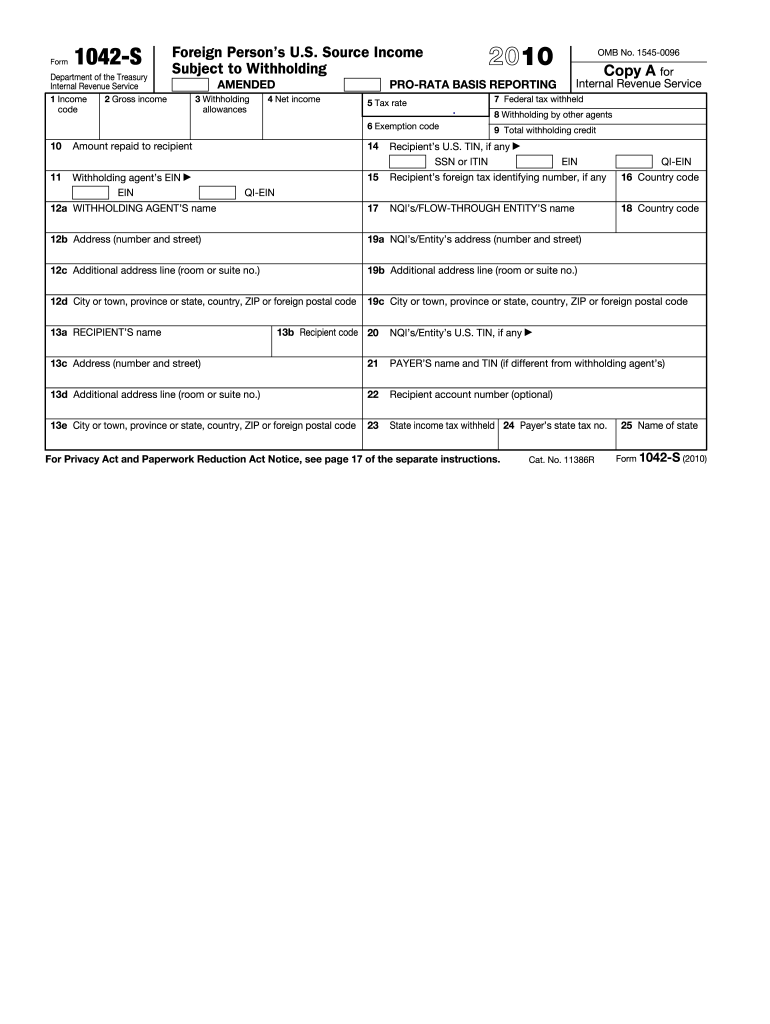
Privacy Act and Paperwork Reduction Act Notice, see page 17 of the separate instructions. Cat. No. 11386R 25 Name of state Form 1042-S (2010) U.S. Income Tax Filing Requirements Generally, every nonresident alien individual, nonresident alien fiduciary, and foreign corporation with United States income, including income that is effectively connected with the conduct of a trade or business in the United States, must file a United States income tax return. However, no return is required to be.
Loading

Open form follow the instructions

Easily sign the form with your finger

Send filled & signed form or save
How to fill out the IRS 1042-S online
Filling out the IRS 1042-S form is essential for reporting income earned by foreign persons who have U.S. source income. This guide provides clear, step-by-step instructions to help you complete the form accurately.
Follow the steps to fill out the IRS 1042-S form online.
- Click ‘Get Form’ button to download the IRS 1042-S form and open it in the editor.
- Begin by entering the income code in Box 1, selecting the appropriate type of income earned. Refer to the provided codes to determine which applies to your situation.
- In Box 2, specify the gross income amount that corresponds to the income reported in Box 1.
- Fill out Box 3 with the number of withholding allowances claimed.
- Report the net income in Box 4, which is the income after any allowable deductions.
- In Box 5, indicate the tax rate that applies to the income being reported.
- Use Box 6 to provide an exemption code, if applicable, to clarify why certain income may not be subject to withholding.
- Enter the total amount of federal tax withheld in Box 7.
- Include any withholding by other agents in Box 8, if applicable.
- Calculate and report the total withholding credit in Box 9.
- If any amount was repaid to the recipient, report that in Box 10.
- Fill in the recipient's U.S. Tax Identification Number (TIN) in Box 14, if available.
- In Box 11, enter the withholding agent’s Employer Identification Number (EIN).
- Complete Box 12a with the withholding agent's name and provide the corresponding address in Box 12b to 12d.
- Report the recipient's name in Box 13a, followed by their code in Box 13b and address details in Box 13c to 13e.
- Lastly, review all the information for accuracy. Save your changes, then download, print, or share the completed form as necessary.
Complete your IRS 1042-S filing online now!
Experience a faster way to fill out and sign forms on the web. Access the most extensive library of templates available.
Related content
Use Form 1042-S to report: Income and amounts withheld as described in the Instructions...
Use Form 1042-S to report: Income and amounts withheld as described in the Instructions...
Apr 15, 2015 — Form(s) 1042-S, you generally must include the amount shown in box 2 of...
Get answers to your most pressing questions about US Legal Forms API.
Why did I not receive 1042-S?
If you did not receive an IRS 1042-S, it could be due to various reasons, such as the payer not reporting any income or your payment threshold not meeting IRS requirements. To resolve this, check with the payer to confirm whether you should have received a form. If you need further assistance, platforms like USLegalForms can provide guidance on your tax documentation needs.
Do I need to send 1042-S to IRS?
You do not need to send your IRS 1042-S to the IRS when filing your tax return. However, ensure that you accurately report the income and any withheld tax amounts from this form on your return. Keeping it for your records is crucial for future reference.
Who issues a 1042-S form?
S form is issued by the withholding agent, which can be a financial institution or a payer of income. This individual or organization is responsible for reporting payments and withholding taxes on foreign persons. If you are unclear about who issued your form, review your payment sources.
Do I need to attach 1042-S to a tax return?
You do not need to attach the IRS 1042-S form to your tax return when filing. However, you should keep it for your records, as it contains vital information for reporting your income accurately. Always ensure that you report the income stated in the 1042-S on your tax return.
What should I do if I receive 1042-S?
If you receive an IRS 1042-S, review it carefully for accuracy. Make sure the reported income aligns with your records. If you have any discrepancies, contact the issuer for clarification and consider how it affects your tax return preparation.
When should I receive my 1042-S?
Typically, you should receive your IRS 1042-S by March 15 of the year following the tax year. This timing allows you to incorporate the information into your tax return. If you do not receive it by this date, it is advisable to follow up with the issuer.
Can I ignore 1042-S?
You should not ignore the IRS 1042-S, as it reports income that is subject to U.S. tax withholding. Ignoring it could lead to complications in your tax filings. It is essential to review the information provided to ensure accuracy and compliance with IRS regulations.
Do I need to report 1042-S in my tax return?
Yes, you need to report the IRS 1042-S in your tax return if you received this form. It ensures you are transparent about your income and fulfills your tax obligations. To make this process easier, consider accessing guides and templates through US Legal Forms, which can help you correctly incorporate this information into your return.
How to report payments to foreign companies?
To report payments to foreign companies, you will generally use the IRS 1042-S form. This form is required for payments made to foreign individuals or entities that are subject to U.S. withholding tax. For a comprehensive understanding of the process, US Legal Forms offers valuable templates and information that can simplify your reporting activities.
Do I need to report 1042-S as income?
Yes, if you received an IRS 1042-S, you must report it as income. This form indicates that you have received U.S.-sourced income, which is taxable. Not reporting this income can lead to compliance issues, so it’s prudent to keep accurate records and consult resources like US Legal Forms for clarification.
Use professional pre-built templates to fill in and sign documents online faster. Get access to thousands of forms.
If you believe that this page should be taken down, please follow our DMCA take down process here.
This form is available in several versions. Select the version you need from the drop-down list below.