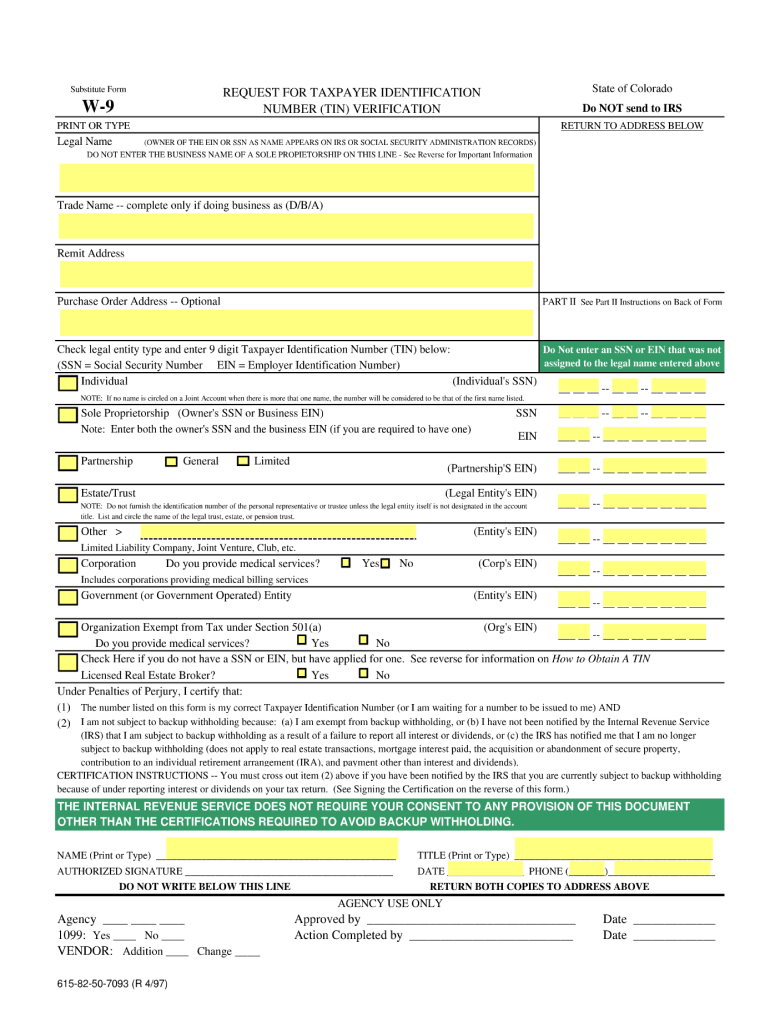
Substitute Form W-9 PRINT OR TYPE REQUEST FOR TAXPAYER IDENTIFICATION NUMBER (TIN) VERIFICATION (OWNER OF THE EIN OR SSN AS NAME APPEARS ON IRS OR SOCIAL SECURITY ADMINISTRATION RECORDS) State of.
Loading

Open form follow the instructions

Easily sign the form with your finger

Send filled & signed form or save
How to fill out the CO DoR Substitute W-9 online
Filling out the CO DoR Substitute W-9 is an essential process for individuals and organizations to provide accurate taxpayer information to the Colorado Department of Revenue. This guide will help you navigate the form effectively, ensuring you understand each section and can complete it confidently online.
Follow the steps to complete the CO DoR Substitute W-9 online.
- Press the ‘Get Form’ button to access the CO DoR Substitute W-9 and open it in your preferred online editor.
- Begin by entering your name in the first box. If you are filling out the form on behalf of an entity, provide the entity's legal name.
- In the second box, input your business name or disregarded entity name if applicable. This section is crucial for ensuring that the form reflects your business identity.
- Provide the address where you receive correspondence in the next sections. This address should be current and accurate to avoid any issues.
- Indicate the tax identification number (TIN). This could be your Social Security number or Employer Identification Number, depending on your status.
- If you are exempt from backup withholding, indicate this in the specified section to clarify your tax status.
- Review the certification section. Here, you will confirm that the information provided is accurate and that you are eligible to provide this information.
- Once all fields are completed, save changes to your filled form. You may also download, print, or share the form as needed.
Complete and submit your CO DoR Substitute W-9 online today!
Experience a faster way to fill out and sign forms on the web. Access the most extensive library of templates available.
Related content
Enter your TIN in the appropriate box. The TIN provided must match the name given on the...
Download the IRS Approved Substitute W-9 (PDF). IRS Form W-9 (Request for Taxpayer...
Com relação à entrada dos canais 7/8 e 9/10, se ambos os conectores de telefone e de...
Get answers to your most pressing questions about US Legal Forms API.
Can you get in trouble for not filing a W9?
Not filing a W9 when requested can lead to backup withholding, where the payor withholds a portion of your payments for tax purposes. This situation can complicate your tax submissions and result in unexpected financial consequences. To avoid this, promptly complete and submit the required CO DoR Substitute W-9 whenever needed.
What is the other classification of W-9?
Besides the common individual taxpayer classification, the W-9 form also accommodates various business entities like corporations, partnerships, and trust. Each classification serves a specific purpose in tax reporting. Using a CO DoR Substitute W-9 ensures that your classification is accurately conveyed to payors and helps prevent issues.
How should a 501c3 fill out a W9?
A 501c3 organization should fill out the W9 by listing its legal name as recognized by the IRS, including any applicable doing-business-as (DBA) names. It's crucial to indicate the correct tax classification as a tax-exempt organization on the CO DoR Substitute W-9. Properly completing this form ensures donors can report contributions correctly.
What is the NYC substitute W9 form?
The NYC substitute W9 form is a variation used specifically for transactions taking place in New York City. This form collects the same taxpayer identification details as the standard W9. If you're operating in NYC, using a CO DoR Substitute W-9 can streamline the reporting process for local transactions.
What is the difference between a W9 and a substitute W9?
A standard W9 is a specific IRS form used to provide taxpayer information, while a substitute W9 may differ in format but contains similar essential information. The CO DoR Substitute W-9 complies with IRS requirements and serves the same purpose of certifying taxpayer information. It's important to ensure that any substitute form includes all necessary data to avoid complications.
How do I file my W9 for taxes?
You typically do not file a W9 directly with the IRS. Instead, you provide your completed CO DoR Substitute W-9 to the payor when they request it. The payor uses your information to report payments made to you to the IRS, ensuring accurate tax reporting.
Can I use an outdated W9?
Using an outdated W9 can lead to complications in tax reporting. It's vital to use the most current version to ensure correct taxpayer information is provided. Submitting a CO DoR Substitute W-9 can help you avoid any issues with the IRS or payors regarding outdated information.
What is a Florida substitute Form W-9?
A Florida substitute Form W-9 is a document you provide to a payor to certify your taxpayer information. This form typically includes your name, business name, address, and tax identification number. By submitting a CO DoR Substitute W-9, you help ensure proper tax reporting for payments you receive, simplifying the process for both parties.
Who is exempt from providing a W-9?
Certain individuals and organizations, such as corporations, non-profits, and government agencies, may be exempt from providing a W-9. However, it's best to verify your specific situation by consulting with a tax professional. If you're unsure, you can still utilize resources like the CO DoR Substitute W-9 for clarity.
Do I legally have to fill out a W-9?
Yes, you are legally required to fill out a W-9 if you receive income that needs to be reported for tax purposes. This is especially true for freelancers and independent contractors. Utilizing the CO DoR Substitute W-9 can simplify this process and help you stay compliant with IRS regulations.
Use professional pre-built templates to fill in and sign documents online faster. Get access to thousands of forms.
If you believe that this page should be taken down, please follow our DMCA take down process here.
This form is available in several versions. Select the version you need from the drop-down list below.