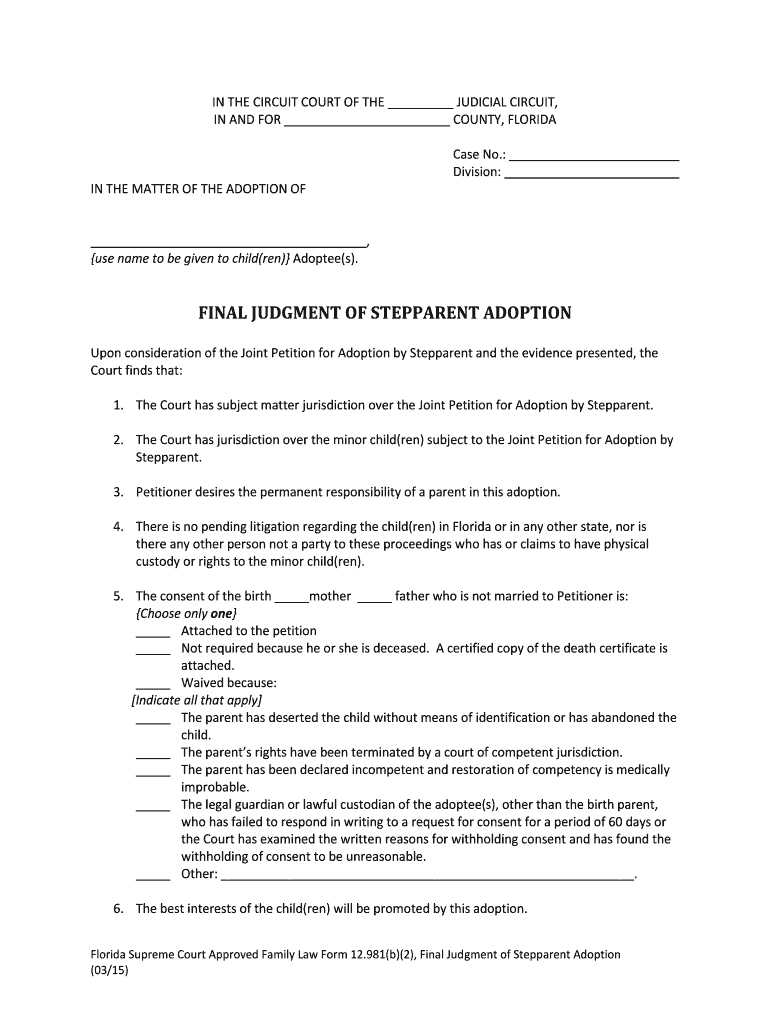
En) Adoptee(s). FINAL JUDGMENT OF STEPPARENT ADOPTION Upon consideration of the Joint Petition for Adoption by Stepparent and the evidence presented, the Court finds that: 1. The Court has subject matter jurisdiction over the Joint Petition for Adoption by Stepparent. 2. The Court has jurisdiction over the minor child(ren) subject to the Joint Petition for Adoption by Stepparent. 3. Petitioner desires the permanent responsibility of a parent in this adoption. 4. There is no pending litigation.
Loading

Open form follow the instructions

Easily sign the form with your finger

Send filled & signed form or save
How to fill out the Petitioner Judgment online
Filling out the Petitioner Judgment online can seem daunting, but this guide aims to simplify the process for you. Understanding each section of the form will help ensure that your petition is completed accurately and efficiently.
Follow the steps to complete the Petitioner Judgment form online.
- Click ‘Get Form’ button to obtain the form and open it in the editor.
- Begin by filling in the case information at the top of the form. This includes entering the case number, judicial circuit, and the county where the case is filed.
- In the section labeled 'In the matter of the adoption of', provide the name that is to be given to the child or children being adopted.
- Proceed to outline the court’s findings. Carefully read each statement about jurisdiction and indicate the necessary details related to your adoption case.
- Fill out the consent section for the birth parent. Choose one of the options provided that best describes your situation and complete any necessary details.
- Continue through the form, ensuring that you have also included information about the best interests of the child or children and their suitability for adoption.
- In the 'NOW, THEREFORE, IT IS ORDERED that' section, detail the legal declaration of the minor child or children as the legal children of the petitioner by clearly stating the names.
- Conclude the document by completing the naming section where you provide the full legal names of the minor child or children.
- Finally, you will need to have the document signed by the circuit judge and certified by the Clerk of Court, ensuring that all required copies are also distributed appropriately.
- After reviewing the completed form, save any changes made, and download or print the document as needed. You can also share the form via email if that is required.
Complete your Petitioner Judgment online today to streamline the process.
Experience a faster way to fill out and sign forms on the web. Access the most extensive library of templates available.
Related content
Appellant/Petitioner -- The appellant/petitioner generally is the party who lost in the...
"Petitioner" refers to the party who petitioned the Supreme Court to review the case. This...
Nov 7, 2023 — A petitioner seeks legal or formal action, while an applicant requests...
Get answers to your most pressing questions about US Legal Forms API.
How to request a default judgment in California?
To request a default judgment in California, you must first ensure that the defendant has been properly served and allowed the appropriate time to respond. Then, prepare and file a request for entry of default along with a supporting declaration, showing proof of service and your basis for the judgment. This process is crucial for obtaining a valid petitioner judgment when the other party does not contest the claim.
Is a judgment a final decision?
Yes, a judgment is generally considered a final decision on the matters presented in court. This means that once a petitioner judgment is issued, it can enforce rights and obligations unless successfully appealed or set aside. Understanding its finality is crucial for all parties involved, as it affects further legal recourse.
How do I file a motion against a default judgment?
Filing a motion against a default judgment involves drafting a motion that outlines your reasons for contesting the judgment, such as improper service or mistake. Submit your motion to the court that issued the judgment, along with any supporting documents. Be mindful of deadlines and procedural rules, as they can significantly impact your ability to successfully challenge the petitioner judgment.
How do I enforce a default judgment in California?
To enforce a default judgment in California, start by obtaining a certified copy of the judgment from the court. You must then decide the most effective method, such as wage garnishment, bank levies, or property liens. Each method requires specific filings and procedures, so understanding your options can greatly enhance your success in collecting the petitioner judgment.
How long do you have to set aside a default judgment in California?
In California, you typically have six months from the date the default judgment is entered to request its set aside. This time frame allows individuals to present a valid reason, such as a lack of proper notice or an excusable mistake. If you believe you qualify, it is crucial to act promptly and gather supporting documents for your petitioner's judgment.
How to file a motion for judgment?
To file a motion for judgment, you must first gather all necessary documents, including the original complaint and proof of service. Next, prepare your motion by clearly stating your request for a petitioner judgment and the legal grounds for it. After you complete the motion, file it with the court and serve it to the opposing party, ensuring adherence to local court rules.
How long do you have to file an appeal in Wisconsin?
In Wisconsin, the general rule is that you have 45 days from the entry of judgment to file an appeal. This timeline applies to most civil cases, including those involving petitioner judgment. However, certain cases may have different deadlines, so it is vital to check the specific rules or consult a legal professional to avoid missing your opportunity to appeal. Tracking your timelines is crucial for maintaining your rights.
When to file a motion for judgment as a matter of law?
You should file a motion for judgment as a matter of law when you believe that the evidence presented at trial supports a strong case for a petitioner judgment in your favor. This motion is appropriate when the opposing party has failed to produce sufficient evidence to support their claims or defenses. Timing is crucial; you must file this motion before the jury deliberates. Consulting with legal resources can help ensure you follow the correct procedures.
What is the purpose of a motion for judgment?
The purpose of a motion for judgment is to request the court to make a decision based on the material facts presented and applicable law, particularly regarding petitioner judgment. This motion is typically filed when one party believes that there are no factual disputes and that they are entitled to victory as a matter of law. It streamlines the legal process by potentially avoiding a lengthy trial. Understanding when and how to file this motion can greatly benefit your case.
How do I write a court petition?
Writing a court petition begins with identifying the legal problem you wish to address, such as a request for a petitioner judgment. Next, state the facts of your case clearly and concisely, supporting your claims with relevant laws. Structure your petition to include a title, introduction, body, and conclusion, making sure to ask the court for specific relief. Platforms like USLegalForms can help you with templates and resources to create an effective petition.
Use professional pre-built templates to fill in and sign documents online faster. Get access to thousands of forms.
If you believe that this page should be taken down, please follow our DMCA take down process here.