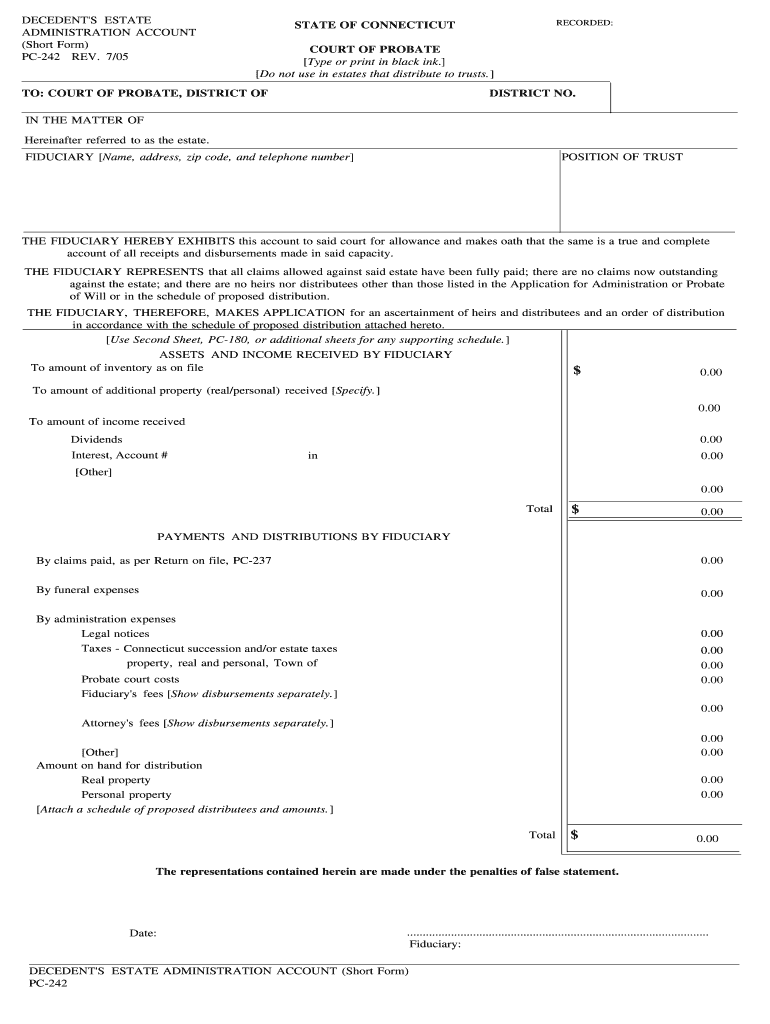
The representations contained herein are made under the penalties of false statement. Date. Fiduciary PC-242 RESET. DECEDENT S ESTATE ADMINISTRATION ACCOUNT Short Form PC-242 REV. 7/05 RECORDED STATE OF CONNECTICUT COURT OF PROBATE Type or print in black ink. Do not use in estates that distribute to trusts. DISTRICT NO. IN THE MATTER OF Hereinafter referred to as the estate. FIDUCIARY Name address zip code and telephone number POSITION OF TRUST THE FIDUCIARY HEREBY EXHIBITS this account to said .
Loading

Open form follow the instructions

Easily sign the form with your finger

Send filled & signed form or save
How to fill out the CT PC-242 online
Filling out the CT PC-242 form online can streamline the process of managing a decedent's estate administration account. This guide provides clear instructions to help you complete the form accurately and efficiently.
Follow the steps to complete the CT PC-242 form online
- Click 'Get Form' button to download the form and open it in your preferred editor. This step will allow you to access the CT PC-242 document in a manageable format.
- Begin by entering the district information at the top of the form. Fill in the specific district of the Probate Court handling the matter, along with the corresponding district number.
- In the section titled 'In the matter of,' identify the decedent's estate. It is important to ensure that this information is accurate and matches any documentation related to the estate.
- Provide the fiduciary’s information, including their name, address, zip code, and telephone number. This section is crucial as it identifies the individual responsible for managing the estate.
- Complete the financial sections outlining the assets and income received by the fiduciary. Here, indicate the total amount of inventory, additional property received, and any income generated, such as dividends or interest.
- Proceed to the payments and distributions section. List all claims paid and expenses incurred, including funeral expenses, administration expenses, and any applicable taxes. Ensure accuracy in the totals to reflect the financial activities of the estate.
- Finalize the form by providing the amount on hand for distribution, including any allocated real or personal property. Don't forget to attach a schedule detailing the proposed distributees and the amounts allocated to them.
- Before submission, make sure to date the form and sign it in the space provided for the fiduciary. This confirms the accuracy of the information provided and fulfills the legal obligations associated with the form.
- After completing the CT PC-242 form, you can save your changes, download a copy for your records, print the form for submission, or share it as required.
Complete your CT PC-242 form online today to ensure a smooth process for managing estate administration.
Experience a faster way to fill out and sign forms on the web. Access the most extensive library of templates available.
Related content
Instructions: 1) A fiduciary may use this form to account for a decedent's estate unless...
The PC Technical Support Certificate provides students with skills needed to obtain a job...
O drive série TR200 da Trane tem importante papel na redução de energia, aumenta a vida...
Get answers to your most pressing questions about US Legal Forms API.
How to close a deceased estate?
To close a deceased estate, initiate the probate process by filing the necessary documents with the appropriate court. Next, handle any debts, distribute the assets, and finalize all financial obligations. Utilizing resources like CT PC-242 can provide valuable guidance, making the estate closure process more efficient and less stressful.
How to close an estate in CT?
Closing an estate in Connecticut involves several steps, starting with filing the will and petition for probate. You will need to gather financial information, notify creditors, and manage asset distribution. Relying on tools like CT PC-242 can clarify these steps, helping you stay organized and on track.
Is a lawyer needed to close an estate?
While it is possible to close an estate without a lawyer, hiring one can provide significant advantages. An attorney familiar with CT PC-242 can navigate the complexities of probate law, filing requirements, and potential disputes. This support can help you avoid common pitfalls and ensure a smoother process.
How much does an estate have to be worth to go to probate in CT?
In Connecticut, estates valued over $40,000 generally require probate. However, this amount can vary based on specific situations and the types of assets involved. Engaging with CT PC-242 can clarify these thresholds, ensuring compliance with local laws.
What assets are subject to probate in CT?
In Connecticut, assets that are solely owned by the deceased may go through probate. This can include real estate, bank accounts, and personal belongings. Understanding these assets helps navigate CT PC-242 effectively and choose the right path for estate settlement.
How long does it take to close an estate in CT?
Closing an estate in Connecticut typically takes between six months to a year. The time frame largely depends on the complexity of the estate and whether any disputes arise among beneficiaries. Utilizing resources like CT PC-242 can help streamline the process, making it smoother and more efficient.
Do all wills in CT have to go through probate?
Not all wills in Connecticut must go through probate; it depends on the estate's value and asset types. Certain small estates may qualify for simplified processes to avoid full probate. Understanding the implications of your will alongside the CT PC-242 is crucial. UsLegalForms can guide you through this assessment and help determine the best course of action.
How much does an estate have to be worth to go to probate in Connecticut?
In Connecticut, an estate must be valued over $40,000 to generally necessitate probate proceedings. Specific exceptions exist for assets that can avoid probate altogether. Understanding the nuances of the CT PC-242 will help you grasp your estate's obligations. UsLegalForms can simplify this process and provide essential forms.
What is the threshold for probate in CT?
The threshold for probate in Connecticut is often set at $40,000 for the total value of the estate. However, if certain assets are jointly owned or have designated beneficiaries, they may not require probate. Familiarizing yourself with the CT PC-242 can provide further insights into your specific case. UsLegalForms offers guidance to help you through the threshold requirements.
How long do creditors have to collect a debt from an estate in CT?
Creditors in Connecticut generally have a period of six months to collect debts from an estate. This timeline begins once the estate is formally opened and the creditor is notified. During this time, utilizing resources like the CT PC-242 can help you manage estate responsibilities more efficiently. UsLegalForms can assist you in understanding these timelines.
Use professional pre-built templates to fill in and sign documents online faster. Get access to thousands of forms.
If you believe that this page should be taken down, please follow our DMCA take down process here.
This form is available in several versions. Select the version you need from the drop-down list below.