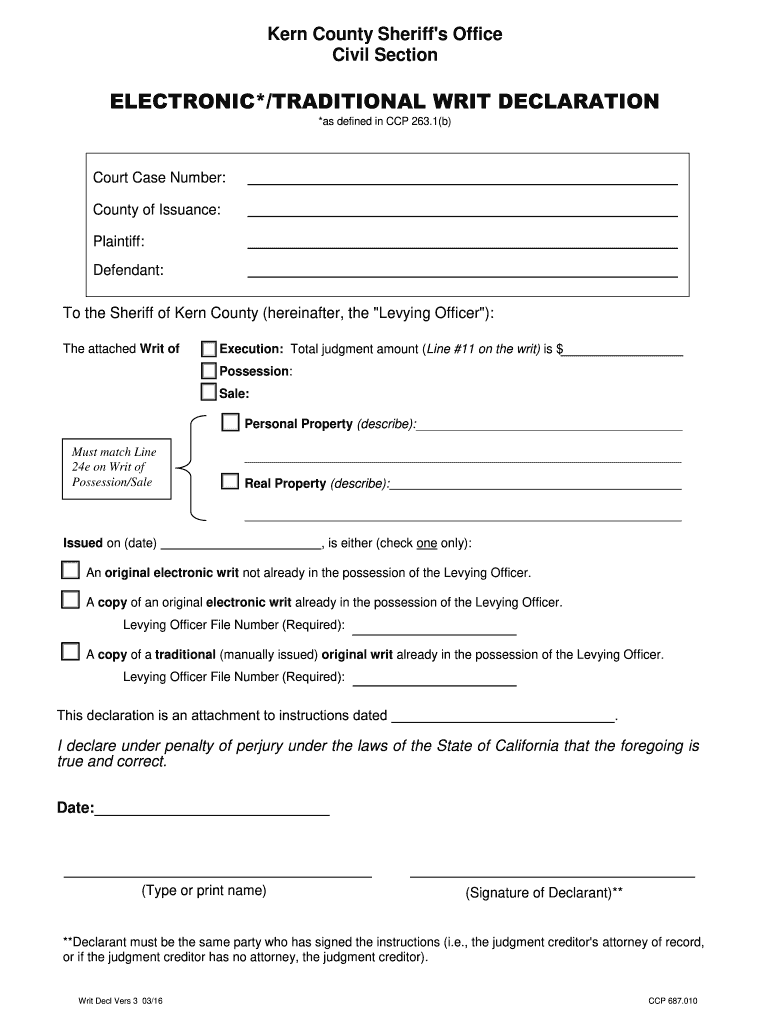
Kern County Sheriff 's Office Civil Section ELECTRONIC*/TRADITIONAL WRIT DECLARATION *as defined in CCP 263.1(b) Court Case Number: County of Issuance: Plaintiff: Defendant: To the Sheriff of Kern.
Loading

Open form follow the instructions

Easily sign the form with your finger

Send filled & signed form or save
How to fill out the CA KCSO Writ Decl Vers 3 online
This guide provides step-by-step instructions for completing the CA KCSO Writ Declaration Vers 3 online. Whether you are new to the process or have some experience, this resource aims to simplify the form-filling experience.
Follow the steps to complete your CA KCSO Writ Declaration Vers 3
- Click 'Get Form' button to obtain the form and open it in the editor.
- Enter the court case number associated with your legal matter in the designated field.
- Specify the county of issuance where the writ is being filed.
- Fill in the name of the plaintiff as it appears in the court records.
- Enter the name of the defendant in the case to whom the writ relates.
- In the section for the sheriff of Kern County, describe the type of writ (Execution, Possession, Sale) and include the total judgment amount from Line #11 on the writ.
- If applicable, provide a description of any personal property involved, ensuring it matches Line 24e on the Writ of Possession or Sale.
- Select the correct box to indicate whether you are submitting an original electronic writ, a copy of an electronic writ, or a traditional writ.
- Complete the levying officer file number, which is required for processing the writ.
- Include the date you are submitting this declaration.
- Type or print your name in the provided space, and ensure your signature is included.
- After completing the form, save your changes, and then review options to download, print, or share the form as needed.
Complete your CA KCSO Writ Declaration Vers 3 online to ensure timely processing.
Experience a faster way to fill out and sign forms on the web. Access the most extensive library of templates available.
Related content
Jan 1, 2024 — California Rules of Court, rules 8.130(f)(3) and 8.834(d)(3), court...
by TG Hasegawa · 2019 — The following month, the Metropolitan King. County Council...
Get answers to your most pressing questions about US Legal Forms API.
What is the deadline for filing a writ in California?
The deadline for filing a writ in California varies based on the type of writ. Typically, for a writ of mandate, you should act within a reasonable timeframe after the decision you contest. Delaying may lead to dismissal of your request. For guidance on strict deadlines, consider consulting uslegalforms to receive tailored advice and tools.
How long do you have to file a writ in California?
In California, you should file a writ promptly after the event you want to contest. While there isn’t a strict deadline, acting quickly is advantageous to protect your rights. It's recommended to file within a reasonable time to avoid complications. Resources at uslegalforms can assist you in understanding and meeting these timeframes.
How long is a writ good for in California?
In California, the effectiveness of a writ varies depending on the type. For example, a writ of execution is valid for 180 days, while other types may have different timeframes. It's crucial to understand the specific rules governing your writ to ensure proper enforcement. Explore resources available on uslegalforms to gain clarity on these timelines.
What is the timeline for writ of mandate in California?
The timeline for a writ of mandate in California can vary depending on the specifics of the case. Generally, you must file your writ within a reasonable time frame after the action you are contesting. It's advisable to act promptly, as delays may affect your rights. Using a platform like uslegalforms can help you prepare and file your writ correctly and on time.
Does a writ of execution expire in California?
In California, a writ of execution does not have a specific expiration date; however, it is generally effective for 180 days from the date of issuance. After this period, you may need to renew the writ to continue enforcing the judgment. It's essential to stay informed about the status of your writ to avoid any lapses. If you need assistance, consider using uslegalforms to navigate the process effectively.
What happens if you ignore a writ of execution?
Ignoring a writ of execution can lead to serious consequences, including property seizure and legal penalties. Courts view such actions as noncompliance with legal orders, which may exacerbate your situation. It's important to respond appropriately to maintain control over your circumstances. Relying on the CA KCSO Writ Decl Vers 3 can help you navigate these challenges with confidence.
What does a writ of execution do?
A writ of execution authorizes creditors to collect debts owed by seizing the debtor's property or assets. This legal instrument acts as a tool for enforcing court judgments, helping creditors recover amounts due. It's critical to understand what this entails for both creditors and debtors alike. The CA KCSO Writ Decl Vers 3 can assist in clarifying these responsibilities.
How long do I have to move after a writ of possession in California?
Following a writ of possession issued in California, you generally have five days to vacate the property. The sheriff will enforce the writ if you do not comply with this timeline. Knowing your rights is essential during this process, as it can minimize stress. Resources like the CA KCSO Writ Decl Vers 3 can provide the guidance you need.
How long is a writ of attachment good for in California?
In California, a writ of attachment is typically effective for three years. This period allows sufficient time for the creditor to enforce the claim on the debtor's property. However, extensions may be requested if necessary. Stay informed with tools like the CA KCSO Writ Decl Vers 3 to manage your legal obligations effectively.
How does a writ of execution work in California?
A writ of execution allows a creditor to enforce a judgment by seizing the property of the debtor. Once issued, law enforcement can take possession of assets to satisfy the monetary judgment. It's important to monitor the process closely, as improper actions can lead to complications. Utilizing the CA KCSO Writ Decl Vers 3 can streamline navigating these processes.
Use professional pre-built templates to fill in and sign documents online faster. Get access to thousands of forms.
If you believe that this page should be taken down, please follow our DMCA take down process here.