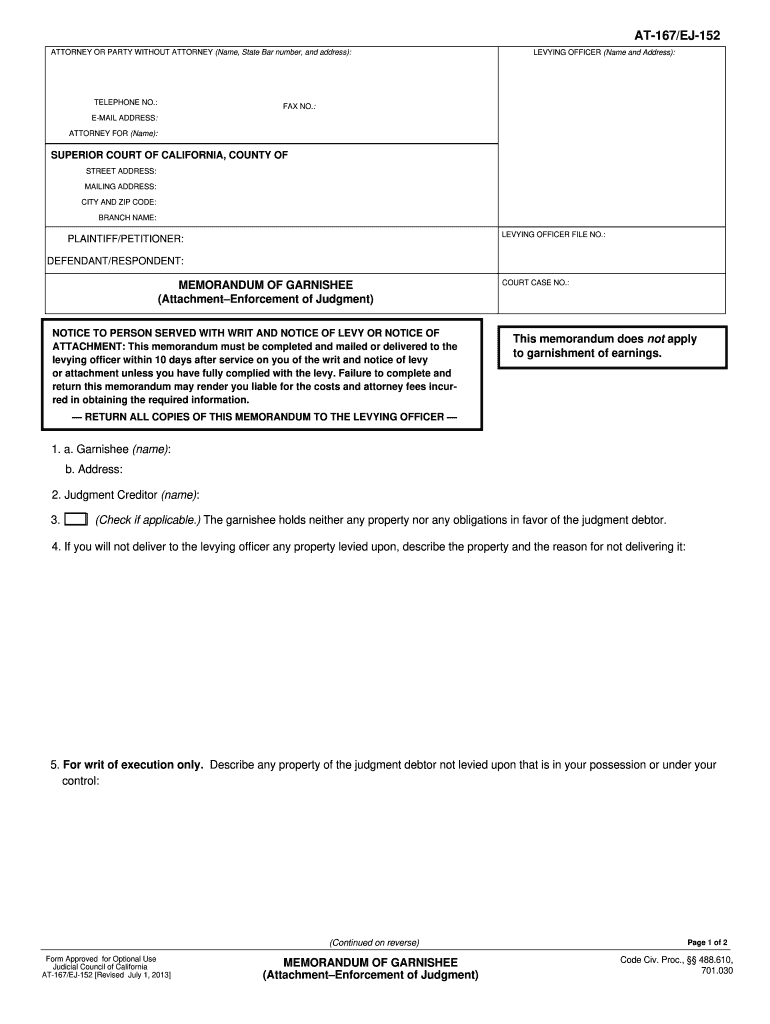
This memorandum does not apply to garnishment of earnings. RETURN ALL COPIES OF THIS MEMORANDUM TO THE LEVYING OFFICER 1. a. Garnishee name b. Address 2. Judgment Creditor name Check if applicable. The garnishee holds neither any property nor any obligations in favor of the judgment debtor. Describe any claims and rights of other persons to the property or obligation levied upon that are known to you and the names and addresses of the other persons DECLARATION OF GARNISHEE I declare under penalt.
Loading

Open form follow the instructions

Easily sign the form with your finger

Send filled & signed form or save
How to fill out the CA AT-167/EJ-152 online
The CA AT-167/EJ-152 form is a crucial document used in the enforcement of judgments, specifically relating to garnishments. This guide provides clear, step-by-step instructions for completing this form online, ensuring a smooth and efficient process.
Follow the steps to accurately complete the CA AT-167/EJ-152 form.
- Press the ‘Get Form’ button to retrieve the CA AT-167/EJ-152 form and open it in the editor.
- In the section for 'Attorney or party without attorney,' provide your name, state bar number, and address. If you are not represented by an attorney, you may leave this section blank.
- Fill out your telephone number, fax number, email address, and the name of the attorney for the plaintiff, if applicable.
- Enter the Superior Court location details including the street address, mailing address, city, and zip code. Make sure to include the branch name and the levying officer file number if available.
- Identify the plaintiff or petitioner and the defendant or respondent by writing their names in the designated fields.
- In the 'Memorandum of Garnishee' section, input the name and address of the garnishee. If the garnishee holds no property or obligations in favor of the judgment debtor, check that applicable box.
- If you cannot deliver property levied upon, describe the property and explain why it cannot be delivered to the levying officer.
- For writ of execution, provide details regarding any property of the judgment debtor that remains in your possession and has not been levied upon.
- Specify any amounts owed to the judgment debtor that you will not pay to the levying officer, detailing the reasons and terms.
- Describe any claims and rights known to you of other persons regarding the property or obligation that has been levied upon.
- Finalize the form by signing and dating it in the 'Declaration of Garnishee' section. Ensure that you print or type your name clearly beneath your signature.
- If needed, attach additional pages to provide more information, ensuring to indicate the total number of attached pages.
- Once completed, you have options to save changes, download the form, print it, or share it as necessary.
Complete the CA AT-167/EJ-152 form online to ensure proper processing and compliance.
Experience a faster way to fill out and sign forms on the web. Access the most extensive library of templates available.
Related content
I declare under penalty of perjury under the laws of the State of California that the...
Edge, SiteLink, SonoCalc, SonoHD2, SonoMB, SonoMBe, SonoSite e o logotipo SonoSite são...
Get answers to your most pressing questions about US Legal Forms API.
Can you file CA statement of Information online?
Yes, you can file the CA statement of Information online, making the process more convenient. By visiting the California Secretary of State's website, you will find online options for accessing and submitting the required CA AT-167/EJ-152 forms. This method saves time and allows you to handle everything from the comfort of your home.
How do I file a California corporate disclosure statement?
Filing a California corporate disclosure statement involves completing the appropriate CA AT-167/EJ-152 forms. You need to gather essential company information like names, addresses, and details about management. After accurately filling out the necessary forms, submit them to the California Secretary of State along with any applicable fees.
What does it mean when you get a notice of levy?
Receiving a notice of levy indicates that a creditor is actively pursuing collection of a debt you owe. This notice informs you that your property or income may soon be seized to resolve the outstanding amount. It is crucial to respond promptly to a notice of levy to protect your assets and explore possible options for negotiation or settlement. Utilizing forms like CA AT-167/EJ-152 can streamline your response process.
How long does a writ of execution last in California?
In California, a writ of execution is valid for a period of 180 days from the date of issuance. This gives creditors a designated timeframe to enforce their judgments and collect debts owed. However, if necessary, creditors can apply for a renewal of the writ before it expires. Understanding the implications of CA AT-167/EJ-152 can assist you in maximizing your collection efforts during this time.
What is a notice of levy in California?
A notice of levy in California is a legal document used by a creditor to take possession of a debtor's property to satisfy a debt. This process is part of the enforcement of a judgment and allows creditors to collect the amounts owed. When a notice of levy is issued, it signals that the creditor seeks to seize specific assets to cover unpaid obligations. Using forms like CA AT-167/EJ-152 can help you navigate this process effectively.
What is a memorandum of law used for?
A memorandum of law is used to outline legal arguments and support a case before the court. It conveys essential information about relevant laws and precedents applicable to your situation. This document helps legal professionals present their cases convincingly. For help in drafting or understanding such documents, consider looking into CA AT-167/EJ-152 resources.
What is a memorandum of garnishee?
A memorandum of garnishee is a document that reports to the court on the status of funds that have been withheld under a garnishee order. This memorandum details the amounts collected and remaining balances. Ensuring accuracy in these documents is pivotal. Information about CA AT-167/EJ-152 provides clarity on how to manage these responsibilities effectively.
What is the meaning of garnishee order?
A garnishee order is a legal directive aimed at a third party holding your funds, usually your employer or bank, to withhold a portion of your earnings or account balance. This order enables creditors to collect debts directly from your payments. Understanding garnishee orders is vital, especially if you're dealing with issues related to CA AT-167/EJ-152.
How to fill out a challenge to garnishment form?
To fill out a challenge to garnishment form, complete the required information, including details of the garnishment and your objections. Make sure you provide a clear explanation of why you believe the garnishment is wrongful. Submit this form to the appropriate court for review. Resources regarding CA AT-167/EJ-152 can assist you in understanding this procedure.
What happens after a memorandum of costs is filed?
After a memorandum of costs is filed, it outlines the expenses incurred during legal proceedings. The court reviews these costs, determining what is allowable or not. You may receive a response or an opportunity to contest the costs listed. Familiarizing yourself with this process can be beneficial, especially in cases involving CA AT-167/EJ-152.
Use professional pre-built templates to fill in and sign documents online faster. Get access to thousands of forms.
If you believe that this page should be taken down, please follow our DMCA take down process here.
This form is available in several versions. Select the version you need from the drop-down list below.