Loading

Open form follow the instructions

Easily sign the form with your finger

Send filled & signed form or save
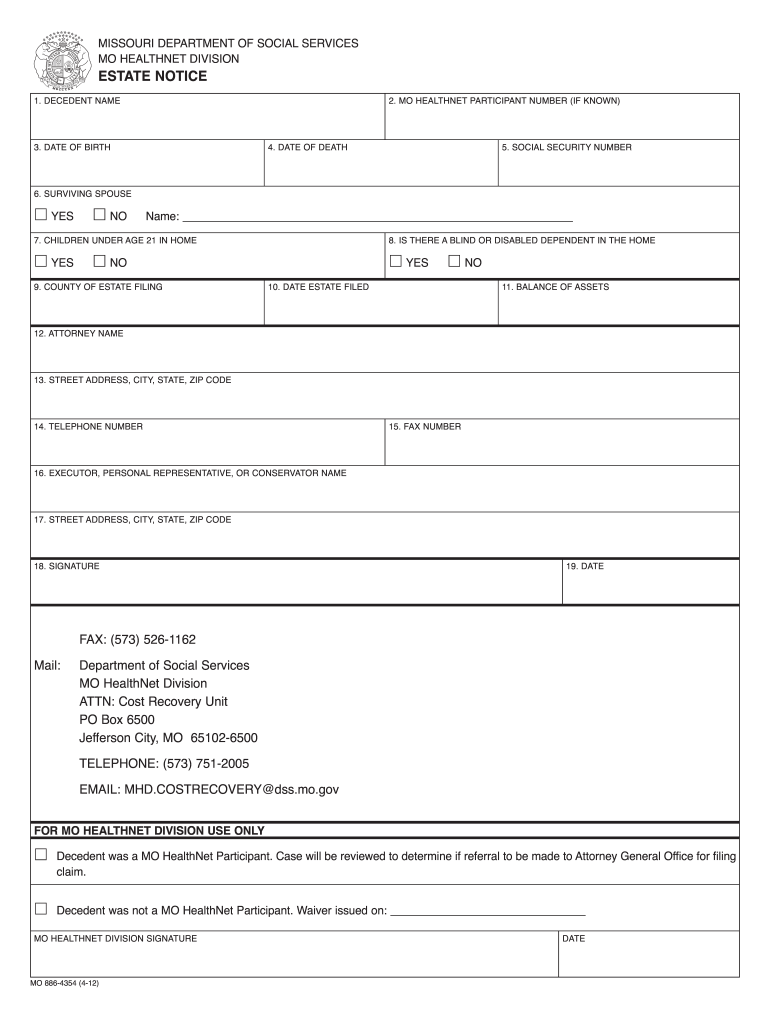
How to fill out the Dss Mo online
This guide provides a comprehensive overview of how to fill out the Dss Mo form online, ensuring that you have the necessary information at your fingertips. It is structured to support users with varying levels of familiarity with legal documents and online submission procedures.
Follow the steps to complete the Dss Mo form online.
- Click the ‘Get Form’ button to access the Dss Mo form and open it in your preferred editor.
- Begin by filling in the decedent's name in section 1, ensuring to provide the full name as it appears on legal documents.
- If known, enter the MO HealthNet participant number in section 2. This information can be found on previous correspondence or medical documentation.
- In section 3, input the decedent's date of birth, formatted as month/day/year.
- In section 4, enter the date of death, again using the month/day/year format.
- Provide the social security number of the decedent in section 5, as it is critical for identification purposes.
- In section 6, indicate if there is a surviving spouse by selecting 'yes' or 'no.'
- Proceed to section 7 and list any children under the age of 21 who are living in the household.
- In section 8, indicate whether there is a blind or disabled dependent in the home, selecting 'yes' or 'no.'
- Fill out section 9 with the county where the estate is filed.
- In section 10, record the date the estate was filed.
- Provide the balance of assets in section 11, indicating the total available.
- Enter the name of the attorney in section 12, followed by the complete street address, city, state, and ZIP code in section 13.
- In section 14, fill in the telephone number associated with the attorney or representative.
- Include the fax number in section 15, if applicable.
- In section 16, list the name of the executor, personal representative, or conservator.
- Fill in the address of the executor, personal representative, or conservator in section 17 with complete details.
- Sign the form in section 18, ensuring that your signature matches your name as listed.
- Finally, enter the date of signing in section 19 before reviewing your entries for accuracy.
- After completing all sections, users can save changes, download a copy of the form, print it, or share it as needed.
Complete your Dss Mo form online today for a streamlined processing experience.
Experience a faster way to fill out and sign forms on the web. Access the most extensive library of templates available.
Related content
The Department of Social Services partners with families and communities to protect...
Contact Information ; Phone. (417) 657-0895 ; Fax. (417) 532-1872 ; Website...
MISSOURI: http://dss.mo.gov/mhd/cs/pharmacy/pages/clinedit.htm - MO HealthNet is...
Get answers to your most pressing questions about US Legal Forms API.
How do I fill out a food stamp application in Missouri?
Filling out a food stamp application in Missouri requires careful attention to detail. You can apply online, or you can obtain a paper application from a local Dss Mo office. Be sure to provide all required information accurately and completely, as incomplete applications can lead to delays. Utilizing resources like UsLegalForms can help guide you through the application process efficiently.
What is the monthly income for food stamps in Missouri?
The monthly income limit for food stamps in Missouri is based on the federal poverty guidelines and varies by household size. Generally, households must earn below a certain threshold to qualify for assistance. To find out the specific income requirements for your situation, it’s best to consult the Dss Mo resources or contact their support. Knowing the limits can help you determine your eligibility clearly.
How long does it take to get approved for food stamps in Missouri?
The approval process for food stamps in Missouri typically takes around 30 days from the date you submit your application. However, if you qualify for expedited services, you may receive assistance sooner. It is important to ensure that your application is complete to avoid delays. Tracking your application status is a good practice while you wait for your Dss Mo benefits.
How do I talk to a live person for food stamps in Missouri?
If you need to speak with a live person regarding food stamps in Missouri, you can call the Missouri Department of Social Services directly. Their dedicated customer service team is available to assist you with your questions and concerns. Additionally, visiting local Dss Mo offices can provide you with in-person support. It's essential to have all relevant information ready when you reach out for assistance.
What documents do I need to apply for food stamps in Missouri?
To apply for food stamps in Missouri, you need several documents to support your application. Essential documents include proof of income, identification, and residency status. Additionally, you may need to provide information about your household size and expenses. Gathering these documents in advance can streamline your application process with Dss Mo.
What disqualifies you from getting food stamps in Missouri?
Certain factors can disqualify you from receiving food stamps in Missouri. If your income exceeds the federal poverty level, or if you possess significant assets, you may not qualify. Additionally, if you have committed fraud in the past related to food assistance, that can also impact your eligibility. Understanding these criteria can help you assess your situation effectively with Dss Mo.
What is the phone number for the DSS interview in Missouri?
The phone number for the DSS interview in Missouri can be found on the Missouri Family Support Division's official website. It’s best to call during business hours for the most reliable information. Having this number handy ensures that you're ready to take the next steps concerning your Dss Mo processes. If you're unsure of your eligibility, reaching out is a great way to get assistance.
How do I make an appointment with Missouri DSS?
Making an appointment with Missouri DSS is straightforward. You can either call their office to speak with a representative or use the online appointment system available on their website. This ensures that you can discuss your Dss Mo concerns in a timely manner. Don't forget to prepare any necessary documentation for your meeting.
How do I schedule an appointment with Missouri DSS?
Scheduling an appointment with Missouri DSS can be done by visiting their website or calling the local office. Their site typically provides an online appointment system for your convenience. This process allows you to secure a time that fits your schedule, making it easier to discuss your Dss Mo needs. Confirm your appointment details to ensure a smooth visit.
How do I chat online with Missouri DSS?
To chat online with Missouri DSS, navigate to their official website where they offer a live chat option during specified hours. This service connects you with a representative who can answer your questions in real-time. By using this feature, you benefit from quick responses and clear guidance on your Dss Mo inquiries. Make sure to have your questions ready for a more efficient conversation.
Use professional pre-built templates to fill in and sign documents online faster. Get access to thousands of forms.
If you believe that this page should be taken down, please follow our DMCA take down process here.