Loading

Open form follow the instructions

Easily sign the form with your finger

Send filled & signed form or save
How to fill out the Axis Bank Rtgs Form online
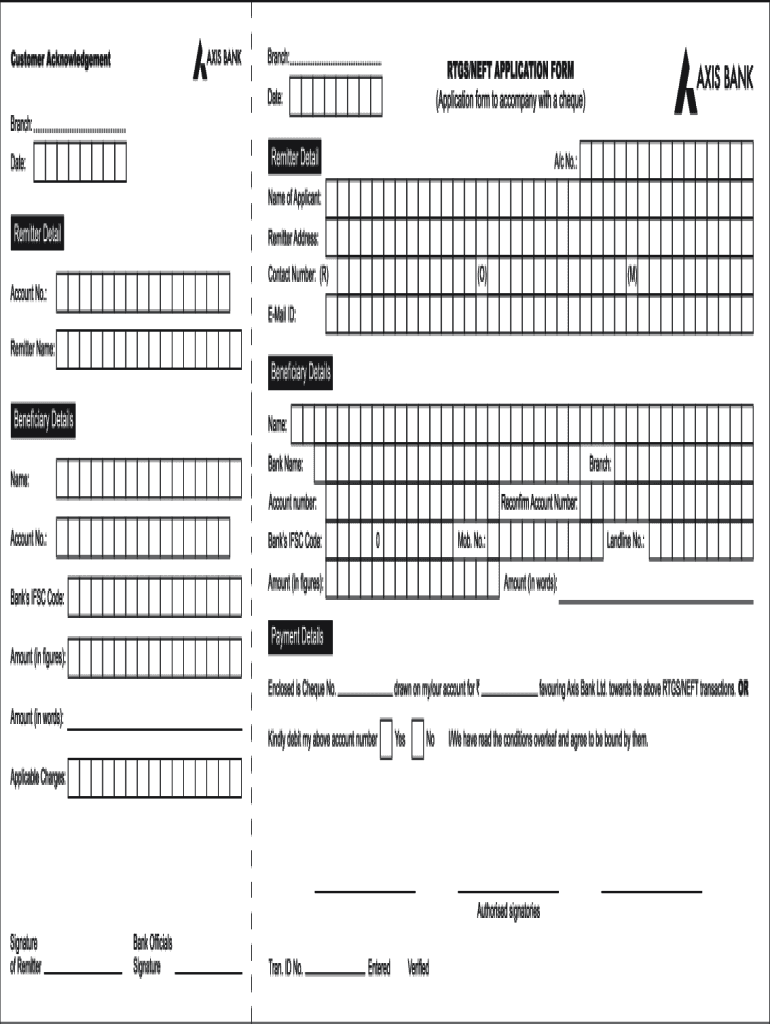
Filling out the Axis Bank Rtgs Form online is an essential step for making seamless fund transfers. This guide provides detailed instructions on how to complete each section of the form effectively.
Follow the steps to complete the Axis Bank Rtgs Form online.
- Click ‘Get Form’ button to obtain the form and open it in the editor.
- Begin filling out the form by entering your details in the 'Sender's Information' section, which typically includes your name, address, and account number.
- In the 'Beneficiary Information' area, provide the recipient’s name, account number, and their bank's details. Ensure accuracy to avoid any transaction issues.
- Fill out the 'Transaction Details' section. Specify the amount you wish to transfer and select a suitable purpose for the transaction from the dropdown options, if available.
- Review the 'Confirmation' section to check all entered information. Mistakes may lead to delays or errors in processing your transaction.
- Once everything is accurately filled, save the changes to your form. You may then choose to download, print, or share the completed form as needed.
Complete your Axis Bank Rtgs Form online today for a smooth fund transfer experience.
Experience a faster way to fill out and sign forms on the web. Access the most extensive library of templates available.
Related content
1) Call and write the company. Tell the company that you are taking away your...
... FORM ... BANK ACCOUNT DETAILS FOR RTGS / NEFT. BENEFICIARY NAME. : WATUMULL INSTITUTE...
The minimum amount to be transferred through RTGS is Rs 2 lakh. Processing charges/Service...
Get answers to your most pressing questions about US Legal Forms API.
How much RTGS can be done in a day online?
The amount you can transfer via RTGS in a day through Axis Bank is generally unlimited. However, it may depend on your account type and banking policies. Be sure to check with Axis Bank or review their guidelines for any specific limits that might apply. Completing the Axis Bank RTGS Form accurately will help you adhere to any necessary requirements.
How do I submit a RTGS form?
To submit an RTGS form at Axis Bank, gather the completed Axis Bank RTGS Form, ensuring all necessary fields are filled in accurately. You can submit the form at a branch or through your online account, depending on your preference. If using online banking, follow the prompts to confirm your submission. If you're at a branch, hand it over to a bank employee for processing.
What to write on Axis Bank Cheque for RTGS?
When filling out a cheque for RTGS in Axis Bank, write 'RTGS' on the top of the cheque. Ensure you include all relevant details such as the payee's name, account number, and the correct amount in figures and words. Using the Axis Bank RTGS Form alongside the cheque can help streamline the payment process. Double-check that everything is accurate before submitting.
Can I fill RTGS form online?
Yes, you can fill the Axis Bank RTGS Form online via the bank’s internet banking service. After logging in, look for the option to transfer funds using RTGS. Fill in all required fields in the form, ensuring the accuracy of information like the recipient’s account number and IFSC code. Finally, submit the form to process your transaction seamlessly.
How to file RTGS online?
Filing an RTGS online is straightforward with Axis Bank. Start by logging into your internet banking account and find the RTGS option under 'Funds Transfer.' Then, you need to complete the Axis Bank RTGS Form, providing details such as the beneficiary name, account number, and amount. Once you review the information, you can confirm to complete the filing process.
Can RTGS be done online?
Yes, RTGS can be done online through Axis Bank's internet banking platform. Once you log in, simply select the RTGS option to proceed. Fill out the necessary Axis Bank RTGS Form with all required details, and click submit to initiate the transaction. Remember, online RTGS is a convenient option available for your banking needs.
How to do RTGS online with Indian bank?
To execute RTGS online with Axis Bank, log into your internet banking account. Navigate to the 'Funds Transfer' section and select 'RTGS' as your transfer method. Complete the Axis Bank RTGS Form by entering the essential details, and then confirm the transaction to send the funds. Make sure to have the recipient's account information handy to ensure a smooth process.
How to make RTGS in Axis Bank?
To make an RTGS transaction in Axis Bank, you need to fill out the Axis Bank RTGS Form. You can visit your nearest Axis Bank branch or use the online banking portal. After filling in the required details, such as beneficiary information and the amount, you should submit the form for processing. Ensure your account has sufficient balance to cover the transaction.
Can I transfer 1.5 lakh through RTGS?
Yes, transferring 1.5 lakh through RTGS is completely feasible. Just fill out the Axis Bank RTGS form accurately, and you will be able to complete your transaction without any issues.
What is the maximum limit for RTGS transfer in Axis Bank?
The maximum limit for RTGS transfers in Axis Bank is typically 10 lakhs per transaction, but you can perform multiple transactions in a day. Be sure to check their official guidelines for any recent changes and complete the Axis Bank RTGS form accordingly.
Use professional pre-built templates to fill in and sign documents online faster. Get access to thousands of forms.
If you believe that this page should be taken down, please follow our DMCA take down process here.