Loading

Open form follow the instructions

Easily sign the form with your finger

Send filled & signed form or save
How to fill out the Misbach Pedigree Chart online
The Misbach Pedigree Chart is an essential tool for documenting genealogical information about families. This guide provides a clear, step-by-step approach to help users fill out the form online accurately and efficiently.
Follow the steps to complete the Misbach Pedigree Chart online.
- Press the ‘Get Form’ button to access the Misbach Pedigree Chart and open it in your preferred editor.
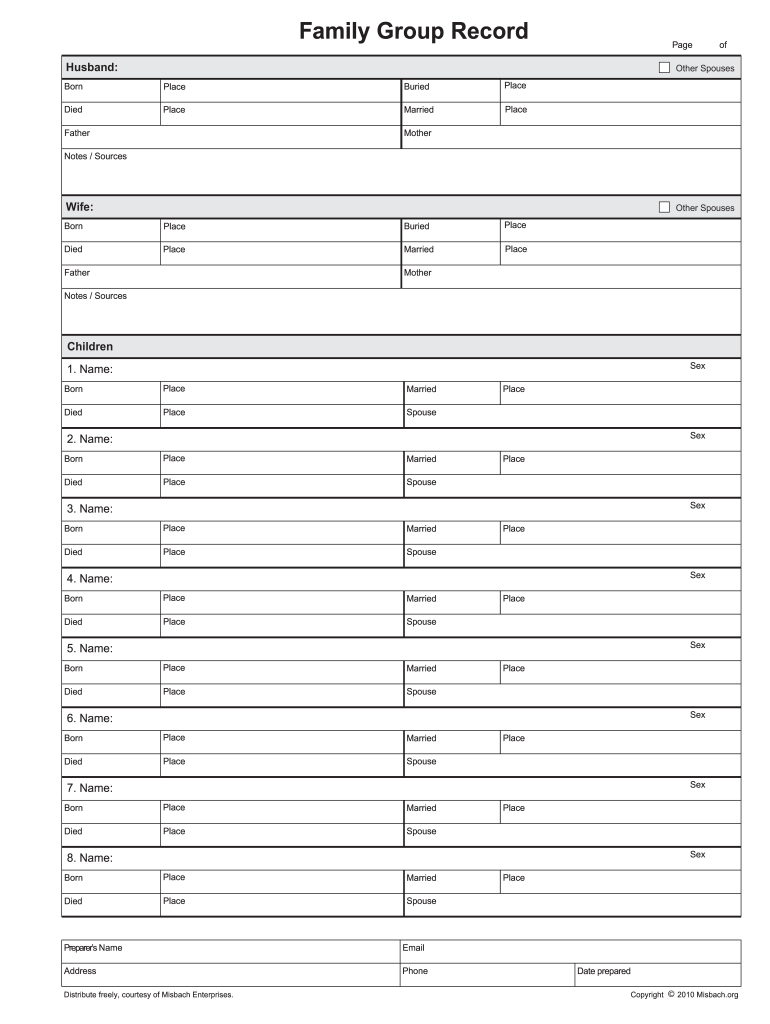
- Begin by filling out the information for the husband section. Include details such as name, date of birth, place of birth, date of death, place of death, and marriage information.
- Move on to the wife section and complete it similarly, providing her name, date of birth, place of birth, date of death, place of death, and marriage information.
- Next, document any other spouses for both the husband and wife, following the same format as previous sections.
- Proceed to fill out details for each child listed. For every child, enter their name, date of birth, place of birth, date of marriage (if applicable), place of marriage, date of death (if applicable), and spouse information.
- In the notes and sources section, provide any additional comments or references that could help in understanding the family history better.
- Finally, add your name, email address, and phone number as the preparer of the chart. Specify the place and date when the chart was prepared.
- After completing all sections, you can save the changes, download a copy, print, or share the completed Misbach Pedigree Chart as needed.
Start filling out your Misbach Pedigree Chart online today!
Experience a faster way to fill out and sign forms on the web. Access the most extensive library of templates available.
Related content
Jul 15, 2025 — An array of fillable forms and coloring pages for you to choose. Misbach...
Apr 14, 2025 — Pedigree Charts ; Ancestral Chart. Basic pedigree chart. Provided by...
Get answers to your most pressing questions about US Legal Forms API.
How to fill out a 5 generation chart?
Filling out a 5-generation chart starts with you at the base. Gradually include your parents, grandparents, great-grandparents, and great-great-grandparents. Make sure to connect each generation with clear lines, and appropriately note any important dates. Utilizing the Misbach Pedigree Chart can simplify this process and provide a robust visual genealogy.
How to fill out a pedigree chart?
To fill out a pedigree chart, start by placing yourself in the center and branch out to include your parents and grandparents. Document their names, birth, and death dates in each section. This layout not only organizes family connections but also enhances the readability of your Misbach Pedigree Chart, benefiting your research immensely.
What is the best way to layout a family tree?
The best way to layout a family tree is to use a top-down approach. Begin with a single ancestor at the top and branch out to their descendants below. Simple lines or boxes can effectively illustrate relationships, ensuring clarity. Incorporating the Misbach Pedigree Chart style can make your layout visually appealing and easy to understand.
How to fill out a family group sheet?
A family group sheet captures vital information about an immediate family unit. Begin with the parents’ full names and then list down the children, noting their birth dates. Organizing this information in one document makes it easier to reference while creating your Misbach Pedigree Chart. This structured method supports accuracy in your genealogy research.
How to fill in a pedigree chart?
Filling in a pedigree chart involves entering family members in a structured format. Start with yourself and add your parents, grandparents, and great-grandparents in order. Use clear relationships, such as mother, father, and so forth. Make sure to include additional details like dates of birth, which adds depth to your Misbach Pedigree Chart.
How to fill out an ancestry chart?
To fill out an ancestry chart, begin by entering your name and move up through the generations. It helps to use verified data from family records. As you include each individual, remember to document any relevant information, such as birthdates or marriage details. This organized approach can enhance your Misbach Pedigree Chart significantly.
How to create a kinship chart in Microsoft Word?
Creating a kinship chart in Microsoft Word is straightforward. Start by opening a new document and using the drawing tools to create boxes for each family member. Connect the boxes with lines to represent relationships. You can label each box clearly, and don't forget to save your design as a template if you intend to use your Misbach Pedigree Chart style in the future.
Can I print a pedigree chart from Ancestry?
Yes, you can print a Misbach Pedigree Chart from Ancestry. After accessing your family tree, look for the print option on the chart interface. This feature allows you to have a physical copy, enabling you to reflect on your family heritage with ease.
How do I create a pedigree chart?
To create a Misbach Pedigree Chart, begin by gathering information about your ancestors, including names, birth dates, and any relevant documents. Use online templates or software for a structured design, which will help visualize the family connections. Platforms like U.S. Legal Forms can facilitate this process by offering ready-to-use formats.
How to identify a pedigree chart?
A Misbach Pedigree Chart identifies family relationships in a structured format, typically displaying ancestors in a tree-like structure. You can recognize it by its layout, where each box represents an individual and lines connect parents to their children. This visual representation makes it easy to track lineage.
Use professional pre-built templates to fill in and sign documents online faster. Get access to thousands of forms.
If you believe that this page should be taken down, please follow our DMCA take down process here.