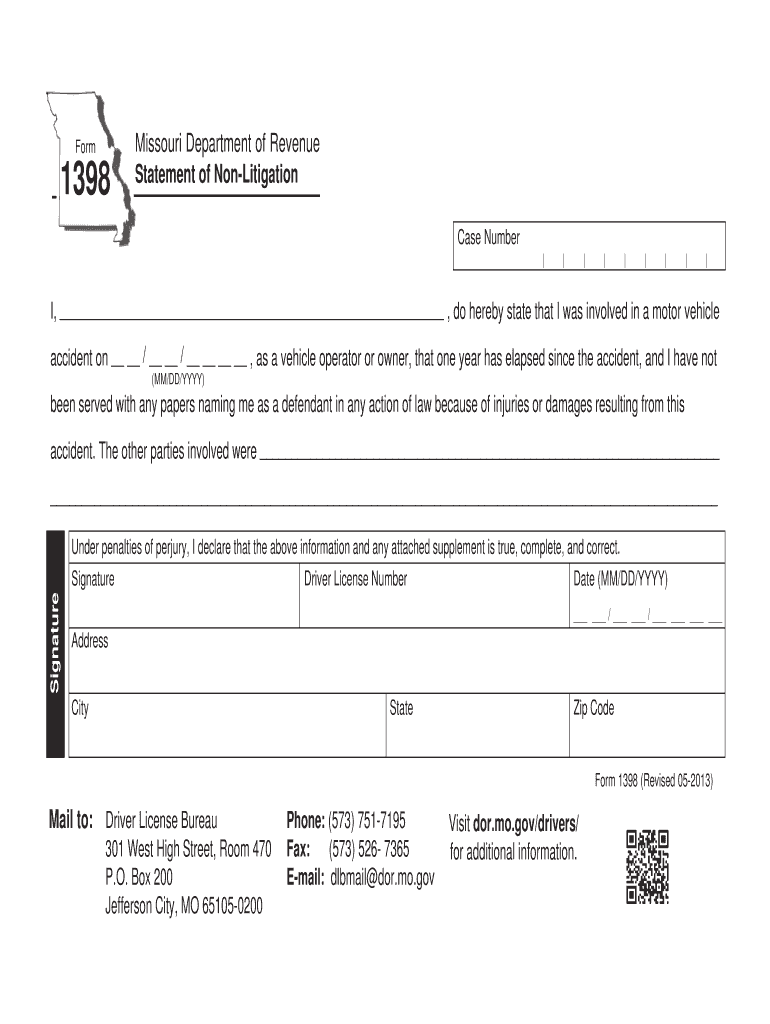
Reset Form Form Print Form Missouri Department of Revenue Statement of Non-Litigation Case Number I do hereby state that I was involved in a motor vehicle accident on / / as a vehicle operator or owner that one year has elapsed since the accident and I have not MM/DD/YYYY been served with any papers naming me as a defendant in any action of law because of injuries or damages resulting from this accident.
Loading

Open form follow the instructions

Easily sign the form with your finger

Send filled & signed form or save
How to fill out the Form 1398 For Missouri online
Filling out Form 1398 for Missouri is a straightforward process that helps you declare your non-litigation status following a motor vehicle accident. This guide will walk you through each section of the form to ensure that you complete it accurately and efficiently.
Follow the steps to successfully complete the Form 1398 online.
- Press the ‘Get Form’ button to access the document and open it in your preferred editor.
- In the space provided, clearly input your full name, as it appears on your identification.
- Enter the date of the motor vehicle accident in the required format (MM/DD/YYYY). This date should reflect when the incident occurred.
- State whether you were the vehicle operator or the owner at the time of the accident by checking the appropriate box or providing the necessary information.
- Indicate that one year has elapsed since the accident by confirming this statement in the provided area.
- In the designated fields, list the names of the other parties involved in the accident, ensuring you provide complete and accurate details.
- Review the declaration statement regarding perjury, confirming the truthfulness of the information you provided.
- Sign the form in the space designated for your signature, ensuring that it matches your driver license.
- Enter your driver license number as requested on the form.
- Fill in your mailing address, including city, state, and zip code to ensure proper delivery.
- After reviewing all entered information for accuracy, you can save changes, download, print, or share the completed form as needed.
Complete your Form 1398 online today for a hassle-free submission process.
Experience a faster way to fill out and sign forms on the web. Access the most extensive library of templates available.
Related content
Form 1398 is a statement of non-litigation for a motor vehicle accident where one year has...
These totals must agree with Appendix 2 which is representation of a Missouri sales and...
by L General · Cited by 5 — Generally, you can deduct the actual state and local gen...
Get answers to your most pressing questions about US Legal Forms API.
Does Missouri have a state withholding form?
Yes, Missouri has a state withholding form known as Form MO-W-4, which is essential for employees to set their state tax withholding accurately. New employees should complete this form to ensure the appropriate amount of state tax is withheld from their paychecks. With tools like Form 1398 for Missouri, you can gain clarity on the requirements surrounding state withholding, ensuring compliance for your business and employees.
Does Missouri require new hire reporting?
Yes, Missouri requires employers to report new hires to the Missouri Department of Social Services within 20 days of hiring. This helps in tracking child support and ensuring compliance with federal law. Form 1398 for Missouri offers insights into the new hire reporting process, making it easier for businesses to adhere to these important regulations.
How to report a new hire in Kansas?
In Kansas, you report a new hire by submitting the New Hire Report Form to the Kansas Department of Labor. This form requires basic information about the employee and must be submitted within 20 days of their hire date. While your focus may be on Missouri, resources like Form 1398 for Missouri could assist you in maintaining compliance with reporting requirements across state lines.
How do I get Missouri state tax forms?
You can obtain Missouri state tax forms from the official Missouri Department of Revenue's website. They provide downloadable forms for various tax obligations that you can access easily. Furthermore, Form 1398 for Missouri can highlight the relevant forms you need based on your specific situation, helping you find what you're looking for quickly.
What forms do new employees need to fill out in Missouri?
New employees in Missouri generally need to complete Form W-4 for federal tax withholding, as well as any state forms required for income tax withholding. Additionally, they should fill out the employee verification form, I-9, to confirm their identity and eligibility to work. Form 1398 for Missouri can provide guidance on the specific forms required and help streamline the onboarding process for your new hires.
How do I file an amended sales tax return in Missouri?
Filing an amended sales tax return in Missouri involves completing the appropriate form, often the STC or ST-12, and marking it as 'amended.' You will need to provide the original return details and clearly indicate the changes. Using Form 1398 for Missouri can simplify understanding what information you need to modify, ensuring a smoother amendment process.
How to start payroll in Missouri?
To start payroll in Missouri, first ensure you have registered as an employer and obtained an Employer Identification Number (EIN) from the IRS. Next, familiarize yourself with state regulations and required deductions. Utilizing Form 1398 for Missouri assists in managing the proper filing of payroll tax forms and ensures compliance with state laws from the beginning.
How do I register as an employer in Missouri?
To register as an employer in Missouri, you must complete the necessary registration forms provided by the Missouri Department of Revenue. You will need to provide details about your business such as its name, address, and type of business activities. Using Form 1398 for Missouri can guide you through the process of ensuring all employer requirements are met, streamlining your registration for state tax purposes.
What forms do I need to file my Missouri state taxes?
To file your Missouri state taxes, you will typically need forms such as the MO-1040, MO-1040A, and possibly MO-1040X for amendments. The exact forms depend on your tax situation and the type of income you earn. It's essential to gather all income-related documents before filing. Form 1398 For Missouri can also guide you in identifying necessary forms for your tax needs.
How do I register for Missouri withholding tax?
To register for Missouri withholding tax, you will need to submit a Missouri Tax Registration Form. This process enables employers to withhold appropriate taxes from employee wages. After registering, you must comply with ongoing filing responsibilities. For further assistance, exploring Form 1398 For Missouri can offer additional insights into tax registration.
Use professional pre-built templates to fill in and sign documents online faster. Get access to thousands of forms.
If you believe that this page should be taken down, please follow our DMCA take down process here.