
Open form follow the instructions

Easily sign the form with your finger

Send filled & signed form or save
How to use or fill out the Usps Letterhead Template online
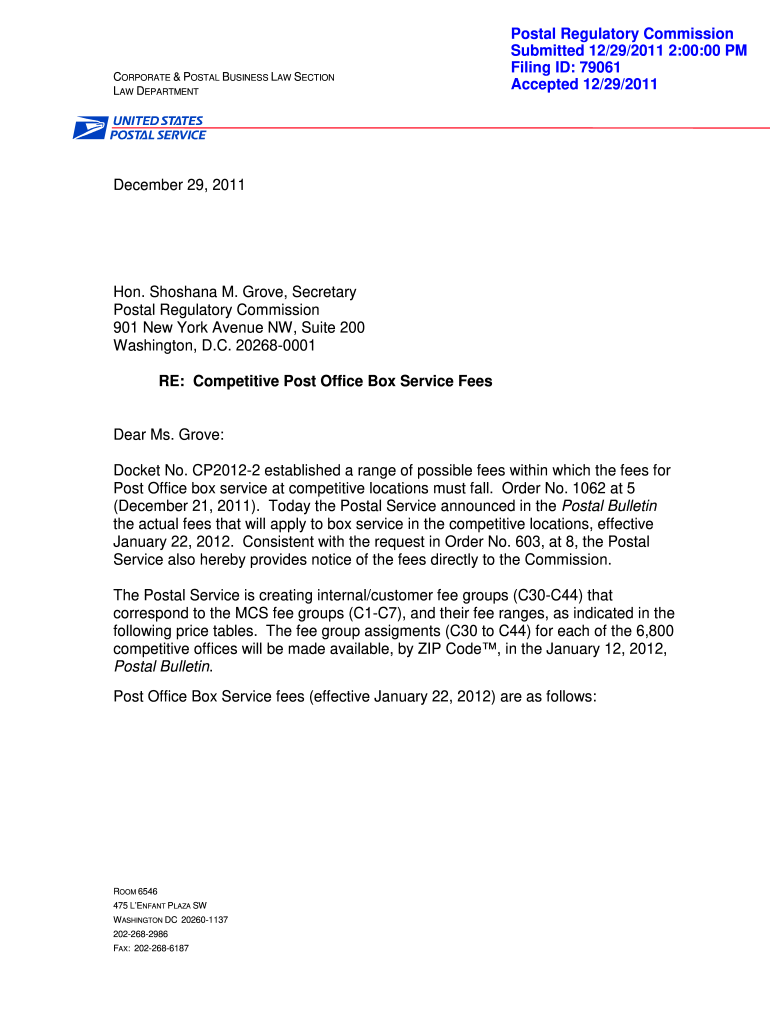
Filling out the Usps Letterhead Template online can streamline communication and ensure professionalism in your correspondence. This guide provides clear, step-by-step instructions to assist you in completing each section of the template effectively.
Follow the steps to successfully fill out the Usps Letterhead Template online.
- Press the ‘Get Form’ button to access the Usps Letterhead Template and open it in your preferred online editor.
- Begin by entering the date at the top of the letter. It’s important to provide the correct date, as it establishes the timeline for the correspondence.
- Next, include the recipient's name and title. For example, write 'Hon. [Recipient's Name], [Recipient's Title]' followed by the name of the organization. This personalizes the letter and shows respect.
- Insert the address of the recipient, ensuring you include all necessary details such as street address, city, state, and zip code. This guarantees the letter reaches the intended person.
- In the subject line, specify the purpose of the correspondence. For instance, you might mention 'Re: [Specific Subject]' to focus the reader's attention.
- Compose the body of your letter, clearly stating your message. Use polite and formal language throughout.
- Conclude the letter with a professional closing, such as 'Sincerely,' followed by your name and title. Place your name below your closing.
- After completing the letter, review all entries for accuracy. Once confirmed, you can save your changes, download the document, print it, or share it as needed.
Start filling out your documents online to enhance your professional communication.
Experience a faster way to fill out and sign forms on the web. Access the most extensive library of templates available.
Related content
Dec 7, 2022 — The OIG's audit will assess the Postal Service's response to mail theft by...
A Microsoft Word template is available to create letters and be printed on preprinted...
Mar 31, 2010 — The acceptance employee must examine and verify that USPS and USPS...
Get answers to your most pressing questions about US Legal Forms API.
How to properly fill out a letterhead?
To properly fill out a letterhead, include your name, address, phone number, and any relevant professional titles. Make sure this information is clear and organized in your Usps Letterhead Template. A well-structured letterhead provides a strong first impression and sets a professional tone for your communication.
What is the basic letter format?
The basic letter format includes a sender's address, date, recipient's address, greeting, body paragraphs, closing, and signature. One effective way to ensure clarity and professionalism is by using a Usps Letterhead Template. This format makes your letter not only easier to read but also more visually appealing.
Is a letterhead the same as a header?
While a letterhead and a header may appear similar, they serve different purposes. A letterhead typically includes specific information like your name, title, and address, while a header can simply denote the start of a document. Incorporating your Usps Letterhead Template ensures you provide essential information in a professional format.
How to write a professional letter template?
Writing a professional letter template involves creating a clear structure. Start with your letterhead, followed by the date, recipient's details, a greeting, the body of the letter, and then a closing statement. By using a Usps Letterhead Template, you add a touch of professionalism that enhances your letter's impact.
How do I insert a letterhead template?
To insert a letterhead template in your document, go to the header section of your document. You can use the insert feature to add your Usps Letterhead Template, ensuring it appears on all pages as desired. Always preview the document to ensure proper placement before finalizing.
Is there a letter template on Word?
Yes, Microsoft Word offers various letter templates, including options suitable for formal and professional correspondence. You can easily adapt these templates to include your Usps Letterhead Template, ensuring consistency and professionalism in your communication.
How to fill out a letter template?
Filling out a letter template is straightforward. Start by replacing the placeholder text with your information, making sure to include the recipient's details. Use a Usps Letterhead Template to give your letter a formal appearance, and check for clarity and correctness before sending.
How do you fill out a letter correctly?
To fill out a letter correctly, begin with your address and the date at the top. Next, include the recipient's address, followed by a greeting. Use clear and professional language throughout the body, and sign off with a closing statement, ensuring you incorporate your Usps Letterhead Template for a polished look.
How do I create a letterhead template?
Creating a letterhead template involves selecting a software program such as Microsoft Word or Canva. Begin with a blank document or choose a pre-designed USPS letterhead template, then insert your branding elements. Ensure the layout is visually appealing and functional before saving it as a template. A well-created letterhead template facilitates consistent branding across all your communications.
How do I create my own letterhead?
To create your own letterhead, start by choosing a design layout that reflects your brand’s identity. Incorporate essential elements such as your logo, company name, address, and contact details using a USPS letterhead template as inspiration. Opt for clean and clear fonts, ensuring all information is easy to read. With the right tools, you can craft a letterhead that stands out and leaves a lasting impression.
Use professional pre-built templates to fill in and sign documents online faster. Get access to thousands of forms.
If you believe that this page should be taken down, please follow our DMCA take down process here.