
Open form follow the instructions

Easily sign the form with your finger

Send filled & signed form or save
How to fill out the Windham Collection Agency Online Paperwork Form online
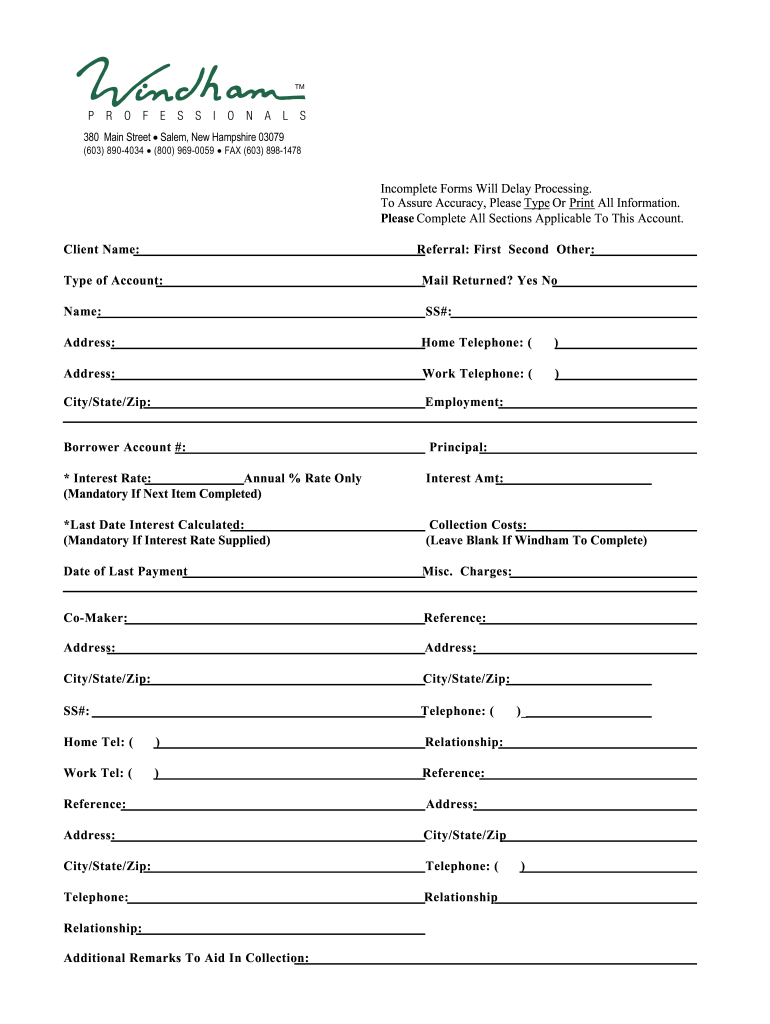
Filling out the Windham Collection Agency Online Paperwork Form is a crucial step in ensuring your account is processed accurately and efficiently. This guide will provide you with clear, step-by-step instructions to help you complete the form effectively.
Follow the steps to successfully fill out the form
- Click ‘Get Form’ button to obtain the form and open it in the editor.
- Begin by entering the 'Client Name' in the designated field. This is essential for identifying your account.
- Next, indicate the referral source by selecting either 'First,' 'Second,' or 'Other.' This information helps track account inquiries.
- Fill in the 'Type of Account' section with the relevant details to specify the nature of your account.
- Provide the 'Name' associated with the account. Ensure this matches the records held by the agency.
- Indicate if the mail has been returned by selecting 'Yes' or 'No.' This may affect communication processing.
- Enter your Social Security Number (SS#) in the specified field for verification purposes.
- Include your current address, ensuring accuracy for future correspondence.
- Fill in the 'Home Telephone' and 'Work Telephone' fields with your contact numbers.
- Complete your 'City/State/Zip' information to give a complete address.
- Provide the 'Employment' field details for your current job, helping verify your financial situation.
- Input the 'Borrower Account #' assigned to your account for identification.
- Specify the 'Principal' amount associated with your account.
- Record the 'Interest Rate' as an annual percentage if applicable, as this information is mandatory for accurate calculations.
- If you have provided an interest rate, enter the 'Last Date Interest Calculated.' This date should reflect when the interest rate was last updated.
- Fill in any 'Collection Costs' if applicable; if not, leave this section blank as Windham will complete it.
- Enter the 'Date of Last Payment' to provide a timeline of account activity.
- Add any 'Misc. Charges' relevant to your account to ensure all financial responsibilities are noted.
- Provide the name of any 'Co-Maker' related to the account, if applicable.
- List references by completing their 'Name', 'Address', 'City/State/Zip', and 'Telephone' information. Indicate the 'Relationship' to clarify their connection to you.
- Finally, add any 'Additional Remarks' that may aid in the collection process, providing context or information that could be helpful.
- Review all completed fields for accuracy. Once confirmed, you can save changes, download, print, or share the completed form.
Complete your document online with confidence!
Experience a faster way to fill out and sign forms on the web. Access the most extensive library of templates available.
Related content
Here you will find change of address forms, property tax abatement application, and...
If a student account balance remains unpaid, the past due student account balance account...
The International Dairy Foods Association (Carry Frye) for the organization of a field...
Use professional pre-built templates to fill in and sign documents online faster. Get access to thousands of forms.
If you believe that this page should be taken down, please follow our DMCA take down process here.