Loading

Open form follow the instructions

Easily sign the form with your finger

Send filled & signed form or save
How to fill out the Myacuvuerewards online
This guide will provide you with a clear and user-friendly approach to completing the Myacuvuerewards submission form online. Follow these detailed steps to ensure a smooth submission process.
Follow the steps to successfully complete the Myacuvuerewards submission.
- Press the ‘Get Form’ button to obtain the form and open it in your preferred editor.
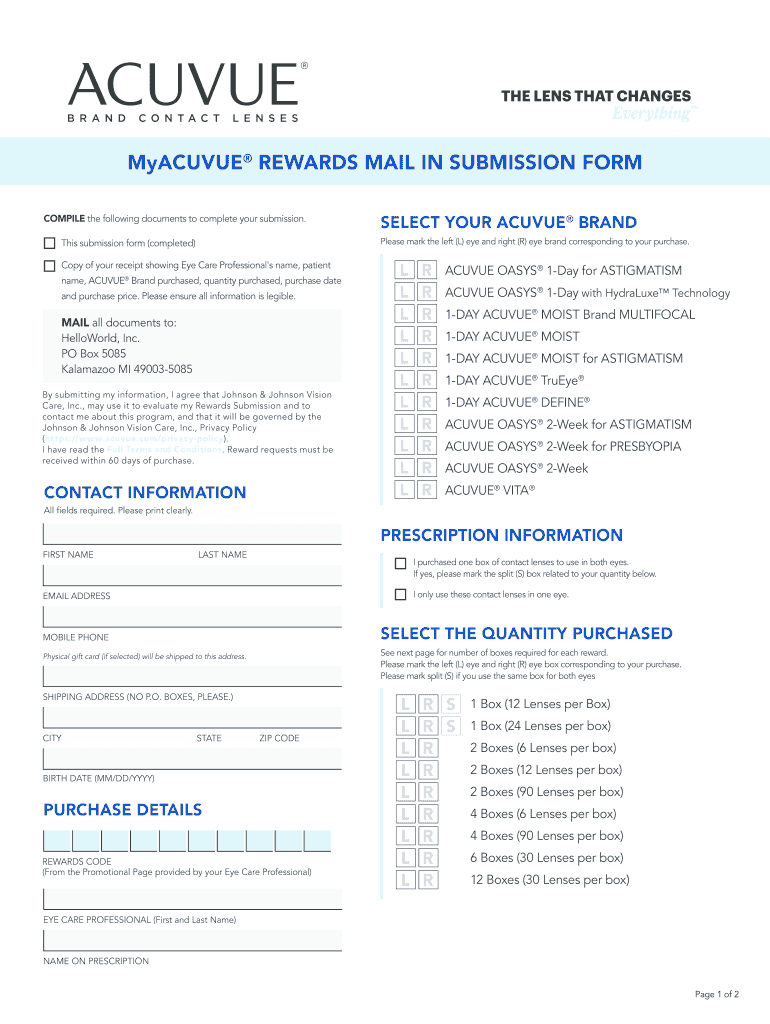
- Select your ACUVUE brand by marking the corresponding boxes for your left (L) eye and right (R) eye. Options include ACUVUE OASYS® 1-Day for Astigmatism and other ACUVUE brands listed on the form.
- Compile the required documents, including a copy of your purchase receipt that contains the name of your Eye Care Professional, your name, the ACUVUE brand purchased, the quantity, the purchase date, and the purchase price. Ensure that all information is legibly printed.
- Fill in your contact information, including your first name, last name, email address, mobile phone number, and shipping address. Make sure to use a physical address as P.O. boxes are not accepted.
- Provide your prescription information, indicating whether you purchased one box of contact lenses for both eyes or only for one eye. Select the appropriate quantity purchased.
- Include your birth date in the specified format (MM/DD/YYYY) and fill in the rewards code provided by your Eye Care Professional.
- Review all fields to ensure that all required information is filled out completely and clearly, as incomplete submissions may be rejected.
- Once all information is verified, submit your documents by mailing them to HelloWorld, Inc., at the specified address. Keep a copy of your submission for your records.
- Optionally, save changes, download, print, or share the form as needed.
Complete your Myacuvuerewards submission online and enjoy your rewards!
Experience a faster way to fill out and sign forms on the web. Access the most extensive library of templates available.
Related content
Apr 11, 2025 — MyAcuvueRewardssays: · April 26, 2025 at 10:45 am. This post was really...
Get answers to your most pressing questions about US Legal Forms API.
How do I redeem myacuvuerewards?
To redeem your Myacuvuerewards, log into your account and select the rewards you wish to use. Ensure you check the terms to know how many points you need for each reward. From there, you can choose your rewards and complete the redemption process, which might include selecting a gift card or other benefits.
What is the best solution for Acuvue Vita contacts?
For Acuvue Vita contacts, the best solution is a quality contact lens solution that provides hydration and comfort. Look for options that are specifically designed for silicone hydrogel lenses. Always consult with your eye care professional to find the solution that best suits your specific needs.
How do I redeem my dime beauty rewards?
To redeem your Dime Beauty rewards, first, log into your Dime account. Navigate to the rewards section and select the offers that interest you. You can then apply these rewards during checkout, making it an effortless experience.
How do I check my MyACUVUE rewards balance?
To check your MyACUVUE rewards balance, log into your MyACUVUE account. Your balance will be displayed prominently on your dashboard for easy access. This way, you can keep track of your rewards and plan your future purchases.
How do I contact Acuvue customer service?
You can contact Acuvue customer service easily by visiting their official website. Look for the 'Contact Us' section, which provides options for phone support, email assistance, or live chat. ACUVUE's representatives are available to help with any inquiries related to MyACUVUErewards.
How do I reset my Acuvue password?
If you need to reset your Acuvue password, visit the MyACUVUErewards login page. Click on the 'Forgot Password' link and follow the instructions sent to your registered email. This will allow you to create a new password and regain access to your rewards account.
How do I get my rebate from ACUVUE?
To receive your rebate from ACUVUE, start by ensuring you have purchased qualifying products. Submit your receipt along with the rebate form found on the MyACUVUErewards website. After processing your submission, ACUVUE will send your rebate to you, typically within a few weeks.
Why was Acuvue discontinued?
Acuvue has not been discontinued, but certain product lines may have been phased out due to changes in demand or product enhancements. Staying informed through the Myacuvuerewards platform ensures you always have access to current offerings and any updates from Acuvue.
How to use Acuvue rebate card?
Using your Acuvue rebate card is simple. Once you receive your card in the mail, activate it online or by phone. You can then use it like a debit card at participating retailers when purchasing more Acuvue products, thus you'll maximize your benefits from Myacuvuerewards.
How to submit Acuvue rebate?
To submit your Acuvue rebate, first ensure you have your receipt and the original UPC code from your Acuvue product. Visit the Myacuvuerewards website and follow the instructions for submitting your rebate online. You can also send your documents by mail if you prefer that method. Keep a copy of everything for your records.
Use professional pre-built templates to fill in and sign documents online faster. Get access to thousands of forms.
If you believe that this page should be taken down, please follow our DMCA take down process here.