Loading

Open form follow the instructions

Easily sign the form with your finger

Send filled & signed form or save
How to fill out the Usaa Direct Deposit Form online
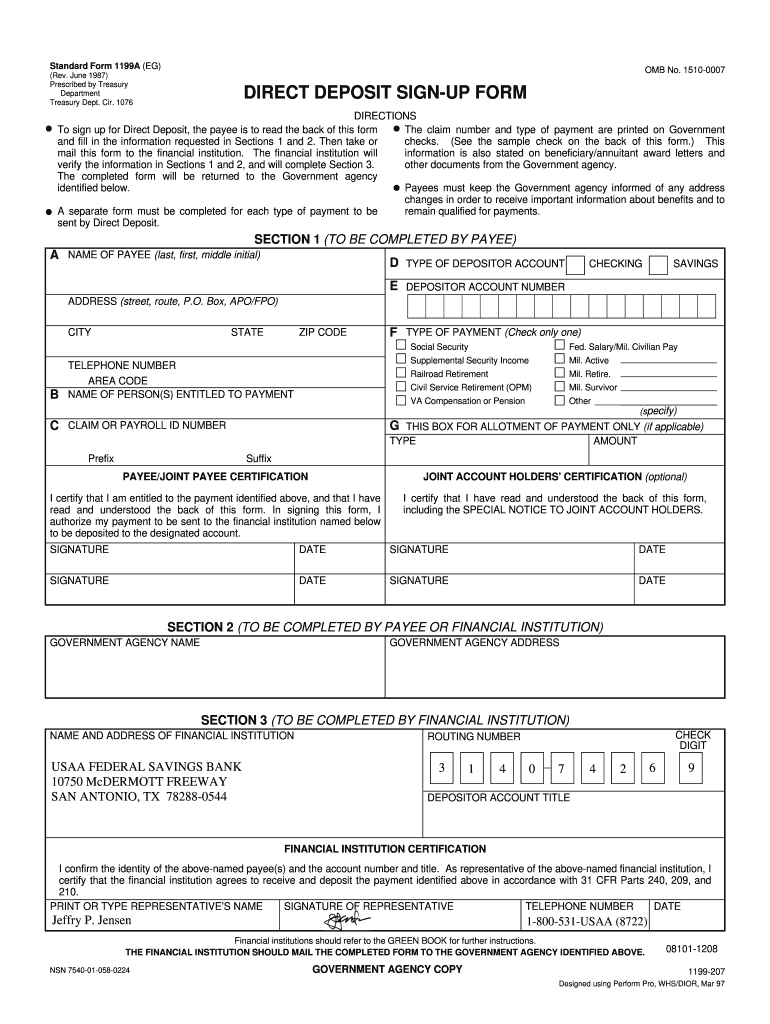
Filling out the Usaa Direct Deposit Form online is an essential step to ensure that your payments are deposited directly into your account. This guide provides a clear, step-by-step process for completing the form accurately and efficiently.
Follow the steps to fill out the Usaa Direct Deposit Form
- Press the ‘Get Form’ button to access the Usaa Direct Deposit Form and open it in your preferred online editor.
- In Section 1, enter the name of the payee. This should be the payee's last name, followed by their first name and middle initial.
- If applicable, fill out the allotment of payment section by providing the type, amount, and any prefixes or suffixes needed.
- Sign and date the form in the ‘Payee/Joint Payee Certification’ section, confirming that you have the authority to request the direct deposit.
- In Section 2, enter the name and address of the government agency providing the payments.
- Once completed, save changes to the form, and proceed to download or print it as needed to submit to the financial institution.
Ensure your payments are deposited directly by completing the Usaa Direct Deposit Form online today.
Experience a faster way to fill out and sign forms on the web. Access the most extensive library of templates available.
Related content
A separate form must be completed for each type of payment to be sent by Direct Deposit...
Form 1199A is a direct deposit sign-up form. Payees fill out sections 1 and 2, then the...
Apr 25, 2007 — The Charles Schwab Corporation (NYSE: SCHW) is an investing services firm...
Get answers to your most pressing questions about US Legal Forms API.
Can I get a voided check online from USAA?
Yes, you can obtain a voided check online from USAA. To do this, log into your USAA account, and navigate to the 'Account Details' section of your checking account. There, you can print a voided check, which can be very useful when you're setting up your USAA direct deposit form or need to provide banking information for other purposes.
How do I get a deposit slip from USAA?
Getting a deposit slip from USAA is straightforward. You can access your deposit slip through the USAA mobile app or online banking. Simply log in, select the 'Accounts' tab, and choose the account for which you need the deposit slip. This option makes managing your finances easier while you utilize your USAA direct deposit form.
How do I get my bank direct deposit form?
To obtain your bank direct deposit form, you can visit the USAA website and log into your account. Once logged in, navigate to the 'Account Services' section, where you will find options for direct deposit. This form is essential for setting up your USAA direct deposit, ensuring that your funds go directly into your account.
How do I get a voided check from USAA?
To obtain a voided check from USAA, you can easily do it through your online banking account. Simply log in to your USAA account and navigate to the checking account section. From there, you can print a check and write 'VOID' across it. This voided check can now be used for direct deposit setups, including filling out forms like the Usaa Direct Deposit Form.
How do I fill out a payment authorization form?
When filling out a payment authorization form, begin by clearly stating your name and contact information at the top. Then, specify the payment amount and frequency, along with your USAA account details. It's crucial to read the terms carefully before signing the form, ensuring you authorize the correct transactions. After everything is confirmed, send the completed form to the intended recipient.
How do I fill out a direct deposit authorization form?
To fill out the Usaa Direct Deposit Form, start by entering your personal information, including your name, address, and Social Security number. Next, provide your bank details, including your USAA account number and the routing number. Make sure to review the form for accuracy, and then sign and date it. Once completed, submit it to your employer or the office handling the payment.
How do you fill out a direct deposit form?
To fill out a direct deposit form effectively, start with your personal details, including your name and address. Next, provide your bank's routing number and your account number. Ensure you clearly specify the type of deposit, and don’t forget to sign and date the Usaa Direct Deposit Form for validation. This process will make it easier for your funds to be transferred directly to your account.
What do you write on a USAA check deposit?
While depositing a USAA check, use the Usaa Direct Deposit Form along with your check. Write your account number on the back of the check to link it to your account. Also, include your signature on the back. This way, your deposit will be processed efficiently without any delay.
What is the bank name for USAA direct deposit?
When using the Usaa Direct Deposit Form, the bank name is USAA Federal Savings Bank. It is crucial to input this correctly so that your direct deposits are processed without any issues. Make sure you have the right routing number handy, as it directly relates to your USAA account. This ensures your funds reach the correct destination.
How to fill out direct deposit by ACH authorization form?
Filling out the Usaa Direct Deposit Form involves a few straightforward steps. First, enter your personal information, including your name, address, and account number. Then, provide the bank's routing number and indicate the type of account you wish to deposit into. Finally, sign and date the form to authorize the direct deposit.
Use professional pre-built templates to fill in and sign documents online faster. Get access to thousands of forms.
If you believe that this page should be taken down, please follow our DMCA take down process here.