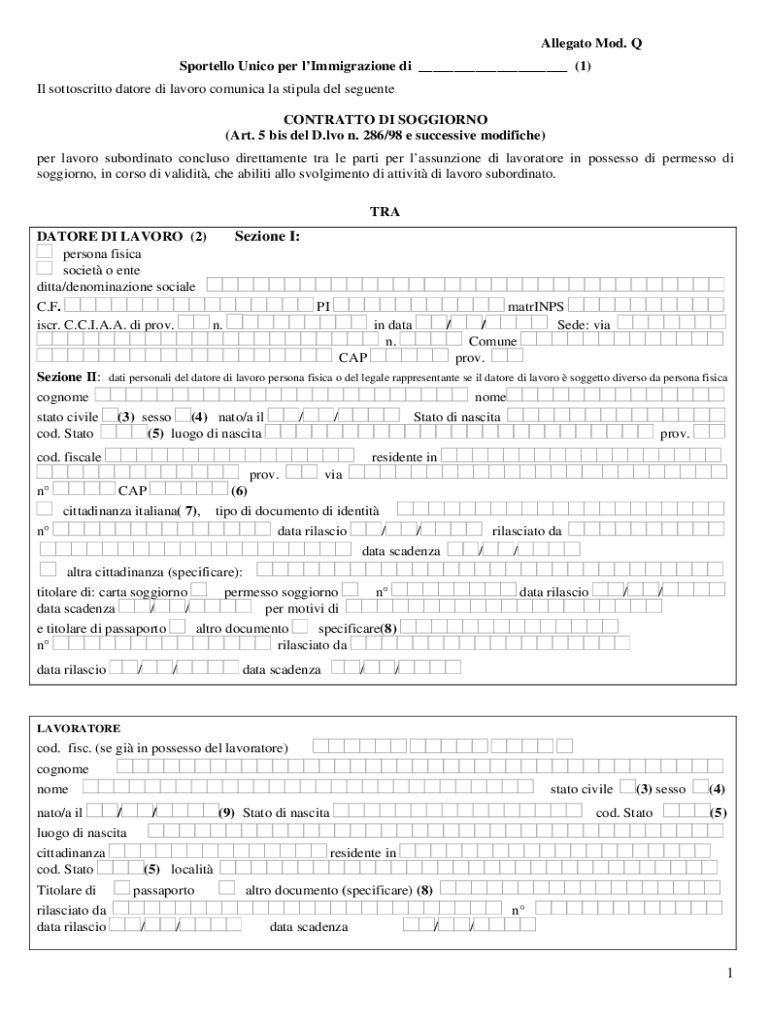
Successive modifiche) per lavoro subordinato concluso direttamente tra le parti per l assunzione di lavoratore in possesso di permesso di soggiorno, in corso di validit , che abiliti allo svolgimento di attivit di lavoro subordinato. TRA Sezione I: DATORE DI LAVORO (2) persona fisica societ o ente ditta/denominazione sociale PI C.F. iscr. C.C.I.A.A. di prov. n. matrINPS / / Sede: via Comune prov. in data n. CAP Sezione II: dati personali del datore di lavoro persona fisica o del l.
Loading

Open form follow the instructions

Easily sign the form with your finger

Send filled & signed form or save
Tips on how to fill out, edit and sign IT Mod. Q online
How to edit IT Mod. Q
Make the best use of our extensive online document editor while preparing your forms. Complete the IT Mod. Q, point out the most significant details, and easily make any other essential adjustments to its content.
Preparing paperwork electronically is not only time-saving but also gives a possibility to edit the template according to your demands. If you’re about to manage the IT Mod. Q, consider completing it with our extensive online editing solutions. Whether you make an error or enter the requested details into the wrong area, you can easily make changes to the form without the need to restart it from the beginning as during manual fill-out. Apart from that, you can stress on the vital data in your paperwork by highlighting certain pieces of content with colors, underlining them, or circling them.
Follow these simple and quick actions to complete and adjust your IT Mod. Q online:
- Open the file in the editor.
- Type in the necessary information in the blank areas using Text, Check, and Cross tools.
- Follow the document navigation to avoid missing any required areas in the template.
- Circle some of the significant details and add a URL to it if needed.
- Use the Highlight or Line options to emphasize the most significant facts.
- Choose colors and thickness for these lines to make your form look professional.
- Erase or blackout the data you don’t want to be visible to others.
- Replace pieces of content that contain errors and type in text that you need.
- Finish modifcations with the Done option as soon as you make certain everything is correct in the document.
Our robust online solutions are the best way to complete and customize IT Mod. Q in accordance with your needs. Use it to prepare personal or professional paperwork from anywhere. Open it in a browser, make any adjustments to your documents, and return to them at any time in the future - they all will be safely kept in the cloud.
How to sign the PA BCO-10 form electronically
airSlate SignNow makes it easy to add a legally-binding electronic signature to your PA BCO-10 form from any device.
- Open the completed PA BCO-10 form in the editor.
- Click My Signature and choose your preferred signature type.
- Place the signature in the designated field and click Done.
- Download or send the signed document directly from the platform.
How to edit IT Mod. Q
Make the best use of our extensive online document editor while preparing your forms. Complete the IT Mod. Q, point out the most significant details, and easily make any other essential adjustments to its content.
Preparing paperwork electronically is not only time-saving but also gives a possibility to edit the template according to your demands. If you’re about to manage the IT Mod. Q, consider completing it with our extensive online editing solutions. Whether you make an error or enter the requested details into the wrong area, you can easily make changes to the form without the need to restart it from the beginning as during manual fill-out. Apart from that, you can stress on the vital data in your paperwork by highlighting certain pieces of content with colors, underlining them, or circling them.
Follow these simple and quick actions to complete and adjust your IT Mod. Q online:
- Open the file in the editor.
- Type in the necessary information in the blank areas using Text, Check, and Cross tools.
- Follow the document navigation to avoid missing any required areas in the template.
- Circle some of the significant details and add a URL to it if needed.
- Use the Highlight or Line options to emphasize the most significant facts.
- Choose colors and thickness for these lines to make your form look professional.
- Erase or blackout the data you don’t want to be visible to others.
- Replace pieces of content that contain errors and type in text that you need.
- Finish modifcations with the Done option as soon as you make certain everything is correct in the document.
Our robust online solutions are the best way to complete and customize IT Mod. Q in accordance with your needs. Use it to prepare personal or professional paperwork from anywhere. Open it in a browser, make any adjustments to your documents, and return to them at any time in the future - they all will be safely kept in the cloud.
Experience a faster way to fill out and sign forms on the web. Access the most extensive library of templates available.
Related content
by F PUB · 1998 · Cited by 359 — ) mod p) mod q. If v = r′, then the signature is...
by F Green · 2000 · Cited by 38 — In this paper we prove that if a polynomial weakly...
Use professional pre-built templates to fill in and sign documents online faster. Get access to thousands of forms.
If you believe that this page should be taken down, please follow our DMCA take down process here.