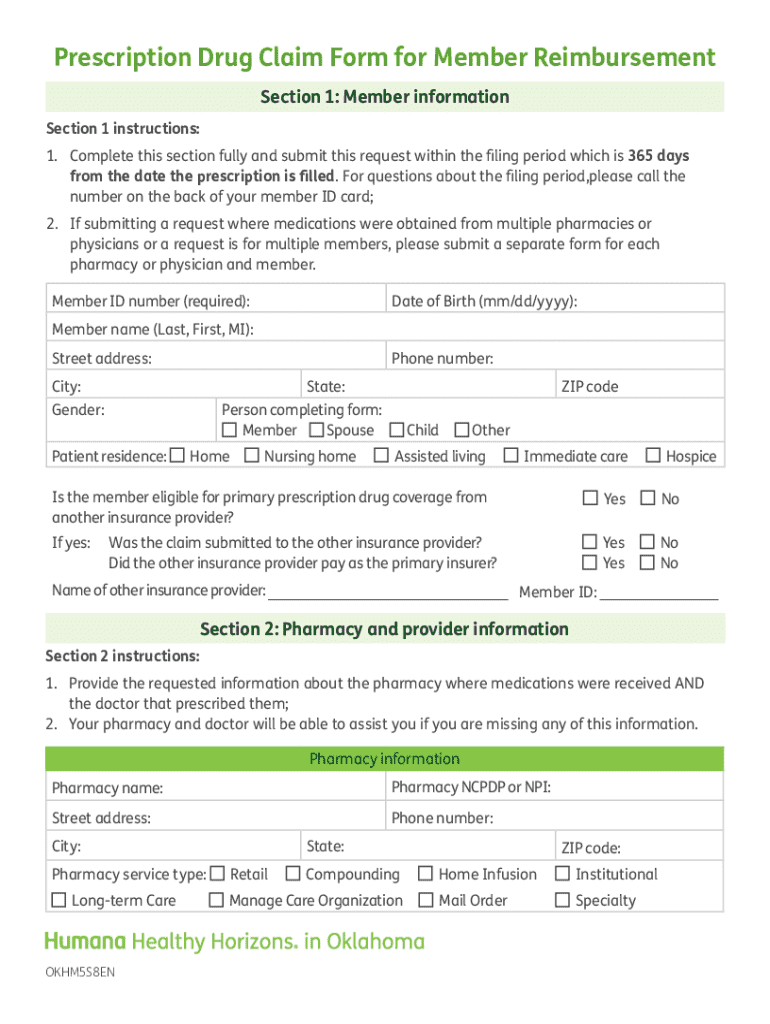
365 days from the date the prescription is filled. For questions about the filing period,please call the number on the back of your member ID card; 2. If submitting a request where medications were obtained from multiple pharmacies or physicians or a request is for multiple members, please submit a separate form for each pharmacy or physician and member. Member ID number (required): Date of Birth (mm/dd/yyyy): Member name (Last, First, MI): Street address: Phone number: City: Gender: State.
Loading

Open form follow the instructions

Easily sign the form with your finger

Send filled & signed form or save
Tips on how to fill out, edit and sign GR-6939 online
How to edit GR-6939
Eliminate the mess from your paperwork routine. Discover the easiest way to find and edit, and file a GR-6939
The process of preparing GR-6939 needs precision and attention, especially from people who are not well familiar with such a job. It is essential to get a suitable template and fill it in with the correct information. With the proper solution for processing documents, you can get all the instruments at hand. It is easy to simplify your editing process without learning new skills. Identify the right sample of GR-6939 and fill it out immediately without switching between your browser tabs. Discover more tools to customize your GR-6939 form in the editing mode.
While on the GR-6939 page, just click the Get form button to start editing it. Add your details to the form on the spot, as all the essential instruments are at hand right here. The sample is pre-designed, so the work needed from the user is minimal. Use the interactive fillable fields in the editor to easily complete your paperwork. Simply click on the form and proceed to the editor mode without delay. Fill in the interactive field, and your file is all set.
Try more tools to customize your form:
- Place more text around the document if needed. Use the Text and Text Box tools to insert text in a separate box.
- Add pre-designed visual elements like Circle, Cross, and Check with respective tools.
- If needed, capture or upload images to the document with the Image tool.
- If you need to draw something in the document, use Line, Arrow, and Draw tools.
- Try the Highlight, Erase, and Blackout tools to change the text in the document.
- If you need to add comments to specific document parts, click the Sticky tool and place a note where you want.
Sometimes, a small error can ruin the whole form when someone fills it by hand. Forget about inaccuracies in your paperwork. Find the samples you need in moments and complete them electronically using a smart editing solution.
How to sign the PA BCO-10 form electronically
airSlate SignNow makes it easy to add a legally-binding electronic signature to your PA BCO-10 form from any device.
- Open the completed PA BCO-10 form in the editor.
- Click My Signature and choose your preferred signature type.
- Place the signature in the designated field and click Done.
- Download or send the signed document directly from the platform.
How to edit GR-6939
Eliminate the mess from your paperwork routine. Discover the easiest way to find and edit, and file a GR-6939
The process of preparing GR-6939 needs precision and attention, especially from people who are not well familiar with such a job. It is essential to get a suitable template and fill it in with the correct information. With the proper solution for processing documents, you can get all the instruments at hand. It is easy to simplify your editing process without learning new skills. Identify the right sample of GR-6939 and fill it out immediately without switching between your browser tabs. Discover more tools to customize your GR-6939 form in the editing mode.
While on the GR-6939 page, just click the Get form button to start editing it. Add your details to the form on the spot, as all the essential instruments are at hand right here. The sample is pre-designed, so the work needed from the user is minimal. Use the interactive fillable fields in the editor to easily complete your paperwork. Simply click on the form and proceed to the editor mode without delay. Fill in the interactive field, and your file is all set.
Try more tools to customize your form:
- Place more text around the document if needed. Use the Text and Text Box tools to insert text in a separate box.
- Add pre-designed visual elements like Circle, Cross, and Check with respective tools.
- If needed, capture or upload images to the document with the Image tool.
- If you need to draw something in the document, use Line, Arrow, and Draw tools.
- Try the Highlight, Erase, and Blackout tools to change the text in the document.
- If you need to add comments to specific document parts, click the Sticky tool and place a note where you want.
Sometimes, a small error can ruin the whole form when someone fills it by hand. Forget about inaccuracies in your paperwork. Find the samples you need in moments and complete them electronically using a smart editing solution.
Experience a faster way to fill out and sign forms on the web. Access the most extensive library of templates available.
Related content
Criminal history record information—(1) Has the meaning given the term in section...
Northwest Africa 6939 ; Class: Ureilite ; Shock stage: S2 ; Weathering grade: W3 ;...
Please refer to the SD-SG11 service manual (S9165SDSG11//) together with this manual...
Use professional pre-built templates to fill in and sign documents online faster. Get access to thousands of forms.
If you believe that this page should be taken down, please follow our DMCA take down process here.