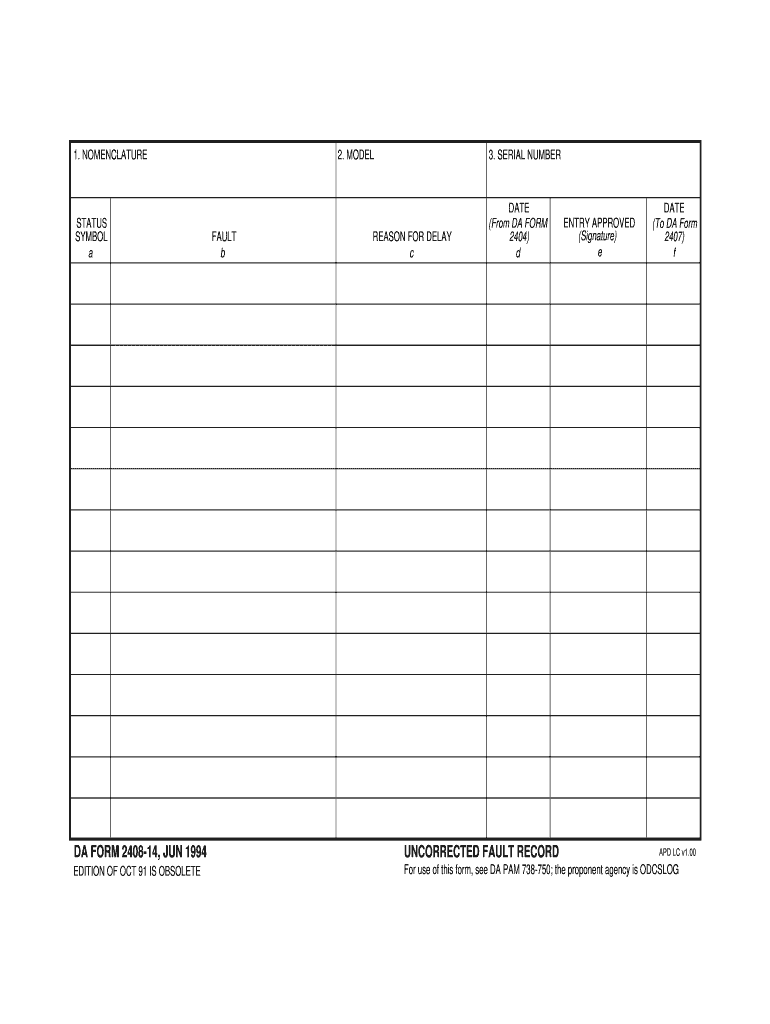
NCORRECTED FAULT RECORD EDITION OF OCT 91 IS OBSOLETE For use of this form, see DA PAM 738-750; the proponent agency is ODCSLOG APD LC v1.00 1. NOMENCLATURE STATUS SYMBOL a 2. MODEL FAULT b REVERSE OF DA FORM 2408-14, JUN 1994 REASON FOR DELAY c 3. SERIAL NUMBER DATE (From DA FORM 2404) d ENTRY APPROVED (Signature) e DATE (To DA Form 2407) f APD LC v1.00 .
Loading

Open form follow the instructions

Easily sign the form with your finger

Send filled & signed form or save
How to fill out the DA 2408-14 online
The DA 2408-14 is an important form used for recording uncorrected faults in equipment. This guide will provide you with clear, step-by-step instructions to complete this form online effectively.
Follow the steps to complete the DA 2408-14 online.
- Press the ‘Get Form’ button to obtain the DA 2408-14 and open it in your preferred online editor.
- In the first section, labeled 'Nomenclature,' enter the name or designation of the equipment you are reporting on.
- Next, look for the 'Model' section. Fill in the specific model number of the equipment associated with the fault.
- In the 'Serial Number' field, input the unique serial number of the equipment. This number is critical for tracking and maintenance purposes.
- Continue to the 'Fault' section. Describe the fault clearly and concisely, specifying what issue is being recorded.
- In the 'Reason for Delay' section, provide an explanation for any delays related to the maintenance or correction of the fault.
- In the date fields, enter the relevant dates as indicated. The date from DA Form 2404 should be noted in the appropriate section.
- Once you have filled in all the required fields, ensure that the entry is approved by signing in the designated signature area.
- Finally, complete the final date field, indicating the date related to DA Form 2407.
- After reviewing your entries, you can save your changes, download the completed form, print it, or share it as needed.
Complete your documents online for efficiency and accuracy.
Experience a faster way to fill out and sign forms on the web. Access the most extensive library of templates available.
Related content
AB150,2408,9 9(a) Dwelling code council. AB150,2408,14 101. `Tangible personal property.'...
Standards: The standards are met when ULM is performed and DA Form 2404 and DA Form...
Dec 23, 1993 — ... 2408-14. Uncorrected Fault Record. DA FORM 5164-R. Hands-On...
Get answers to your most pressing questions about US Legal Forms API.
What is DA Form 2408?
DA Form 2408 is a documentation form used to track assembly, maintenance, and inspections of Army equipment. It provides detailed records necessary for maintaining proper service and accountability. Understanding its components is vital for ensuring compliance and operational readiness. You can leverage resources from USLegalForms to enhance your knowledge and proper utilization of related forms like the DA 2408-14.
How to fill out a DA form 2404?
Filling out a DA form 2404 requires specific focus on accurate and detailed entries. Begin with essential identification information, followed by condition reports and maintenance notes. Ensure that you review and double-check all information for accuracy. Tools like USLegalForms can provide necessary templates and clarifications, ultimately benefiting your handling of forms like the DA 2408-14.
How to properly fill out 2404?
To properly fill out a DA form 2404, start by entering the complete identification details of the equipment, including the serial number and equipment category. Then, indicate any deficiencies found during inspections and the actions taken. Ensuring accurate entries boosts accountability and compliance. Using tools from USLegalForms can also guide you through the filling process effectively for the DA 2408-14.
What is a DA form 2404 used for?
A DA form 2404 is primarily used for maintenance and inspection of Army equipment. This form documents the status, identification, and maintenance actions of machinery or vehicles. Proper use of the DA form 2404 helps in maintaining accountability and service readiness. Integrating this with the DA 2408-14 enhances the overall management of military assets.
Who is responsible for keeping information current and correct on the DA form 2404-5988-E?
The responsibility for maintaining current and accurate information on the DA form 2404-5988-E falls to the unit's personnel. Each individual involved must ensure that all entries reflect the latest data and changes. Regular reviews and updates will prevent discrepancies and maintain compliance with standards. Consider using platforms like USLegalForms for templates and guidance, streamlining updates related to the DA 2408-14.
How to fill out a DA form 5914?
Filling out a DA form 5914 involves a series of straightforward steps. Begin by gathering all necessary information such as unit details and individual certifications. Follow the instructions carefully and ensure that all sections are completed accurately. Using resources like USLegalForms can simplify this process, helping you understand the requirements associated with DA forms like the DA 2408-14.
How to fill out a Flipl USMC?
Filling out a Flipl (Financial Liability Investigation of Property Loss) in the USMC requires detailing the incident causing the loss or damage of military property. Start by providing all necessary information, including the circumstances and evidence of accountability. To ensure compliance and accuracy, consider using the USLegalForms platform for templates and instructions tailored to your needs. This tool will help clarify the process and streamline your submission.
How to fill out a DA Form 200?
To fill out a DA Form 200, start by gathering all required information about the property being documented. Include identifiers like the serial number and description, ensuring all entries are complete and accurate. To further simplify this task, refer to the USLegalForms platform for templates and examples. This will help you produce a professional and compliant DA Form 200.
How to fill out DA 200?
Filling out a DA 200 involves documenting the transfer or loss of military property. Begin by entering essential identifiers, such as document numbers and dates, ensuring accuracy at each step. For added support, utilize resources from USLegalForms, which provide templates and guidance. This will help you navigate the complexities and ensure that your DA 200 form meets all requirements.
How to properly fill out a DA form 2404?
To fill out a DA Form 2404 correctly, you need to record equipment discrepancies and the overall condition of the item. Clearly label any issues and attach the necessary supporting documents, if applicable. Using tools and templates from the USLegalForms platform can streamline this process and enhance accuracy. By following these steps, you maintain complete and effective equipment records.
Use professional pre-built templates to fill in and sign documents online faster. Get access to thousands of forms.
If you believe that this page should be taken down, please follow our DMCA take down process here.