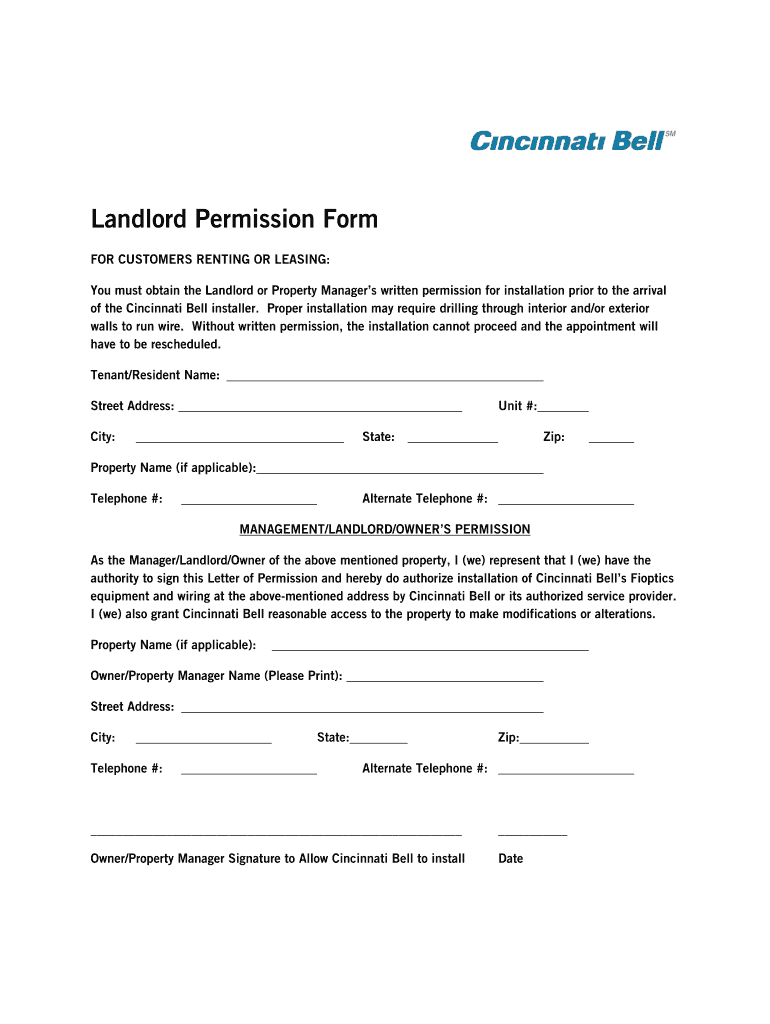
Landlord Permission Form FOR CUSTOMERS RENTING OR LEASING: You must obtain the Landlord or Property Managers written permission for installation prior to the arrival of the Cincinnati Bell installer.
Loading

Open form follow the instructions

Easily sign the form with your finger

Send filled & signed form or save
How to fill out the Cincinnati Bell Landlord Permission Form online
Filling out the Cincinnati Bell Landlord Permission Form is essential for ensuring that installation can proceed without delays. This guide provides step-by-step instructions for completing the form online, making the process straightforward and accessible for all users.
Follow the steps to complete the Cincinnati Bell Landlord Permission Form seamlessly.
- Click ‘Get Form’ button to obtain the form and open it in the editor.
- Begin by filling in the tenant or resident's name in the appropriate field at the top of the form. Ensure that the name matches the lease agreement to avoid any discrepancies.
- Enter the street address of the rental property where the Cincinnati Bell installation is planned. This includes the unit number if applicable, followed by the city, state, and zip code.
- In the section labeled 'Management/Landlord/Owner’s Permission,' clearly state that the property manager, landlord, or owner is consenting to the installation of Cincinnati Bell's services. This part requires the signature to authorize installation.
- Fill in the property name if applicable and provide the name of the owner or property manager in the designated area. Ensure clarity on how they choose to print their name for official documentation.
- Complete the contact details for the owner or property manager, including the street address, city, state, zip, and both telephone numbers. This information ensures clear communication regarding the installation.
- The owner or property manager must then sign and date the form in the space provided. This validates the permission granted to Cincinnati Bell for installation.
- After thoroughly reviewing the completed form for accuracy, users can save changes, download, print, or share the form as needed.
Complete your Cincinnati Bell Landlord Permission Form online today for a smooth installation process!
Experience a faster way to fill out and sign forms on the web. Access the most extensive library of templates available.
Related content
Landlord shall construct the Storage Space pursuant to plans and specifications approved...
... Landlord/Tenant Information · PromisePay · Landlord Payment Plan Authorization ·...
Oct 24, 2018 — The enclosed Form of Proxy for use at the General Meeting should be...
Get answers to your most pressing questions about US Legal Forms API.
Is Altafiber the same as Cincinnati Bell?
Yes, Altafiber is the rebranded name for Cincinnati Bell's internet and communication services. This new name reinforces their commitment to providing high-speed internet and reliable service. If you face any issues or concerns, having your Cincinnati Bell Landlord Permission Form can help clarify any service-related questions.
Why is my Altafiber remote not working?
If your Altafiber remote is unresponsive, first check the battery level and connections. A simple battery replacement might solve the problem. Additionally, verify that your Cincinnati Bell Landlord Permission Form is correctly filled out, as it can impact service quality if not properly submitted.
How long does Altafiber take to install?
The installation time for Altafiber typically ranges from one to three hours, depending on your specific setup needs. During this process, technicians will ensure everything is configured correctly for your devices. To avoid potential delays, having your Cincinnati Bell Landlord Permission Form ready can streamline approvals for installation work.
Why is my Cincinnati Bell Altafiber remote not working?
Your Cincinnati Bell Altafiber remote might not be functioning due to several reasons, such as weak batteries or disconnects from the TV. Change the batteries and ensure the remote is pointing directly at the device. In some cases, reviewing the Cincinnati Bell Landlord Permission Form can help determine if there are access issues that might impact service functionality.
How do I reset my FiOPtics remote?
To reset your FiOPtics remote, press and hold the 'Home' and 'Back' buttons until you see the LED light flash. This process should restore the remote to its original settings. If issues persist, double-check if your Cincinnati Bell Landlord Permission Form is up to date, as proper authorization can sometimes affect your service connections.
Why is my Bell Fibe remote not responding?
If your Bell Fibe remote is not responding, it may need a simple reset or new batteries. First, check the battery level; if the batteries are low, replace them with fresh ones. If that does not work, try resetting the remote by holding down the 'Home' and 'Enter' buttons simultaneously. Additionally, ensure that the device is paired correctly, as sometimes the Cincinnati Bell Landlord Permission Form can ensure that all necessary approvals are in place for optimal service.
Use professional pre-built templates to fill in and sign documents online faster. Get access to thousands of forms.
If you believe that this page should be taken down, please follow our DMCA take down process here.