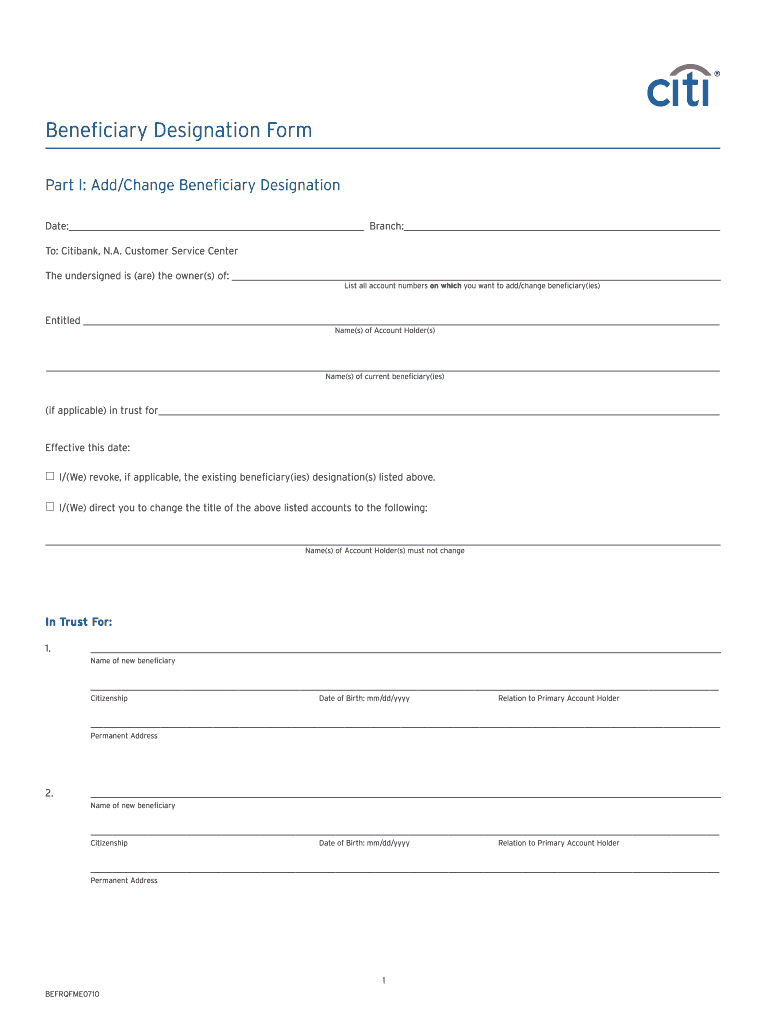
_____________________________ To: Citibank, N.A. Customer Service Center The undersigned is (are) the owner(s) of: _______________________________________________________________________________________________________________ List all account numbers on which you want to add/change beneficiary(ies) Entitled _________________________________________________________________________________________________________________________________________________ Name(s) of Account Holder(s) _____________.
Loading

Open form follow the instructions

Easily sign the form with your finger

Send filled & signed form or save
How to fill out the CITI BEFRQFME0710 online
This guide provides clear and comprehensive instructions on filling out the CITI BEFRQFME0710, also known as the Beneficiary Designation Form. Users may find this document essential for adding or changing beneficiaries associated with their accounts.
Follow the steps to complete the form accurately.
- Click the ‘Get Form’ button to obtain the form and open it in your preferred editor.
- Fill in the date and branch at the top of the form. These details are needed to document the request properly.
- Indicate the owner(s) of the account clearly in the designated section. This information ensures that the correct person or people are associated with the account.
- List all account numbers on which you want to add or change beneficiaries. Ensure that the account details are accurate to avoid processing errors.
- Fill in the name(s) of the current beneficiary(ies) if applicable. If there are no current beneficiaries, you may proceed directly to adding new ones.
- Specify the effective date for the changes to take place. This part is crucial for record-keeping.
- If you are revoking any existing beneficiary designations, clearly indicate this in the provided area.
- For each new beneficiary, provide their full name, citizenship, date of birth, relationship to the primary account holder, and permanent address. Repeat this for each new beneficiary you wish to add.
- Review the section that instructs Citibank to accept various forms of communication relating to your account. Make sure to understand the implications of this authorization.
- Provide your signature and the date for the primary account holder and any co-account holders as required. Ensure that everyone signs appropriately.
- Complete the authentication of the signature section as per the requirements. Choose one of the three methods of acknowledgment.
- Once all the sections are completed and signed, review the entire form for accuracy. Finally, you can save changes, download, print, or share the completed form as needed.
Start filling out your CITI BEFRQFME0710 online today to manage your beneficiary designations efficiently.
Experience a faster way to fill out and sign forms on the web. Access the most extensive library of templates available.
Related content
RegionCodeChapterLocationRecognition Date (Fraternity)NCAR0001AlphaSampaloc, ManilaMar 2...
Get answers to your most pressing questions about US Legal Forms API.
What is the ACH routing number for Citibank?
The ACH routing number for Citibank varies depending on your location, but it generally starts with 021000089 for domestic transactions. This number is necessary for direct deposits and electronic transfers. Always double-check with Citibank to ensure accuracy when performing transactions. For additional assistance with banking matters, services like US Legal Forms can offer valuable solutions.
How do I report phishing texts to Citibank?
To report phishing texts, you should forward the suspicious message to Citibank's designated number, which you can find on their official website. Additionally, it’s advisable to delete the text and not click on any links contained within. Staying vigilant helps protect your financial information. If you have further questions about this process, consider reaching out to customer service for assistance.
What was the Citibank mistaken payment?
The Citibank mistaken payment refers to instances where funds were incorrectly transferred due to a processing error. If you suspect a mistake in your account, it is essential to report it promptly to Citibank. They can help you investigate the issue and rectify any errors. In cases of confusion about payments, utilizing platforms like US Legal Forms may help streamline communication with your bank.
Does Citibank send you text messages?
Yes, Citibank does send text messages to its customers to provide account alerts and updates. These messages are designed to keep you informed about your banking transactions and security notifications. To ensure you receive these alerts, your mobile number must be registered with your account. If you believe you should not be receiving these texts, please reach out to Citibank for assistance.
Why am I getting texts from banks I don't use?
You may receive texts from banks you don’t use if your phone number was inadvertently linked to their marketing lists. Additionally, some fraudsters can spoof bank numbers to send phishing texts. Always be cautious and verify the sender if you receive unexpected messages. If you have concerns, contact your service provider for guidance on blocking unwanted texts.
When was Citibank?
Citibank was founded in 1812 as the City Bank of New York. Over the years, it has evolved into a global bank, providing various financial services. Understanding its history may help you appreciate its commitment to serving customers like you. For current services and features, visit the Citibank website or get in touch with customer support.
Why am I getting a Citi Alert?
You might receive a Citi Alert if there are important updates or notifications regarding your account. This can include alerts about transactions, security measures, or promotions. Understanding these alerts can help you manage your finances better. If the alert seems unusual or suspicious, consider contacting Citibank directly for clarification.
Does Citibank have physical bank locations?
Yes, Citibank operates numerous physical bank locations across the country. These branches provide a variety of services including account management, customer support, and financial advice. Visiting a local Citibank branch can enhance your banking experience and answer any questions you may have regarding CITI BEFRQFME0710.
Does Citibank accept checks?
Yes, Citibank accepts checks as part of their banking services. This includes both personal and business checks, which you can deposit through various methods such as at branches or via ATMs. Remember to keep your checks secure, as they carry sensitive financial information that can impact your use of CITI BEFRQFME0710.
Can Citibank use any ATM?
Citibank customers can use any ATM, though fees may apply when using out-of-network machines. By using Citibank ATMs, you can access your funds without incurring additional charges. It's always beneficial to locate nearby Citibank ATMs for maximum convenience and minimal fees, especially when you rely on services like CITI BEFRQFME0710.
Use professional pre-built templates to fill in and sign documents online faster. Get access to thousands of forms.
If you believe that this page should be taken down, please follow our DMCA take down process here.