Loading
Get Anthem Form 94044 2003-2026
How it works
-

Open form follow the instructions
-

Easily sign the form with your finger
-

Send filled & signed form or save
How to fill out the Anthem Form 94044 online
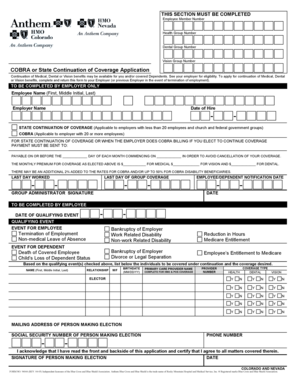
Filling out the Anthem Form 94044 online is an essential step for those looking to apply for continuation of medical, dental, or vision benefits. This comprehensive guide provides clear, step-by-step instructions to ensure that you accurately complete the form to meet your needs.
Follow the steps to fill out the Anthem Form 94044 online effectively.
- Press the ‘Get Form’ button to access the Anthem Form 94044 and open it in your editing interface.
- Begin by entering your Employee Member Number, Health Group Number, Dental Group Number, and Vision Group Number in the designated fields.
- In the ‘Continuation of Coverage’ section, review your eligibility for continuation of medical, dental, or vision benefits and indicate your interest by checking the appropriate box.
- For the employer section, provide the Employee Name, Employer Name, Date of Hire, Last Day Worked, and Last Day of Group Coverage.
- Choose the applicable coverage option by selecting either the State Continuation of Coverage or COBRA based on whether the employer has less than or more than 20 employees.
- Fill in the payment details, including the monthly premium amounts for medical, vision, and dental coverage, and payment deadlines to avoid cancellation.
- As the employee, indicate the Date of Qualifying Event and select the relevant event from the list provided.
- List the individuals who will be covered under continuation, including their name, relationship, gender, birthdate, primary care provider name, and coverage type.
- Provide the mailing address, social security number, and phone number of the person making the election.
- Review the form thoroughly and acknowledge that you have read and agree to all matters covered by signing and dating the form.
- Once completed, you can save your changes, download, print, or share the filled form as needed.
Complete your Anthem Form 94044 online today to secure your coverage!
Written reconsiderations To submit a written reconsideration, use a blank Claim Information/Adjustment Request 151 Form, available online at https://mediproviders.anthem.com/va > Claims > Forms. Once the form is complete, attach any necessary information and mail it to: HealthKeepers, Inc.