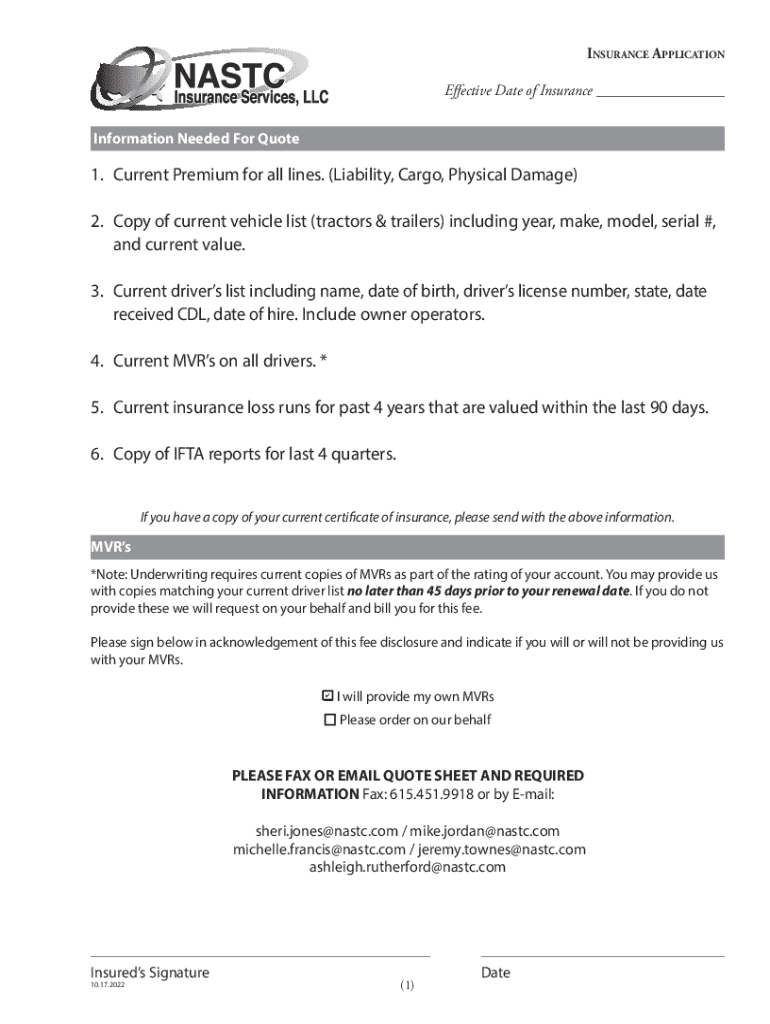
Insurance Application Effective Date of Insurance Information Needed For Quote1. Current Premium for all lines. (Liability, Cargo, Physical Damage) 2. Copy of current vehicle list (tractors &.
Loading

Open form follow the instructions

Easily sign the form with your finger

Send filled & signed form or save
How to fill out the NASTC Insurance Services Insurance Application online
Filling out the NASTC Insurance Services Insurance Application online can seem daunting, but this guide will break down each step to make the process straightforward. Whether you are a beginner or have some experience with insurance applications, this guide provides clear and detailed instructions to help you complete the form accurately.
Follow the steps to successfully complete the NASTC Insurance Services Insurance Application.
- Click ‘Get Form’ button to obtain the form and open it for editing.
- Enter the effective date of insurance in the designated field. This is crucial for determining the coverage start date.
- Provide your current premium amounts for all lines of coverage, including liability, cargo, and physical damage.
- Upload a copy of your current vehicle list, ensuring to include the year, make, model, serial number, and estimated current value.
- List the current drivers along with their names, dates of birth, driver’s license numbers, states of issuance, CDL dates, and hire dates. This includes owner operators.
- Attach current Motor Vehicle Records (MVRs) for all drivers, as these are required for the underwriting process.
- Include current insurance loss runs for the past four years, ensuring they are valued within the last 90 days.
- Provide copies of IFTA reports for the last four quarters, which help in evaluating your operations.
- Complete the signature section to acknowledge any applicable fees related to MVR retrieval as indicated.
- Before submitting, confirm all fields are filled out accurately. Save changes, and choose to download, print, or share the completed application per your need.
Start filling out your NASTC Insurance Services Insurance Application online today for a seamless experience.
Experience a faster way to fill out and sign forms on the web. Access the most extensive library of templates available.
Related content
... (NASTC), PFA Transportation Insurance & Surety Services, Sompo International ... Jul...
For more information contact. Janean Harter at K&K Insurance Company – (800) 237-2917...
Account Manager With NASTC Insurance Services, LLC. BPme Rewards Visa perks include: 15¢...
Use professional pre-built templates to fill in and sign documents online faster. Get access to thousands of forms.
If you believe that this page should be taken down, please follow our DMCA take down process here.