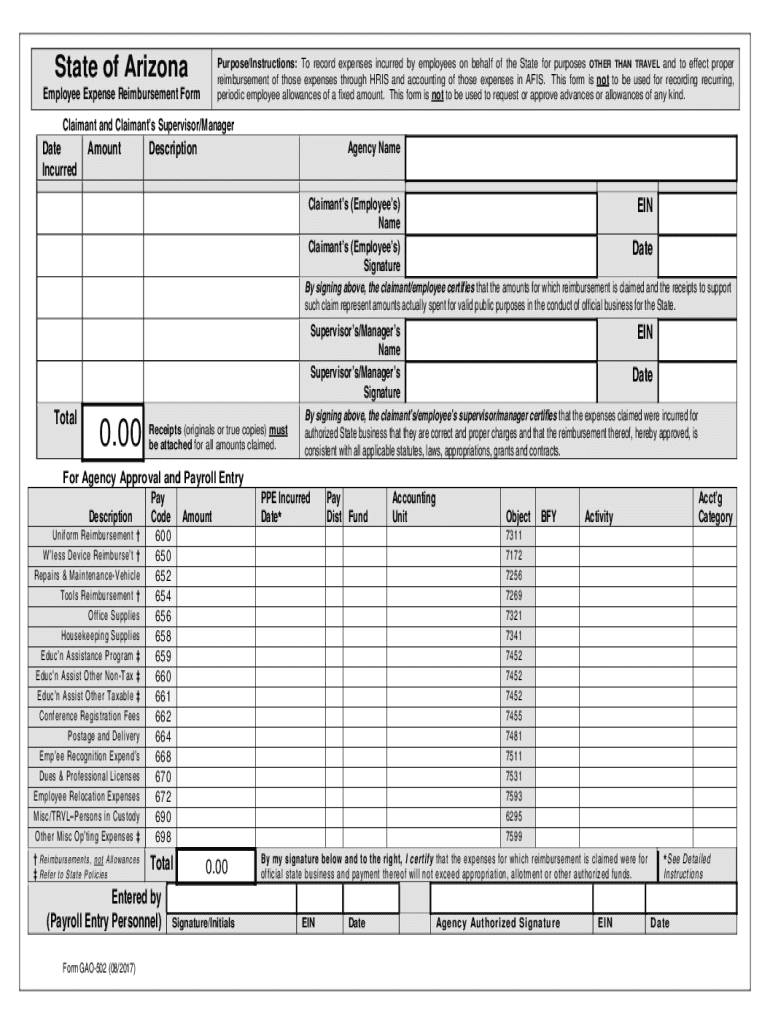
State of ArizonaEmployee Expense Reimbursement FormPurpose/Instructions: To record expenses incurred by employees on behalf of the State for purposes OTHER THAN TRAVEL and to effect proper reimbursement.

Open form follow the instructions

Easily sign the form with your finger

Send filled & signed form or save
How to fill out the AZ Form GAO-502 online
The AZ Form GAO-502 is essential for employees seeking reimbursement for expenses incurred on behalf of the State. This guide provides detailed instructions on how to complete the form effectively and ensure a smooth reimbursement process.
Follow the steps to fill out the AZ Form GAO-502 correctly.
- Press the ‘Get Form’ button to access the form and display it in your browser for editing.
- Begin by filling out the Claimant and Claimant’s Supervisor/Manager section at the top of the form. Enter the Date incurred, Amount, and Description of each expense in the designated fields.
- Input your Agency Name and your Information, including your Name and Employee Identification Number (EIN). Ensure that your Signature and the Date of signing are included.
- Complete the Supervisor’s/Manager’s Information, including their Name, EIN, Signature, and Date of signing.
- Move to the lower section labeled 'For Agency Approval and Payroll Entry.' Ensure that the Total here matches the Total amount in the upper section.
- Fill in all required columns under this section. This includes the Pay Code, PPE Incurred Date, Payroll Distribution, Fund, Accounting Unit, and any other relevant details.
- Attach original or true copies of all receipts that support the amounts claimed. These must be included to validate your reimbursement request.
- Review all the entered data for accuracy. Once everything is correctly filled out, you can save your changes, download the form, print it, or share it as needed.
Complete the AZ Form GAO-502 online today for efficient expense reimbursement.
Experience a faster way to fill out and sign forms on the web. Access the most extensive library of templates available.
Related content
GAO-5. Warrant Copy Request, 09-29-2022 ; GAO-502. Employee Expense Reimbursement Form...
Jan 19, 2023 — Mileage reimbursement rate has increased to 62.5 cents per mile. Single...
eller utsettes for noen form for støt. ... További részletek és az összekötéseket...
Get answers to your most pressing questions about US Legal Forms API.
Who is the Arizona comptroller?
Ashley serves as the Assistant Director of Business & Finance and serves as the State Comptroller.
Who is the Arizona state comptroller?
Ashley Retsinas has served as the Arizona State Comptroller since March 2020. Before her current role, she served as Interim Deputy State Comptroller from September 2019 until March 2020 and as the Arizona Department of Corrections Business Administrator from 2014 until 2019. Prior to joining state government, Ms.
Who oversees insurance companies in AZ?
Arizona Revised Statutes, Title 20, outlines insurance law and establishes the Department of Insurance and Financial Institutions (DIFI). The Director of the DIFI, appointed by the Governor, has general authority to enforce insurance laws, to adopt rules, and to investigate and resolve consumer complaints (A.R.S.
Who is the current government of Arizona?
Seeing her home state at a critical turning point, Governor Hobbs made the decision to run for Governor, and in 2022 was elected the fifth woman, and also fifth Arizona native, to lead the state.
Who is the head of Arizona state government?
Office of the Arizona Governor Katie Hobbs.
Use professional pre-built templates to fill in and sign documents online faster. Get access to thousands of forms.
If you believe that this page should be taken down, please follow our DMCA take down process here.