HONE NUMBER PAGE b. POINT OF CONTACT (If different from above) PAGES 3. JOB TICKET NUMBER c. COMMERCIAL TELEPHONE NO. (Include area code) ( 5. PHYSICAL LOCATION OF EQUIPMENT a. ADDRESS (Room No., Building, Street, City, State, ZIP Code) OF ) c. TELEPHONE NO. (If different from above) ( ) 6. EQUIPMENT TO BE EXCESSED OSD CONTROL NO. a. ITEM COMP ITEM MFR MODEL SERIAL COND NO. CODE DESCRIPTION CODE NO. NO. CODE d. e. f. g. h. b. c. 7. I certify that all hard drives ha.
Loading

Open form follow the instructions

Easily sign the form with your finger

Send filled & signed form or save
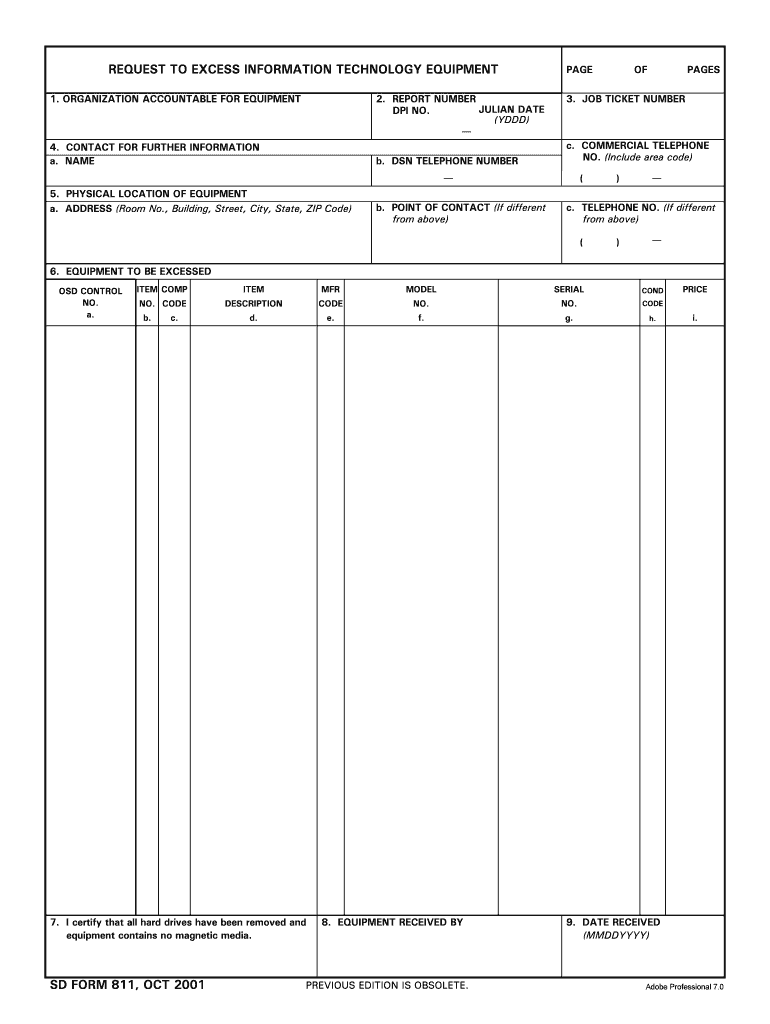
How to fill out the SD Form 811, Request To Excess Information Technology Equipment, October 2001
Filling out the SD Form 811 is essential for the proper excessing of information technology equipment. This guide provides a step-by-step approach to ensure that you accurately complete the form with all necessary information.
Follow the steps to successfully complete and submit your request.
- Press the ‘Get Form’ button to obtain the SD Form 811 and open it for editing.
- In section 1, provide the name of the organization accountable for the equipment. Ensure the organization is accurately identified.
- In section 2, fill in the report number along with the Julian date and DPI number formatted as YDDD.
- Section 4 requires contact information for further inquiries. Fill in the name, DSN phone number, and a commercial telephone number if applicable.
- In section 5, complete the physical location of the equipment, including room number, building, street, city, state, and ZIP code.
- Section 6 is for detailing the equipment to be excessed. This includes entering the OSD control number, item description, manufacturer, model, serial number, condition code, and any additional information for each item.
- Before proceeding, ensure that you certify in section 7 that all hard drives have been removed and that there is no magnetic media remaining in the equipment.
- In section 8, record the name of the individual or organization who received the equipment.
- Finally, indicate the date the equipment was received in section 9 using the MMDDYYYY format.
- After filling out all necessary sections, review the form for accuracy. You can then save your changes, download, print, or share the completed form as needed.
Complete your SD Form 811 online today for efficient equipment excessing.
Experience a faster way to fill out and sign forms on the web. Access the most extensive library of templates available.
Related content
Oct 30, 2000 — To authorize appropriations for fiscal year 2001 for military activities...
Nov 26, 2013 — The DD Form 1494, “Application for Equipment Frequency Allocation,”...
This transmittal introduces Chapter 40, Hospital and Hospital Health Care Complex Cost...
Use professional pre-built templates to fill in and sign documents online faster. Get access to thousands of forms.
If you believe that this page should be taken down, please follow our DMCA take down process here.