Loading
Get Nm Answer To Civil Complaint 2013-2026
How it works
-

Open form follow the instructions
-

Easily sign the form with your finger
-

Send filled & signed form or save
How to fill out the NM Answer To Civil Complaint online
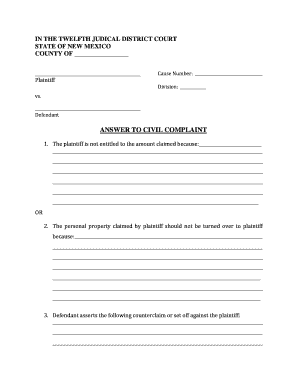
This guide will walk you through the process of completing the NM Answer To Civil Complaint form online. Designed to be user-friendly, this resource aims to help individuals, regardless of their legal experience, navigate the required sections with confidence.
Follow the steps to successfully complete the form.
- Press the ‘Get Form’ button to access the form and open it in your editing tool.
- Begin with the first section where you will explain why the plaintiff is not entitled to the amount claimed. Provide detailed reasons in the space provided, ensuring that you present clear and comprehensive explanations.
- In the next section, if relevant, articulate why the personal property claimed by the plaintiff should not be returned to them. Again, ensure your statements are thorough and well-articulated.
- If you have any counterclaims or set-offs against the plaintiff, document them in the following section. Clearly outline any claims you are asserting, using sufficient detail.
- Indicate whether a trial by jury is demanded. Mark the appropriate checkbox. If the plaintiff has already demanded a jury trial, you may skip this step.
- Date the form in the designated area after completion. Make sure to check the current date and enter it correctly.
- Sign the form in the specified space, providing your printed name, address, city, state, zip code, and telephone number. This ensures your information is complete and accurate.
- In the Certificate of Service section, certify that you have sent a copy of this document to the opposing party. Select how you sent it (mailed, delivered, or faxed) and complete the necessary fields with the date.
- Review the entire form to ensure that all sections are completed accurately. Make any necessary corrections before finalizing.
- Once finalized, save the changes you've made to the form, and choose to download, print, or share it based on your filing needs.
Begin completing your documents online today to ensure a smooth process.
Related links form
Format your documents properly and include all required information. Your answer should include the court name, case name, case number, and your affirmative defenses. Print three copies of your answer. File one with the clerk's office and mail (or “serve”) one to the plaintiff or plaintiff's attorney.