Loading
Get Canada Ce-cm-605 - Ontario 2018-2026
How it works
-

Open form follow the instructions
-

Easily sign the form with your finger
-

Send filled & signed form or save
How to fill out the Canada CE-CM-605 - Ontario online
Filling out the Canada CE-CM-605 form online can seem daunting, but with a step-by-step guide, you can complete it with confidence. This guide is designed to help you understand each section of the form and ensure your information is accurately submitted.
Follow the steps to successfully complete the form online.
- Click the ‘Get Form’ button to access and open the Canada CE-CM-605 form in your preferred online document editor.
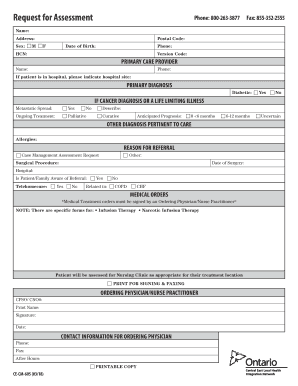
- Begin by entering your personal information. Fill in your name, address, postal code, sex (select either 'M' or 'F'), and date of birth. Make sure the details are accurate to avoid any issues later.
- Provide your phone number and Health Care Number (HCN). These details are important for identification and communication purposes.
- In the 'Primary Care Provider' section, enter the provider's name and phone number. If you are currently in a hospital, please indicate the hospital's name.
- For the 'Primary Diagnosis', indicate if you are diabetic by selecting 'Yes' or 'No'.
- If you have a cancer diagnosis or a life-limiting illness, you will need to address additional questions. Indicate if there is any metastatic spread and whether you are receiving ongoing treatment, selecting either 'Palliative' or 'Curative' and providing a description if necessary.
- Indicate your anticipated prognosis by selecting one of the options provided: '0 <6 months', '6-12 months', or 'Other Diagnosis Pertinent to Care', in which you should list any allergies.
- In the 'Reason for Referral' section, select 'Case Management Assessment Request' or another applicable reason. If you are undergoing a surgical procedure, include the date and hospital.
- Select if the patient or their family is aware of the referral and provide information related to telehomecare, indicating 'Yes' or 'No' and specifying any related conditions.
- Under 'Medical Orders', ensure that any treatment orders are signed by the ordering physician or nurse practitioner. Remember that some treatments may require specific forms.
- Finally, enter the contact information for the ordering physician or nurse practitioner, including the CPSO/CNO number, name, signature, and date.
- Once completed, be sure to save your changes. You can then download, print, or share the form as required.
Start completing your Canada CE-CM-605 form online today for a streamlined experience.