Loading
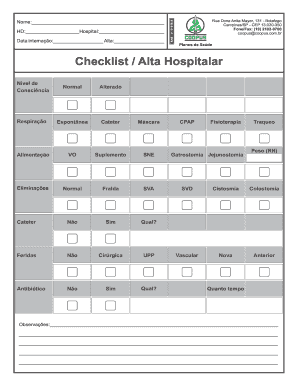
Get Br Coopus Checklist/alta Hospitalar 2016-2026
How it works
-

Open form follow the instructions
-

Easily sign the form with your finger
-

Send filled & signed form or save
How to fill out the BR Coopus Checklist/Alta Hospitalar online
This guide provides clear, step-by-step instructions on how to complete the BR Coopus Checklist/Alta Hospitalar online. By following these directions, users can ensure they accurately fill out the necessary information on the form.
Follow the steps to successfully complete the BR Coopus Checklist/Alta Hospitalar.
- Click 'Get Form' button to obtain the form and open it in the editor.
- In the first section, fill in the user's name in the designated field. Ensure that you input the correct spelling to avoid any issues with documentation.
- Next, enter the hospital's designation using the field labeled 'Hospital.' This information is essential for processing.
- Input the date of admission in the 'Data internação' field and the discharge date in the 'Alta' field. Ensure the dates are accurate to the patient's records.
- Proceed to the 'Checklist / Alta Hospitalar' section. Mark the level of consciousness by selecting either 'Normal' or 'Alterado' as applicable.
- Specify the patient's breathing method by checking 'Espontânea,' 'Cateter,' or 'Máscara' in the breathing section.
- In the nutrition section, select the appropriate method from 'VO,' 'Suplemento,' or 'SNE' based on the patient's dietary needs.
- For eliminations, indicate the method used by checking 'Normal,' 'Fralda,' 'SVA,' or 'Cateter.' Provide details if needed.
- Address any wounds in the 'Feridas' section by marking 'Não' or 'Sim,' specifying the type if 'Sim' is selected.
- In the 'Antibiótico' field, select 'Não' or 'Sim' and indicate 'Qual?' if antibiotics are prescribed.
- Fill out any additional treatments, such as CPAP or physiotherapy, if relevant to the patient’s condition.
- Document any other specific conditions or treatments like gastrostomy, jejunostomy, or tracheostomy as necessary.
- For any relevant notes, use the observations section to write any pertinent information to ensure complete comprehension of the patient's needs.
- Once all fields are accurately filled, save your changes, and decide whether to download, print, or share the completed form.
Complete and submit your documents online to ensure a seamless process.