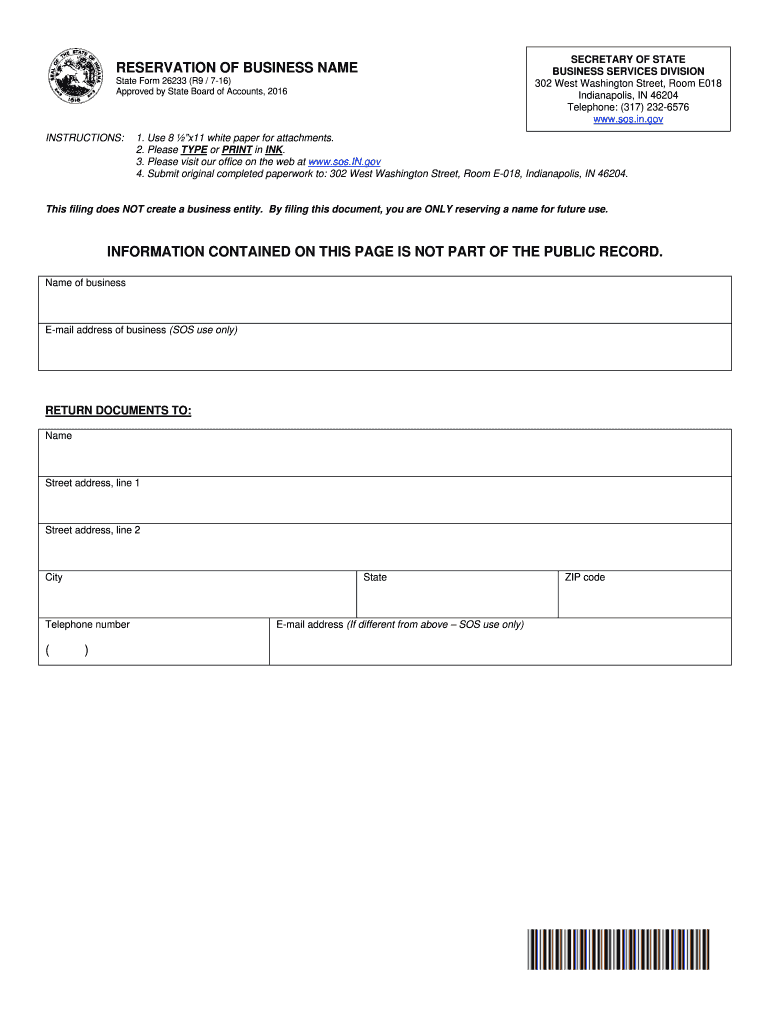
(317) 232-6576 www.sos.in.gov RESERVATION OF BUSINESS NAME State Form 26233 (R9 / 7-16) Approved by State Board of Accounts, 2016 INSTRUCTIONS: 1. Use 8 x11 white paper for attachments. 2. Please TYPE or PRINT in INK. 3. Please visit our office on the web at www.sos.IN.gov 4. Submit original completed paperwork to: 302 West Washington Street, Room E-018, Indianapolis, IN 46204. This filing does NOT create a business entity. By filing this document, you are ONLY reserving a name for futu.
Loading

Open form follow the instructions

Easily sign the form with your finger

Send filled & signed form or save
How to fill out the IN State Form 26233 online
This guide provides clear instructions on how to properly fill out the IN State Form 26233, which is used for the reservation of a business name in Indiana. Follow these steps to ensure your application is completed accurately.
Follow the steps to complete the IN State Form 26233 online
- Click ‘Get Form’ button to access the IN State Form 26233 online and open it in the appropriate editor.
- Begin by filling in the 'Name of business' field. Ensure that you type the exact name you wish to reserve, following any naming rules that apply.
- Provide an email address in the designated field for business correspondence, which will be used by the Secretary of State.
- In the 'Return Documents To' section, enter your name and complete your street address, including city, state, telephone number, and ZIP code.
- Next, specify your proposed business name in the 'Proposed name to be reserved' section, ensuring it is unique and adheres to the guidelines provided.
- Fill in your personal information as the applicant, including your name, address, city, state, and ZIP code.
- Affix your signature in the designated area and include your printed name to validate the application.
- After completing all fields, review your information for accuracy in all sections before proceeding.
- Once you are satisfied with the form, save your changes, download, and if necessary, print the completed form for your records or submission.
- Finally, ensure the form is submitted as specified, along with any required attachments, if applicable.
Complete your IN State Form 26233 online today to reserve your business name.
Experience a faster way to fill out and sign forms on the web. Access the most extensive library of templates available.
Related content
May 29, 1992 — 26233. First Name. MATTHEW. Last Name. WEBB. License Status. Active...
Oct 19, 2016 — Form VII. Middle Tennessee State ... 2016-17. Education and General...
by T Johnson · 1992 · Cited by 5 — According to our agreement with Adobe, owners of...
Get answers to your most pressing questions about US Legal Forms API.
Can a promissory note be secured by real property?
Secured Promissory Notes The property that secures a note is called collateral, which can be either real estate or personal property. A promissory note secured by collateral will need a second document. If the collateral is real property, there will be either a mortgage or a deed of trust.
Is a promissory note enforceable in court?
Promissory notes are legally binding whether the note is secured by collateral or based only on the promise of repayment. If you lend money to someone who defaults on a promissory note and does not repay, you can legally possess any property that individual promised as collateral.
Does a promissory note need to be secured?
With a secured promissory note, the borrower is required to put up some form of collateral, usually property or assets. If the borrower fails to pay back the lender, they will receive the collateral to make up for the lost payments. Loans are typically accompanied by unsecured promissory notes.
What makes a promissory note secured?
A secured promissory note, as the name partially implies, is secured by some form of property (i.e. collateral), while an unsecured promissory note does not involve collateral. If the borrower defaults on a Secured Promissory Note, the lender gets to keep the collateral (the property that was used to secure the loan).
What happens if I dont pay my promissory note?
What Happens When a Promissory Note Is Not Paid? Promissory notes are legally binding documents. Someone who fails to repay a loan detailed in a promissory note can lose an asset that secures the loan, such as a home, or face other actions.
Will a promissory note hold up in court?
Generally, as long as the promissory note contains legally acceptable interest rates, the signatures of the two contracted parties, and are within the applicable Statute of Limitations, they can be upheld in a court of law.
Does a promissory note require collateral?
Secured and Unsecured Promissory Notes Banks and other financial institutions will require property to be used as collateral to secure the note whereas an individual loaning money to a family member may choose to forego the use of collateral.
What makes a promissory note legally binding?
A promissory note must include the date of the loan, the dollar amount, the names of both parties, the rate of interest, any collateral involved, and the timeline for repayment. When this document is signed by the borrower, it becomes a legally binding contract.
Do promissory notes have collateral?
A promissory note is the document that sets forth the terms of a loan's repayment. A promissory note can be secured with a pledge of collateral, which is something of value that can be seized if a borrower defaults.
What is a promissory note secured by a mortgage?
A home mortgage effectively secures a promissory note with the title to the property in question in case the lender should need to foreclose and sell the property in event of nonpayment. Your lender will keep the original promissory note until your loan is paid off.
Use professional pre-built templates to fill in and sign documents online faster. Get access to thousands of forms.
If you believe that this page should be taken down, please follow our DMCA take down process here.