Loading
Get The Hartford Lc-7135 2021-2026
How it works
-

Open form follow the instructions
-

Easily sign the form with your finger
-

Send filled & signed form or save
How to fill out The Hartford LC-7135 online
Filling out The Hartford LC-7135 form can seem daunting, but this guide aims to streamline the process for you. With clear instructions, you will be supported in providing all necessary information accurately and efficiently.
Follow the steps to complete The Hartford LC-7135 form.
- Click ‘Get Form’ button to obtain the form and open it in the editor.
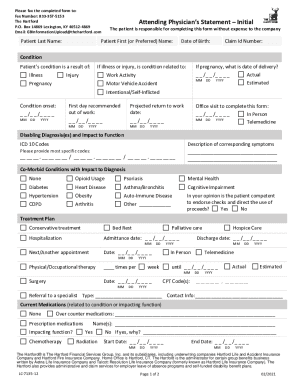
- Enter the patient's last name and first (or preferred) name in the designated fields.
- Provide the date of birth of the patient in the specified format (MM/DD/YYYY).
- Fill in the Claim ID Number, which is a required field to track the claim efficiently.
- Indicate the patient's condition by selecting the relevant options and providing the date of condition onset.
- Complete the section regarding work activity, including the first day recommended out of work and projected return to work dates.
- Detail the disabling diagnosis(es) by entering appropriate ICD-10 codes and describe the corresponding symptoms.
- Indicate any co-morbid conditions that may impact the diagnosis by marking the relevant options.
- Provide details on the treatment plan, including any conservative treatments, surgeries, and follow-up appointments.
- Complete the level of functionality section, specifying the patient's abilities to sit, stand, and walk during an 8-hour period.
- List any completed or planned diagnostic tests, including dates and findings if applicable.
- Fill out provider details including name, specialty, and contact information.
- Sign and date the form on the designated lines at the bottom.
- Once all fields are filled out, save your changes, and download or print the form for submission.
Complete The Hartford LC-7135 form online today to ensure timely processing of your claim.