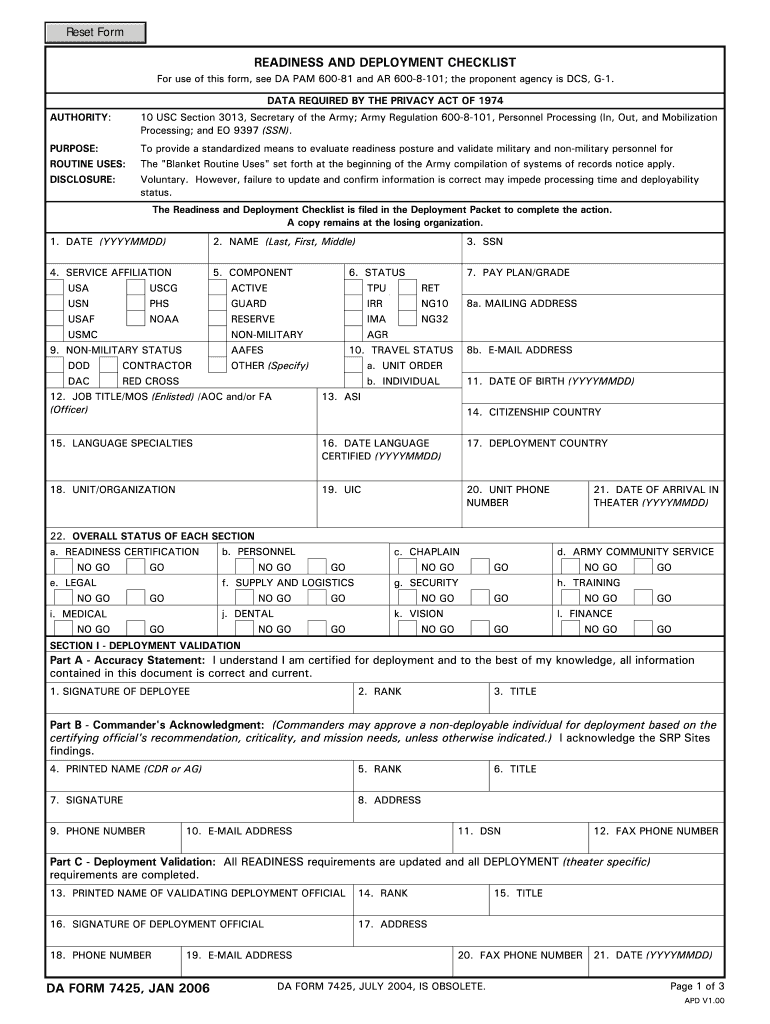
REQUIRED BY THE PRIVACY ACT OF 1974 AUTHORITY: 10 USC Section 3013, Secretary of the Army; Army Regulation 600-8-101, Personnel Processing (In, Out, and Mobilization Processing; and EO 9397 (SSN). PURPOSE: To provide a standardized means to evaluate readiness posture and validate military and non-military personnel for The "Blanket Routine Uses" set forth at the beginning of the Army compilation of systems of records notice apply. ROUTINE USES: Voluntary. However, failure to update and conf.

Open form follow the instructions

Easily sign the form with your finger

Send filled & signed form or save
How to fill out the DA 7425 online
The DA 7425 form is essential for evaluating readiness posture and validating military and non-military personnel. This guide offers clear, step-by-step instructions to help you complete the form accurately and efficiently online.
Follow the steps to successfully fill out the DA 7425 online.
- Click ‘Get Form’ button to obtain the form and open it in the editor.
- Enter the date in the specified format (YYYYMMDD). This is crucial for documentation and tracking purposes.
- Fill in your full name, including your last name, first name, and middle name, in the designated fields.
- Select your service affiliation from the available options (e.g., USA, USCG, USN).
- Choose your component type (e.g., Active, TPU, Retired) as applicable.
- Enter your Social Security Number (SSN) in the provided field, ensuring accuracy for identification.
- Indicate your status (e.g., Active, Guard, Reserve) by selecting the appropriate option.
- Fill out your pay plan or grade as per your service records.
- Provide your email address and mailing address in the specified area to ensure accurate communication.
- Complete the fields regarding your job title, date of birth, and language specialties as necessary.
- Under 'Deployment Validation,' carefully read and agree to the accuracy statement, and provide your signature.
- Fill out the Commander's acknowledgment section, ensuring that relevant signatures and information are included.
- Review the entire form for accuracy, then proceed to save your changes.
- Download, print, or share the completed form according to your needs.
Complete your DA 7425 form online today for seamless processing!
Experience a faster way to fill out and sign forms on the web. Access the most extensive library of templates available.
Related content
Aug 20, 2020 — Unit commanders will use DA Form 7425 to determine each Soldier's...
DA Form 5123-1 (In-processing Personnel Record) guides a soldier through the in-processing...
The ML6425 and ML7425 are direct-mount, electric spring return. ... 2-10 VDC, 4-20 mA NSR...
Get answers to your most pressing questions about US Legal Forms API.
How often do armor units deploy?
Currently, they're closer to one every three years. That combatant command demand for armor units is pushing leadership to see where they can be flexible on what deploys, when and where.
What does SRP mean in the military?
Soldier Readiness Processing, or SRP, is a process the Army uses to prepare and certify Soldiers for deployment.
What do they do at Army SRP?
The Soldier Readiness Program (SRP) prepares, validates and reports individual Soldier and unit readiness for deployment to the unit commander.
Do you get leave before deployment?
This is sometimes referred to as “block leave” and may happen before or after a deployment or during a holiday period. Commonly, block leave time is allowed during the summer and Christmas holidays, and before and after deployments.
What is predeployment like?
Pre-Deployment. During pre-deployment, service members work closely with family members and loved ones to complete various tasks before deployment. It's a busy time where service members undergo training, briefings, medical evaluations and counseling.
How long is an SRP?
Traditionally when the whole mouth needs SRP we will complete one side at a time. For most patients the SRP is done in two visits that are each about an hour long.
How long does Army SRP take?
A soldier may typically complete these stations in as little as 25 minutes or as long as two hours. The soldier will visit several stations during the administrative portion of the SRP, including legal, chaplain, life insurance, family situation changes, and security clearances.
What happens at SRP Army?
Soldiers are provided pre- and post-deployment readiness, as well as general readiness, at the Soldier Readiness Processing (SRP). Service members and DoD civilians are given materials, guidance, and care to ensure deployments are executed and completed to the Army deployment standards.
Use professional pre-built templates to fill in and sign documents online faster. Get access to thousands of forms.
If you believe that this page should be taken down, please follow our DMCA take down process here.