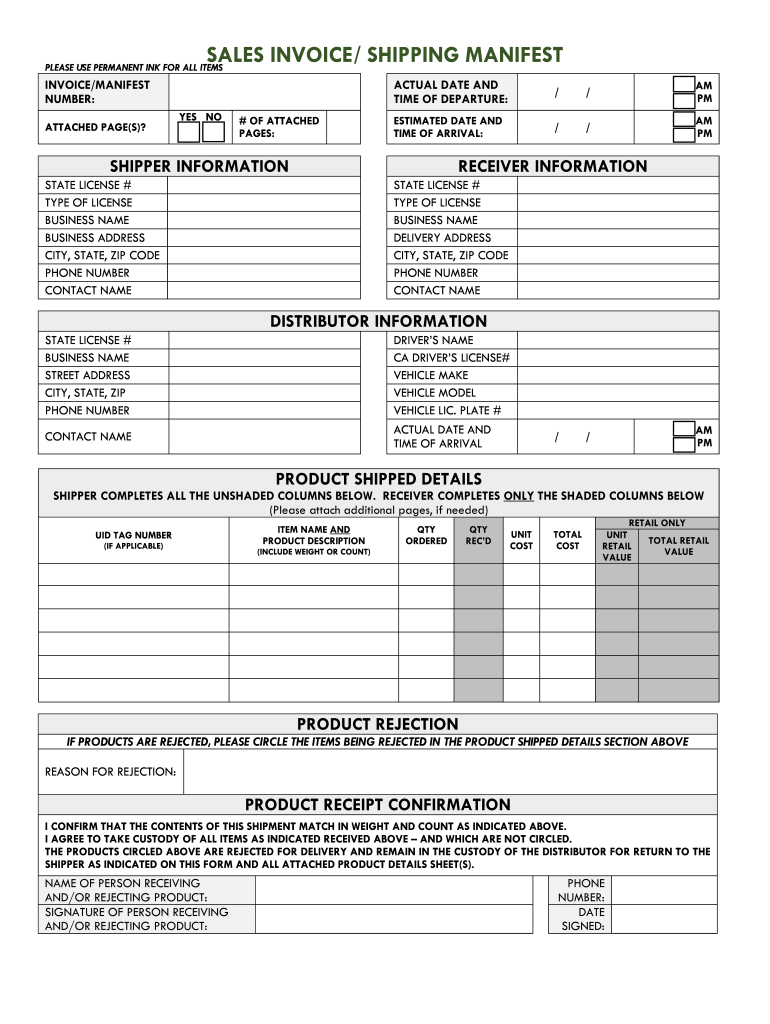
IMATED DATE AND TIME OF ARRIVAL: / / AM PM SHIPPER INFORMATION RECEIVER INFORMATION STATE LICENSE # TYPE OF LICENSE BUSINESS NAME BUSINESS ADDRESS CITY, STATE, ZIP CODE PHONE NUMBER CONTACT NAME STATE LICENSE # TYPE OF LICENSE BUSINESS NAME DELIVERY ADDRESS CITY, STATE, ZIP CODE PHONE NUMBER CONTACT NAME DISTRIBUTOR INFORMATION STATE LICENSE # BUSINESS NAME STREET ADDRESS CITY, STATE, ZIP PHONE NUMBER DRIVER S NAME CA DRIVER S LICENSE# VEHICLE MAKE VEHICLE MODEL VEHICLE LIC. PLATE #.
Loading

Open form follow the instructions

Easily sign the form with your finger

Send filled & signed form or save
How to fill out the SALES INVOICE/ SHIPPING MANIFEST online
Filling out the sales invoice or shipping manifest online is a crucial step in ensuring accurate documentation for shipments. This guide provides clear instructions to help users effectively complete each section of the form.
Follow the steps to fill out the form correctly.
- Click ‘Get Form’ button to obtain the form and open it in the editor.
- Begin by entering the invoice or manifest number in the designated field. Ensure that this number is unique to each shipment for tracking purposes.
- Indicate whether there are any attached pages by selecting 'Yes' or 'No.' If 'Yes,' specify the number of attached pages.
- Fill in the actual date and time of departure, using the appropriate format for clarity. Include AM/PM as needed.
- Provide the estimated date and time of arrival in the same format.
- Enter the shipper information, including state license number, type of license, business name, business address, city, state, zip code, phone number, and contact name.
- Next, fill out the receiver information, which includes similar fields: state license number, type of license, business name, delivery address, city, state, zip code, phone number, and contact name.
- Input distributor information by filling in the state license number, business name, street address, city, state, zip code, and phone number.
- Complete the driver’s details, including their name, California driver’s license number, vehicle make, vehicle model, vehicle license plate number, and actual date and time of arrival.
- For product shipped details, make sure the shipper completes all the unshaded columns, which include the UID tag number (if applicable), item name and product description (including weight or count), quantity ordered, quantity received, unit cost, total cost, and retail values.
- If any products are rejected, circle the items in the product shipped details section and provide the reason for rejection.
- To confirm product receipt, fill in the name of the person receiving and/or rejecting the product, obtain their signature, phone number, and date signed.
- Review the completed form for accuracy before you save your changes, download, print, or share it as needed.
Start filling out your documents online today to ensure prompt processing and accuracy.
Experience a faster way to fill out and sign forms on the web. Access the most extensive library of templates available.
Related content
SALES INVOICE/ SHIPPING MANIFEST. PLEASE USE PERMANENT INK FOR ALL ITEMS...
Chapter 5: Bureau of Cannabis Control, Sales Invoice/Shipping Manifest. Cannabis: Business...
quotation, acknowledgment or invoice from Seller relevant to the sale of the Goods...
Get answers to your most pressing questions about US Legal Forms API.
What is an invoice manifest?
A Manifest is the detailed statement or invoice of a vessel's cargo. It includes such information as the Bills of Lading numbers, the numbers of packages and their identifying marks, the names of the shippers and consignees, ports of destination, etc.
What is the purpose of a manifest?
A manifest is a compilation of information about the goods carried on a means of transport (ship, airplane, truck, rail wagon and barge), together with the information about the means of transport, such as its identification, characteristics and route.
What is a manifest statement?
Manifest is a collection of documents, including forms, such as the cargo declaration and annotated bills of lading, that lists and describes the cargo contents of a carrier, container, or warehouse.
What is the meaning of manifest document?
A manifest, customs manifest or cargo document is a document listing the cargo, passengers, and crew of a ship, aircraft, or vehicle, for the use of customs and other officials.
What is a shipping manifest?
A manifest is a compilation of information about the goods carried on a means of transport (ship, airplane, truck, rail wagon and barge), together with the information about the means of transport, such as its identification, characteristics and route.
Can an invoice be used as a bill of lading?
A shipping invoice is an accounting document businesses use to provide a record of the products shipped from a seller to a buyer. The shipping invoice, also called a bill of lading, is a legal document required any time a company sends a freight shipment of goods.
What is manifest charges in shipping?
Freight Manifest This is done for the collection of freight charges from the consignor at the port of origin or the consignee of the shipment from the port of discharge. The freight manifest may also be used for the calculation of freight commission, etc.
What is an example of manifest document?
A manifest file in computing is a file containing metadata for a group of accompanying files that are part of a set or coherent unit. For example, the files of a computer program may have a manifest describing the name, version number 4.2, license and the constituent files of the program.
Use professional pre-built templates to fill in and sign documents online faster. Get access to thousands of forms.
If you believe that this page should be taken down, please follow our DMCA take down process here.