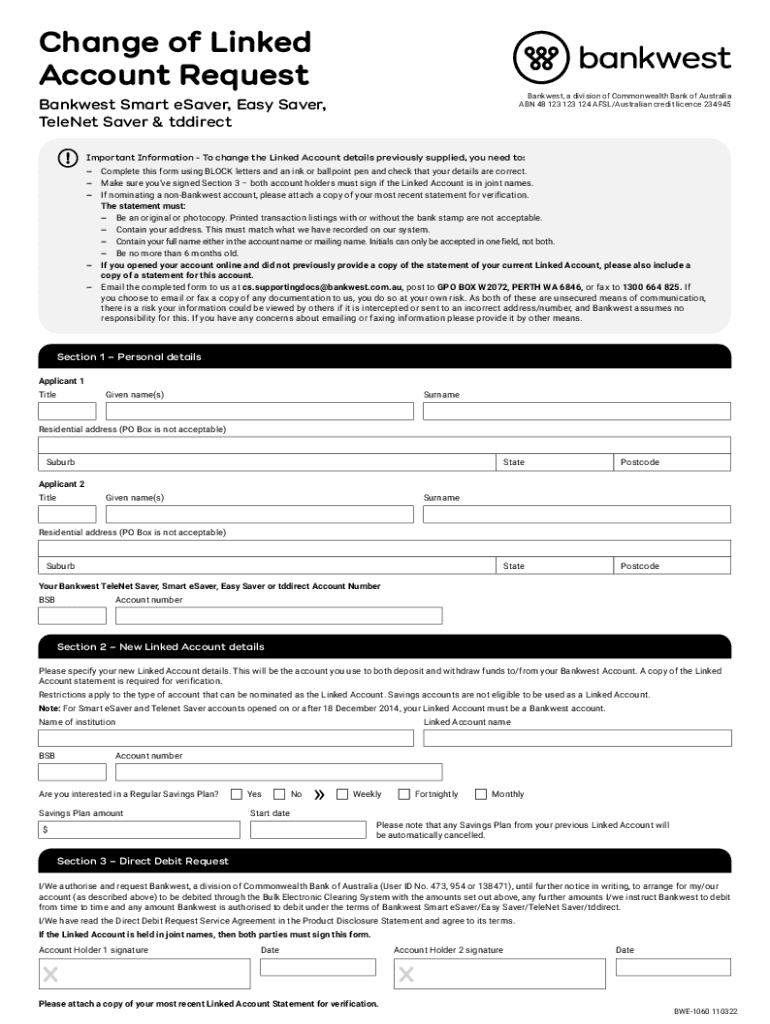
Change of Linked Account Request Banquet Smart saver, Telnet Saver & tddirectBankwest, a division of Commonwealth Bank of Australia ABN 48 123 123 124 ADSL/Australian credit license 234945Important.
Loading

Open form follow the instructions

Easily sign the form with your finger

Send filled & signed form or save
How to fill out the AU Bankwest BWE-1060 online
Filling out the AU Bankwest BWE-1060 form is a straightforward process that allows users to change their linked account details. This guide provides you with step-by-step instructions to ensure you complete the form accurately and submit it correctly.
Follow the steps to successfully complete the form.
- Click ‘Get Form’ button to access the form and open it in the editor.
- In Section 1, enter your personal details. Input your title, given names, surname, residential address (not a PO Box), suburb, state, and postcode for both applicants if applicable.
- Provide your Bankwest TeleNet Saver, Smart eSaver, Easy Saver, or tddirect account number and BSB in the respective fields.
- Move to Section 2, where you will specify your new linked account details. Make sure to provide the name of the financial institution, BSB, linked account name, and account number.
- Indicate your interest in a Regular Savings Plan by selecting 'Yes' or 'No'. If 'Yes', state the savings plan amount and choose the frequency (weekly, fortnightly, or monthly).
- In Section 3, read the Direct Debit Request carefully. If the linked account is in joint names, both account holders must sign the form. Provide the date next to each signature.
- Attach a copy of your most recent linked account statement for verification. Ensure the statement meets the requirements outlined in the important information section.
- Review all completed sections to ensure accuracy in your details. Once confirmed, you can save changes, download, print, or share the form as needed.
Complete your form online today to ensure your linked account details are updated promptly.
Experience a faster way to fill out and sign forms on the web. Access the most extensive library of templates available.
Related content
The European Commission has required that the fee be reduced to zero for relevant...
Sep 18, 1996 — Remittance should be made payable to the order of the Board of Governors...
Aug 21, 2015 — ERM Power delivered record electricity sales and earnings for the 2015...
Get answers to your most pressing questions about US Legal Forms API.
How do I find my BSB bank ID number?
Your BSB number can be found by searching for the branch in which you opened your account. The BSB number will show in the search results alongside the branch location and hours of operation. On your statements. Your BSB and account number will appear on your statement copies.
What is the bank code for Bankwest?
What's the Bankwest SWIFT code? The Bankwest SWIFT code is BKWAAU6P. A SWIFT code is an international bank code that identifies particular banks worldwide and is used to transfer money between banks from different countries. It's sometimes known as a Bank Identifier Code (BIC).
What is the BSB bank ID number for Bankwest?
Australia BSB Number 306-107 - Bankwest.
What is Bankwest bank?
Bankwest is an Australian full-service bank based in Perth, Western Australia. It was sold in October 2008 to the Commonwealth Bank of Australia for A$2.1 billion and operates as a division of its parent company. Bankwest. Formerly. Agricultural Bank of Western Australia.
What is BSB bank ID?
BSB meaning A BSB is a six-digit number that's used to identify the individual branch of an Australian bank or financial institution. In other words, BSB numbers are used to identify the recipient of a bank transfer. So, what does BSB stand for? Simple – it stands for Bank State Branch.
What is Bankwest BIC number?
The Bankwest SWIFT code is BKWAAU6P. A SWIFT code is an international bank code that identifies particular banks worldwide and is used to transfer money between banks from different countries. It's sometimes known as a Bank Identifier Code (BIC).
What is BSB number for Bankwest?
In the Bankwest App - see them under each account name on your accounts list. Copy the details by swiping left. In BOB - see them in your 'Account balances' view. The first six digits make up your BSB (like 306-089) and the next seven digits make up your account number (like 0001234).
What is my Bankwest credit card BSB and account number?
In the Bankwest App - see them under each account name on your accounts list. Copy the details by swiping left. In BOB - see them in your 'Account balances' view. The first six digits make up your BSB (like 306-089) and the next seven digits make up your account number (like 0001234).
Use professional pre-built templates to fill in and sign documents online faster. Get access to thousands of forms.
If you believe that this page should be taken down, please follow our DMCA take down process here.