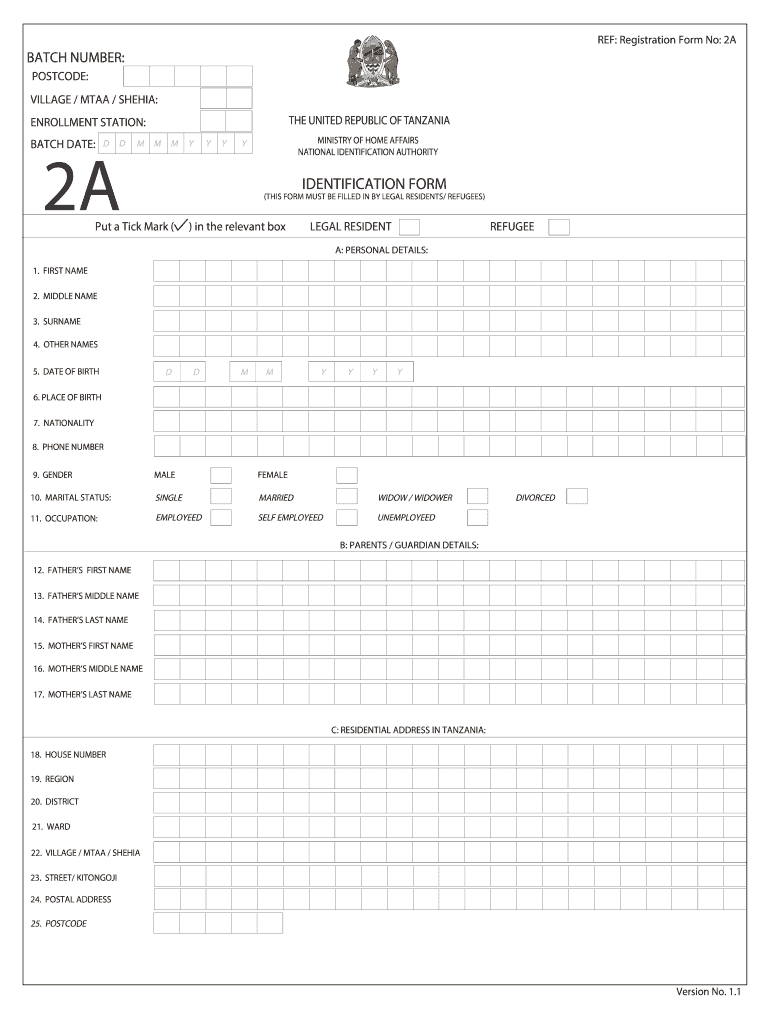
REF: Registration Form No: 2ABATCH NUMBER: POSTCODE: VILLAGE / MTAA / SHEHIA: THE UNITED REPUBLIC OF TANZANIAENROLLMENT STATION: BATCH DATE:DD2AM M MYYYMINISTRY OF HOME AFFAIRS NATIONAL IDENTIFICATION.
Loading

Open form follow the instructions

Easily sign the form with your finger

Send filled & signed form or save
How to fill out the REF: Registration Form No: 2A online
Filling out the REF: Registration Form No: 2A online is a straightforward process. This guide provides you with step-by-step instructions to help ensure that you complete the form accurately and efficiently.
Follow the steps to successfully complete the REF: Registration Form No: 2A.
- Click the ‘Get Form’ button to access and open the REF: Registration Form No: 2A.
- Begin by filling in the batch number, postcode, village, and enrollment station. These details help specify your application and identify your location.
- Proceed to section A titled 'Personal Details.' Here, you will enter your first name, middle name, surname, other names, date of birth, place of birth, nationality, phone number, gender, and marital status. Make sure to select the appropriate checkbox for your marital status and occupation.
- In section B, 'Parents / Guardian Details,' provide the first, middle, and last names of both your father and mother or guardian as applicable.
- Section C covers your residential address in Tanzania. Fill out all fields including house number, region, district, ward, village, street, postal address, and postcode.
- Next, in section D, provide your permanent address details, which include country and up to five address lines as needed.
- In section E, personal references, you may need to check a box if you are attaching your passport number. Also, fill in the passport expiry date and any relevant details regarding your resident permit, authority permit, and their respective expiry dates.
- Complete section F, the applicant’s declaration, by verifying the accuracy of the information you provided. Sign and date where indicated.
- Finally, review all entries for accuracy. You can then save changes, download the form, print it if necessary, or share it with the relevant authorities.
Start filling out the REF: Registration Form No: 2A online today to complete your registration process.
Experience a faster way to fill out and sign forms on the web. Access the most extensive library of templates available.
Related content
359-f(2) Exemption Instruction Sheet Printable PDF Exemption instruction sheet; Antitrust...
2A-9.006 - Programmatic and Reimbursement Requirements ... (t) Fund raising, including any...
Dec 14, 2020 — Dear Sir/Madam,. With reference to your online application dated...
Get answers to your most pressing questions about US Legal Forms API.
What is form 2A in maharera?
Form 1 (Architect's Certificate)- Word. Form 2 (Structural Engineer's Certificate)-PDF. Form 2 (Structural Engineer's Certificate)-Word. Form 2A Quality Assurance Certificate-PDF. Form 2A Quality Assurance Certificate-Word.
What is Form 3 RERA Maharashtra?
Form 3 - Certificate for withdrawal of funds from a separate account.
How can I register for RERA agent in Maharashtra?
Step 1: Visit Rera Maharashtra OFficial Website. Step 2: Click on 'New Registration' to create a new user. Step 3: You'll be directed to a new window, wherein you'll have to select 'User Type' (promoter/real estate agent/citizen). Step 4: Enter all the required information based on your user type selection.
Who is eligible for RERA in Maharashtra?
As per RERA, every estate in Maharashtra that exceeds 500 square metres or eight units must be registered with Maha RERA.
What is RERA registration fees in Maharashtra?
RERA Government Fees ParticularsGovt. Fees(in Rs.)RERA Registration fees for IndividualRs 10,600RERA Registration for other than IndividualRs. 1,00,600
Use professional pre-built templates to fill in and sign documents online faster. Get access to thousands of forms.
If you believe that this page should be taken down, please follow our DMCA take down process here.