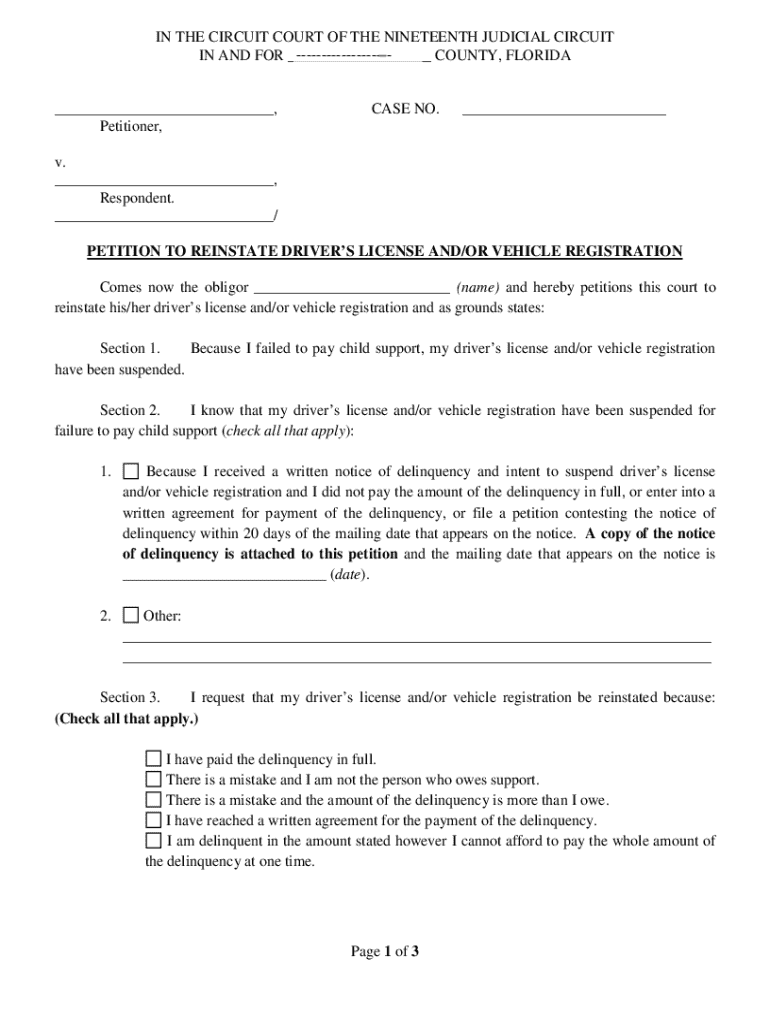
Tant: Use this petition ONLY if your driver s license and/or vehicle registration HAVE ALREADY BEEN SUSPENDED for failure to pay child support. Please Read all instruction carefully before completing the form. 1. Section 1. This petition is to be used when a person who is obligated to pay child support (the obligor) has had his/her driver s license and/or vehicle registration suspended for failure to pay child support. 2. Section 2. You MUST state why you know your driver s license and.
Loading

Open form follow the instructions

Easily sign the form with your finger

Send filled & signed form or save
How to fill out the Motion To Contest Driver's License Suspension Florida online
This guide aims to support users in filling out the Motion To Contest Driver's License Suspension in Florida. It provides step-by-step instructions to help you navigate the process effectively, ensuring that your form is completed accurately.
Follow the steps to complete your motion online.
- Press the ‘Get Form’ button to access the form.
- In Section 1, clearly indicate your obligation to pay child support and acknowledge that your driver's license and/or vehicle registration has been suspended due to non-payment.
- In Section 2, specify the reason for your suspension. If applicable, include the mailing date of the notice of delinquency you received and attach a copy of that notice to the petition.
- In Section 3, outline the grounds for contesting the suspension by checking all applicable boxes. Make sure to provide accurate details about your situation.
- Complete Section 4 by selecting your method of service for delivering copies of the petition and notice. Ensure you provide the addresses of the other party and the local Department of Revenue.
- In Section 5, if a nonlawyer assisted you in completing the form, ensure they provide their details at the bottom of the last page.
- Finally, review the completed form to confirm all sections are filled out accurately, then save your changes. You may download, print, or share the motion as needed.
Complete your documents online with confidence today!
Experience a faster way to fill out and sign forms on the web. Access the most extensive library of templates available.
Related content
61.13016 Suspension of driver licenses and motor vehicle registrations.— ... Files a...
by MT Levin · 2020 · Cited by 1 — DRIVER'S LICENSE SUSPENSIONS FOR NONPAYMENTS. 76...
Personal information is: driver license, driver permit or identification ... The period of...
Get answers to your most pressing questions about US Legal Forms API.
How do I Unsuspend my Florida driver's license?
To clear the suspension, contact the court in the county where the suspension was issued and satisfy the court requirements. You may then present proof of satisfaction in the form of an affidavit within 30 days, along with all applicable reinstatement fees, to any Florida driver license service center.
How much does it cost to Unsuspend a license in Florida?
How much to reinstate your license in Florida? The standard fee for reinstating your license is $45. However, if you've allowed your license to fault to a revocation, then you can expect to pay upwards to $75.
How long does it take to get your license back after suspension in Florida?
You should be able to receive your reinstated driver license at a local DHSMV or tax collector office in approximately 5 to 11 business days after paying the reinstatement fees with DHSMV.
What is the Driver's License Suspension Reform Act Florida?
The bill provides an effective date of July 1, 2022. The Department of Highway Safety and Motor Vehicles (DHSMV) can revoke or suspend a driver license or driving privilege for several driving-related and non-driving-related reasons.
How do I dispute a suspended license in Florida?
To clear the suspension, contact the court in the county where the suspension was issued and satisfy the court requirements. You may then present proof of satisfaction in the form of an affidavit within 30 days, along with all applicable reinstatement fees, to any Florida driver license service center.
How much time do you get for driving on a suspended license in Florida?
Penalties for Driving with a Suspended License Under Section 322.34, Florida Statutes, a first offense for driving with a suspended license (with knowledge of the suspension, revocation, or cancellation) can result in 60 days jail and a fine of up to $500.00.
How do I reinstate my suspended license in Florida for no insurance?
You must maintain insurance coverage throughout the vehicle registration period. If your driver license and license plate(s) are suspended for not having insurance under the No-Fault Law, you will have to pay $150 and show proof of insurance to get them back.
How long does a license suspension stay on your record in Florida?
Points are assigned based on the type of conviction and remain on the driver record for at least five years from the date of disposition (conviction)....Point Suspensions. PointsSuspension24 points within 36 monthsOne-year suspension2 more rows
Use professional pre-built templates to fill in and sign documents online faster. Get access to thousands of forms.
If you believe that this page should be taken down, please follow our DMCA take down process here.