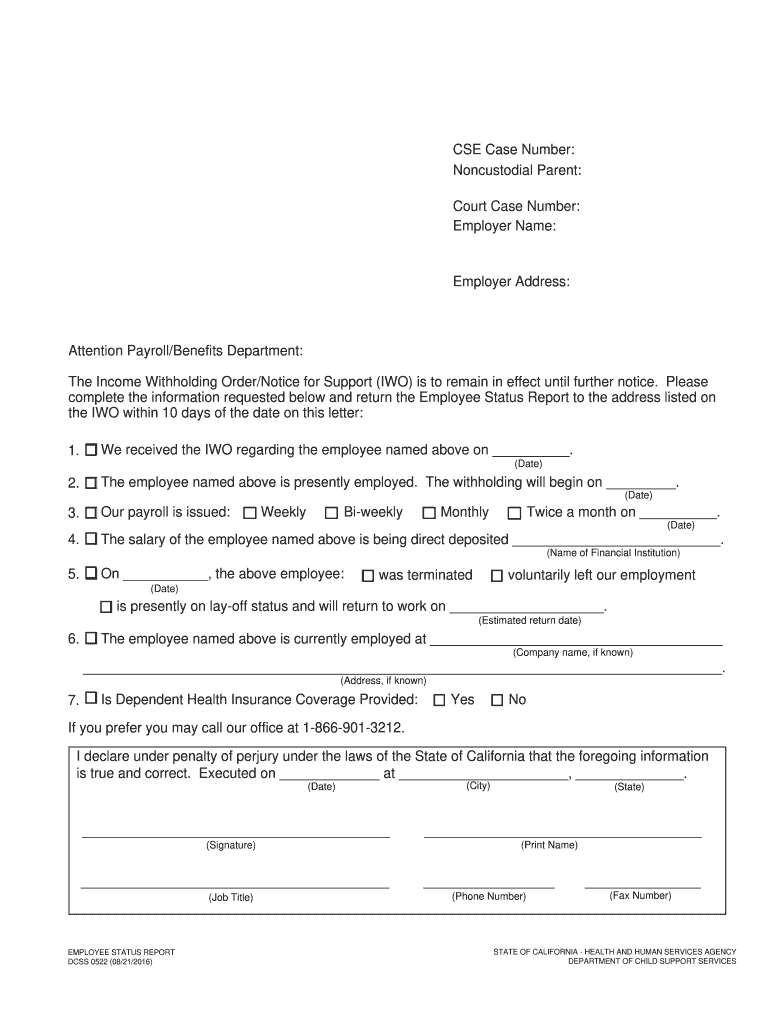
In in effect until further notice. Please complete the information requested below and return the Employee Status Report to the address listed on the IWO within 10 days of the date on this letter: 1. We received the IWO regarding the employee named above on . (Date) 2. The employee named above is presently employed. The withholding will begin on . 3. Our payroll is issued: 4. The salary of the employee named above is being direct deposited .
Loading

Open form follow the instructions

Easily sign the form with your finger

Send filled & signed form or save
How to fill out the Dcss 0522 online
The Dcss 0522 form is essential for reporting employee status concerning child support obligations. This guide will help you navigate through each section of the form with clarity and ease, ensuring that you provide the necessary information accurately.
Follow the steps to complete the Dcss 0522 form efficiently.
- Press the ‘Get Form’ button to access the Dcss 0522 form and open it in your preferred online editor.
- Enter the CSE case number at the top of the form. This number helps to identify the related child support case.
- Fill in the noncustodial parent's name. This is the individual responsible for making child support payments.
- Provide the court case number. This reference is crucial for linking the form to the court's records.
- Input the employer's name and address. This identifies where the employee works and assists in ensuring proper routing of the information.
- Direct your attention to the section for payroll/benefits. Specify the date you received the Income Withholding Order (IWO).
- Indicate the date on which withholding will begin for the employee named above.
- Select the schedule for payroll issuance: indicate whether it is weekly, bi-weekly, monthly, or twice a month, and provide the appropriate dates.
- Detail the current employment status of the employee, including any termination or layoff dates, if applicable.
- If known, specify the company name and address where the employee currently works.
- Clarify whether dependent health insurance coverage is provided by selecting 'Yes' or 'No.'
- Complete the declaration at the bottom of the form, signing with your name, job title, date, and contact information.
- After reviewing your entries for accuracy, save your changes. You can then download, print, or share the completed form as needed.
Begin filling out your Dcss 0522 form online today to ensure timely processing.
Experience a faster way to fill out and sign forms on the web. Access the most extensive library of templates available.
Related content
The Income Withholding Order/Notice for Support (IWO) is to remain in effect until further...
Contact Candice Buckley, the ADA Coordinator at 404-297-0522, ext. 1111, ... FEBRUARY...
Sep 27, 2014 — INDUSTRIAL TWINAX CABLE FOR PLCs AND DCSs Insul. ... O.D. R790-0522 22...
Use professional pre-built templates to fill in and sign documents online faster. Get access to thousands of forms.
If you believe that this page should be taken down, please follow our DMCA take down process here.