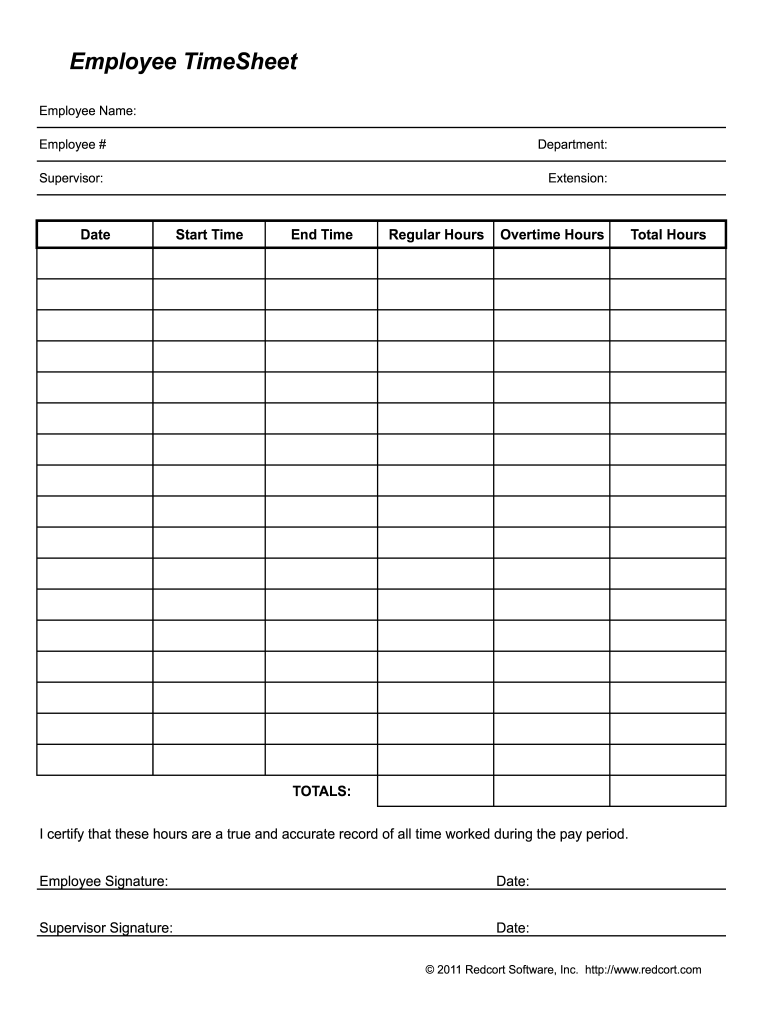
A true and accurate record of all time worked during the pay period. Employee Signature: Date: Supervisor Signature: Date: 2011 Redcort Software, Inc. http://www.redcort.com.

Open form follow the instructions

Easily sign the form with your finger

Send filled & signed form or save
How to fill out the Red Cort online
Filling out the Red Cort Employee TimeSheet online can streamline the process of tracking work hours for accurate payroll. This guide will provide step-by-step instructions to ensure users can easily complete the form with confidence.
Follow the steps to fill out the Red Cort Employee TimeSheet accurately.
- Click ‘Get Form’ button to access the Employee TimeSheet form and open it for editing.
- In the 'Employee Name' field, enter your full name as it appears on your official identification.
- Fill in your 'Employee #' to uniquely identify your record according to your organization’s system.
- Enter the name of your 'Department' to specify your work unit within the organization.
- Provide your 'Supervisor' name to ensure proper approval for the reported hours.
- Include your 'Extension' number if applicable, for easy contact.
- In the 'Date' field, indicate the specific date for the time period you are recording.
- Record your 'Start Time' using a 24-hour format to avoid confusion.
- Enter your 'End Time' in a similar format to ensure clarity.
- Capture the number of 'Regular Hours' worked during the designated period.
- Note any 'Overtime Hours' you may have worked that exceed the regular schedule.
- Calculate your 'Total Hours' by adding both Regular and Overtime hours.
- Review all entries for accuracy before proceeding.
- In the certification section, sign and date to confirm the recorded hours are true and accurate.
- Ensure that your supervisor also signs and dates to validate the submitted hours.
- After completing the form, you can save your changes, download a copy, print it out, or share it as needed.
Begin filling out your Red Cort Employee TimeSheet online now for efficient time tracking.
Experience a faster way to fill out and sign forms on the web. Access the most extensive library of templates available.
Related content
The Sacramento River runs through the central portion of Red Bluff, which provides endless...
In the classroom, on the athletic field, throughout the community and across the globe, we...
The International Criminal Court (ICC or ICCt) is an intergovernmental organization and...
Get answers to your most pressing questions about US Legal Forms API.
How do you calculate total hours worked in a month?
Calculating Basic Hours for a Full-time Employee 2080 Hours / 12 Months = 173.33 Average Monthly Hours. 40 Hours x 52 Weeks = 2080 Hours. (Weekly Hours x 52 Weeks / 12 Months = Monthly Averaged Hours) (Weekly Hours x 52 Weeks / 12 Months = Monthly Averaged Hours)
What is the formula for total hours worked?
To find the total hours, subtract the time the employee clocked in from when they clocked out.
How do you calculate time for payroll?
To calculate hours and minutes for payroll, first, total all the hours and minutes worked by each employee during the pay period. Then, convert the minutes into decimal form (60 minutes = 1 hour) and multiply the total hours worked by the employee's hourly rate to compute their pay.
How many total hours worked 40 hours a week?
The average full-time U.S. employee works five days a week for eight hours a day, totaling 40 hours a week. There are 52 weeks in a calendar year. On average, there are 2,080 working hours a year.
How do I calculate hours worked in Excel per week?
1:04 5:29 How To Calculate The Total Hours Worked In Excel - YouTube YouTube Start of suggested clip End of suggested clip Actually let's make it blue. So let's start with the first day of the week Monday. Let's say thatMoreActually let's make it blue. So let's start with the first day of the week Monday. Let's say that John he clocks in at eight in the morning. And he ends at 5 pm.
What is employee time cards?
A time card, also called a timesheet, is a method for recording and tracking the amount of an employee's time spent on each job. A time card improves project execution, decision-making and compliance with labor and government regulations.
How do I calculate my work hours?
How to calculate hours worked Step 1: Determine start and end time. Simple as that. ... Step 2: Convert time to military time. ... Step 3: Subtract start time from end time. ... Step 4: Subtract unpaid breaks. ... Step 5: Convert to decimal format. ... Step 6: Add up total hours for pay period.
How do you calculate total hours worked in a week?
There are two ways to calculate the total hours worked in a week. Here they are: Add up the total hours worked per day and then total these figures for the work period. Add up the total hours in the work period (there are 168 in a week) and then deduct time off to see the total time worked.
Use professional pre-built templates to fill in and sign documents online faster. Get access to thousands of forms.
If you believe that this page should be taken down, please follow our DMCA take down process here.