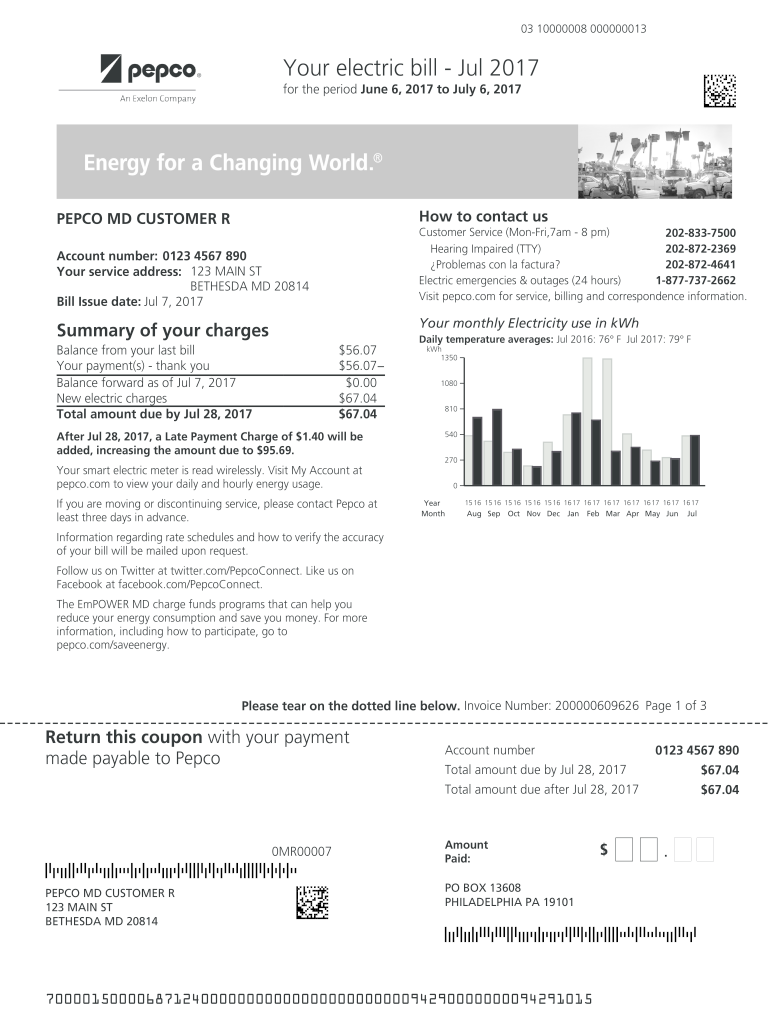
03 10000008 000000013Your electric bill Jul 2017 for the period June 6, 2017 to July 6, 2017An CompanyHow to contact usPEPCO MD CUSTOMER RCustomer Service (MonFri,7am 8 pm) 2028337500 Hearing Impaired.

Open form follow the instructions

Easily sign the form with your finger

Send filled & signed form or save
How to use or fill out the DOC.098 PEPCO - View Sample Bills - .pdf For Pepco MD Customer online
This guide provides clear and supportive instructions for filling out the DOC.098 PEPCO form, which allows you to access and view your sample bills online. By following the steps outlined here, you will be equipped to complete the form efficiently.
Follow the steps to complete the DOC.098 PEPCO form online.
- Click ‘Get Form’ button to obtain the form and open it in the editing interface.
- Review the form details, which typically include your account number, service address, and billing period. Ensure that the information displayed aligns with your records.
- Fill out any requested fields, such as your contact information or any specific details related to your service. Check for clarity and accuracy as you go.
- Review the summary of your charges and ensure that all figures are correct. This includes reviewing the balance forward, new electric charges, and total amounts due.
- Follow any additional instructions included in the form, such as how to sign up for direct debit or other services. If required, provide your signature or electronic authorization.
- Once you have completed filling out the form, save your changes. You may have the option to download, print, or share the completed form for your records.
Get started and complete your documents online today!
Experience a faster way to fill out and sign forms on the web. Access the most extensive library of templates available.
Related content
23 Oct 2020 — necessarily reflect the views of USAID or the United States Government...
by RH Creek — and maintained by a subsidiary of Pepco Holdings Inc. (PHI). ... Annual...
Get answers to your most pressing questions about US Legal Forms API.
How do I cancel my Pepco account?
Stop My Service If you require additional assistance, please give us a call at 202-833-7500.
What is Pepco account number?
Your Pepco Account Number is the 12-digit number located on the top left corner of your bill. Please be sure to enter all 12 digits with no dashes.
Can you add someone to Pepco account?
As many as two individuals can be listed on your Pepco account. Only the person(s) whose name appears on the bill can make changes to the account or to the electric service. You may be required to pay a deposit or establish satisfactory credit.
How do I transfer my Pepco account to another person?
Applying For or Transferring Service You can request electric service on our website at pepco.com, by phone at 202-833-7500, in writing or in person at one of our Customer Service Centers. As many as two individuals can be listed on the account.
How do I find my Pepco account number?
Your Pepco Account Number is the 12-digit number located on the top left corner of your bill. Please be sure to enter all 12 digits with no dashes.
How do I contact Pepco Maryland?
Call us at 202-833-7500, between 7 a.m. and 8 p.m., Monday – Friday, with questions or for information about our programs. You can also submit your questions online by visiting pepco.com/contactform. Our Customer Care representatives can assist customers in 200 languages.
How do I open a Pepco account?
What you'll need: A valid email address. One of the following combinations: Phone number and the last 4 digits of your SSN/TIN. Account number and the last 4 digits of your SSN/TIN OR Zip Code.
Can I pay Pepco bill with credit card?
Online: You can make online payments through a credit card/checking account via a Pepco online account. If you have opted into AutoPay, the payment will be automatically deducted from your bank account. You can also pay online as a guest profile.
Use professional pre-built templates to fill in and sign documents online faster. Get access to thousands of forms.
If you believe that this page should be taken down, please follow our DMCA take down process here.