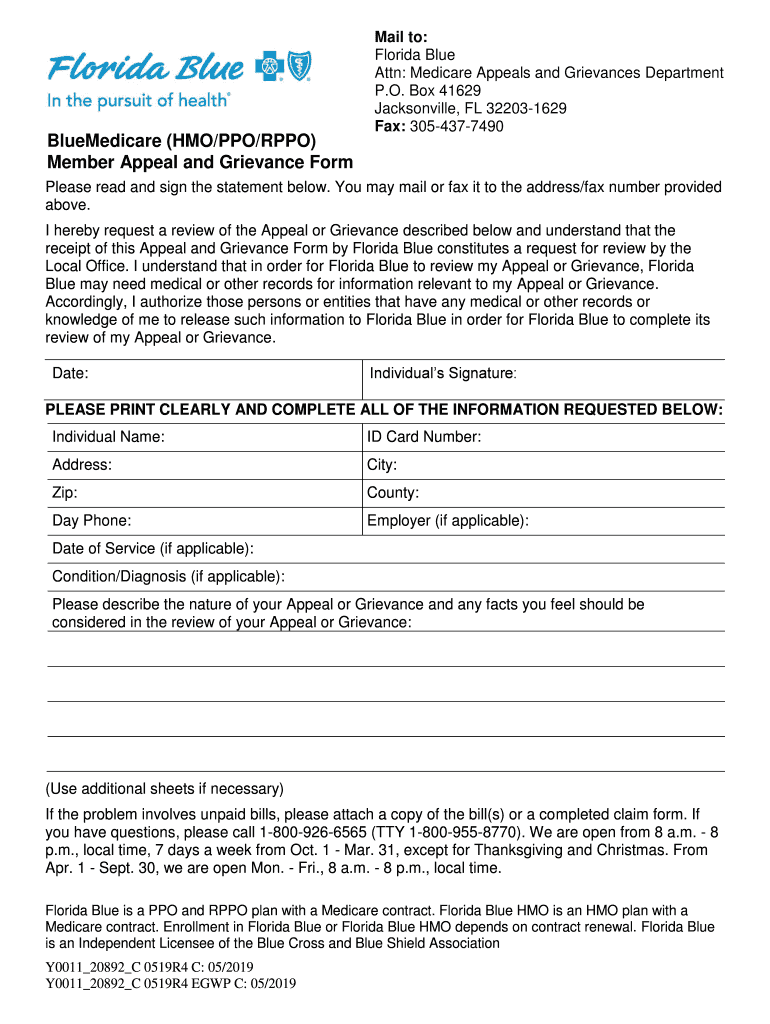
BlueMedicare (HMO/PPO/RPPO) Member Appeal and Grievance FormMail to: Florida Blue Attn: Medicare Appeals and Grievances Department P.O. Box 41629 Jacksonville, FL 322031629 Fax: 3054377490Please read.
Loading

Open form follow the instructions

Easily sign the form with your finger

Send filled & signed form or save
How to fill out the BlueOptions Appeal Form online
The BlueOptions Appeal Form is an essential document used to request a review of claims or grievances related to your healthcare services. This guide provides clear and concise instructions on how to fill out the form accurately and efficiently to ensure your appeal is processed smoothly.
Follow the steps to fill out the BlueOptions Appeal Form
- Press the ‘Get Form’ button to access the BlueOptions Appeal Form and open it for completion.
- Begin by filling in your personal information clearly. Include your full name, ID card number, address, city, zip code, and county.
- Provide your day phone number and the name of your employer, if applicable. This information is important for contact purposes.
- Specify the date of service and the condition or diagnosis, if relevant to your appeal.
- Describe the nature of your appeal or grievance in detail, including any facts that should be considered during the review process. You may use additional sheets if necessary.
- If your appeal involves unpaid bills, attach copies of the relevant bill(s) or a completed claim form to support your request.
- Read and sign the statement provided at the end of the form, authorizing the release of necessary medical or other records to Florida Blue for review.
- Finally, save your changes, and you can choose to download, print, or share the completed form as needed.
Take the first step in resolving your healthcare issues by completing the BlueOptions Appeal Form online today.
Experience a faster way to fill out and sign forms on the web. Access the most extensive library of templates available.
Related content
An Independent Licensee of the Blue Cross and Blue Shield Association ... This form is for...
This External Review Form must be filed with Blue Cross and Blue Shield of Florida, Inc...
is an all-new pickup with the essential truck appeal of chrome bumpers, center grille bar...
Get answers to your most pressing questions about US Legal Forms API.
How do I file an appeal with Bcbsnc?
An expedited review may be requested by calling Customer Service at 1-877-258-3334. Blue Cross NC will communicate the decision by phone to you and your provider as soon as possible, but no later than 72 hours after receiving the request for the expedited appeal.
Where do I mail my BCBS appeal in NC?
Appeal Department, Blue Cross and Blue Shield of North Carolina, P.O. Box 2291, Durham, NC 27702-2291 or Fax: Billing/Coding (919) 287-8708 or Medical Necessity/Administrative Denials Fax: (919) 287-8709.
What is the timely filing limit for Florida Blue appeal?
Filing limitations for appealing a claim is one year (365 days) from the final processing date or the date the claim denied.
How do I file an appeal with BCBS SC?
Calling us at 866-781-5094 (TTY 866-773-9634). Writing a letter and sending it to us. Filling out a Member Grievance Form and sending it to us. You can get the form on this page or by calling the number above.
How long do you have to file an appeal with BCBS NC?
How long do I have to submit a Level I Provider Appeal? Providers will have 90 calendar days from the claim adjudication date to submit a Level I Provider Billing/Coding Dispute. Providers will have 90 calendar days from the claim adjudication date to submit a Level I Provider Medical Necessity Appeal.
What is the phone number for BCBS NC Appeals?
These appeals may be submitted internally to Blue Cross NC without written consent from the member. The pre-service review process is not changing. If a pre-service request is denied, providers may contact Healthcare Management and Operations (HCM & O) at 1-800-672-7897 for a pre-service Provider Courtesy Review (PCR).
What is the timely filing limit for BCBS of NC appeal?
How long do I have to submit a Level I Provider Appeal? Providers will have 90 calendar days from the claim adjudication date to submit a Level I Provider Billing/Coding Dispute. Providers will have 90 calendar days from the claim adjudication date to submit a Level I Provider Medical Necessity Appeal.
What is the phone number for Florida Blue Appeals Department?
You can ask us to reconsider by filing a grievance with us. You can look in your “Evidence of Coverage” for information about how to file a grievance, contact us at 1-800-926-6565 (TTY users: 1-800-955-8770) or click here for more information.
How do I file an appeal with Florida Blue?
Visit .Availity.com; 2. Select My Payer Portals; and 3. Select the Florida Blue PASSPORT link • In PASSPORT, select the green Electronic Appeal tile to start the process. The electronic appeal process is currently not available for the Federal Employee Program (FEP) or BlueCard claims.
Use professional pre-built templates to fill in and sign documents online faster. Get access to thousands of forms.
If you believe that this page should be taken down, please follow our DMCA take down process here.