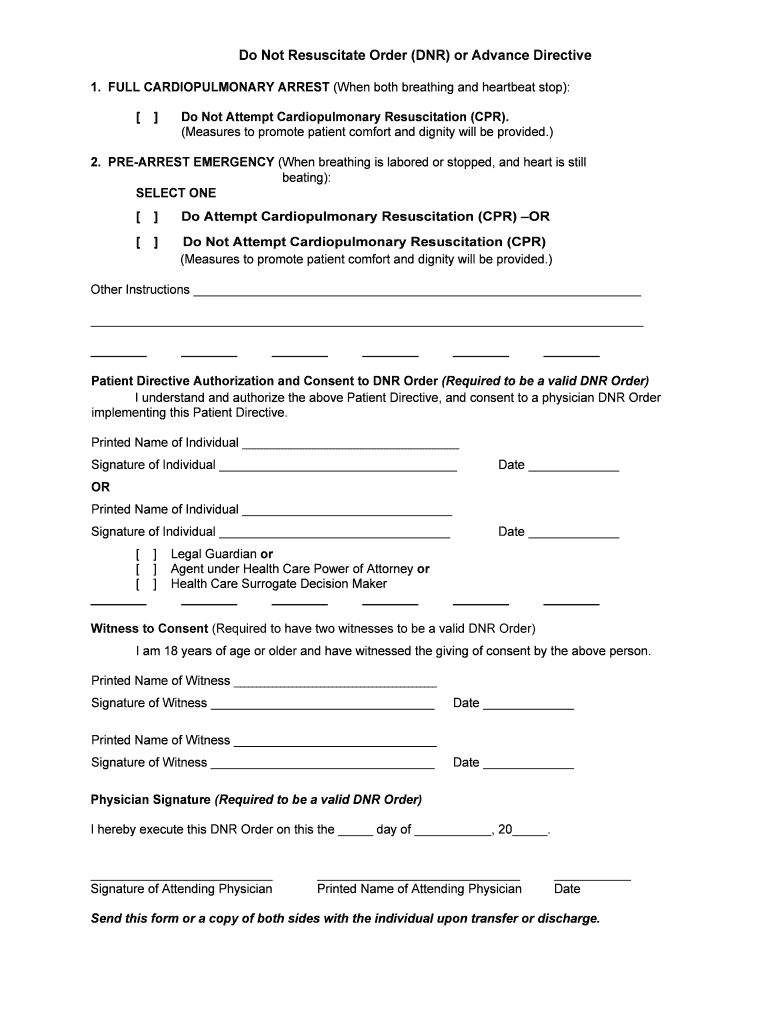
Do Not Resuscitate Order (DNR) or Advance Directive 1. FULL CARDIOPULMONARY ARREST (When both breathing and heartbeat stop): Do Not Attempt Cardiopulmonary Resuscitation (CPR). (Measures to promote.
Loading

Open form follow the instructions

Easily sign the form with your finger

Send filled & signed form or save
How to fill out the Do Not Resuscitate Form Pdf online
This guide will assist you in completing the Do Not Resuscitate Form Pdf online. It is essential to understand each section of the form and how to accurately provide your information to ensure your medical preferences are clearly communicated.
Follow the steps to successfully complete the DNR form online.
- Click ‘Get Form’ button to obtain the form and open it in the online editor.
- Begin by reviewing the full cardiopulmonary arrest section. Indicate your preferences regarding cardiopulmonary resuscitation (CPR) by selecting the appropriate option.
- Move to the pre-arrest emergency section. Choose whether you desire CPR attempted or not. Ensure your choice reflects your medical preferences.
- In the patient directive authorization section, print your name, sign the form, and date it. If applicable, indicate your role as a legal guardian, agent under health care power of attorney, or health care surrogate decision maker.
- Locate the witness to consent section. Have two individuals, who are 18 years or older, witness your consent. They should print their names, sign the form, and date it.
- The attending physician must sign and print their name on the form along with the date when executing the DNR order.
- Complete the patient’s name and summarize the medical condition in the designated areas to provide context for the form.
- Review when the form should be reviewed, along with the completion of the review outcomes. Make selections reflecting any changes or voiding of the form.
- Document any advance directives you may have, such as health care power of attorney or living will, along with the contact person's name and phone number.
- Once all sections are completed and accurate, save your changes, download the completed form, print a copy, or share it as necessary.
Start filling out your Do Not Resuscitate Form Pdf online today to ensure your medical wishes are respected.
Experience a faster way to fill out and sign forms on the web. Access the most extensive library of templates available.
Related content
Aug 10, 2021 — After completing the Texas OOH DNR Order form, the patient may obtain, at...
Note: Staple this cover sheet to the envelope containing the signed EMS-DNR Order. Page 3...
Get answers to your most pressing questions about US Legal Forms API.
What is the difference between DNR-CC and DNR-CCA?
State of Ohio A Do Not Resuscitate (DNR) order means that CPR is not to be conducted in case of cardiac or respiratory arrest. In the state of Ohio there are two DNR orders: DNR-CCA (Comfort Care Arrest) and DNR-CC (Comfort Care). Only a physician or Licensed Independent Practitioner can write a DNR order.
How many types of DNR are there?
Did you know that there are two different types of DNR orders that can be chosen? The first is the DNR Comfort Care (DNRCC) and the other is the DNR Comfort Care- Arrest (DNRCC-Arrest).
How do you write a DNR note?
I, _________________________________________, request limited emergency care as herein described. I understand DNR means that if my heart stops beating or if I stop breathing, no medical procedure to restart breathing or heart functioning will be instituted.
What is level 2 DNR?
Level 2: Stay in the facility and receive all medications and treatments possible within the facility. Level 3: Be transferred to a hospital from a nursing facility but not given CPR or taken to intensive care. Level 4: Be taken to a hospital and given all possible medical interventions. Do everything possible.
What is DNR PDF?
A Do-Not-Resuscitate Order (DNR) is a medical directive to doctors and other first responders instructing them to withhold CPR treatment should a patient's breathing or heart stop.
Can a healthy person get a DNR?
Any adult can request a DNR, including healthy adults. People most likely to use them are those who know in advance that their chance of surviving CPR is very low and/or they don't want to spend their last days on life support.
What are the 2 types of DNR?
Did you know that there are two different types of DNR orders that can be chosen? The first is the DNR Comfort Care (DNRCC) and the other is the DNR Comfort Care- Arrest (DNRCC-Arrest).
What is the difference between DNR and DNAR?
The American Heart Association in 2005 moved from the traditional do not resuscitate (DNR) terminology to do not attempt resuscitation (DNAR). DNAR reduces the implication that resuscitation is likely and creates a better emotional environment to explain what the order means.
Use professional pre-built templates to fill in and sign documents online faster. Get access to thousands of forms.
If you believe that this page should be taken down, please follow our DMCA take down process here.