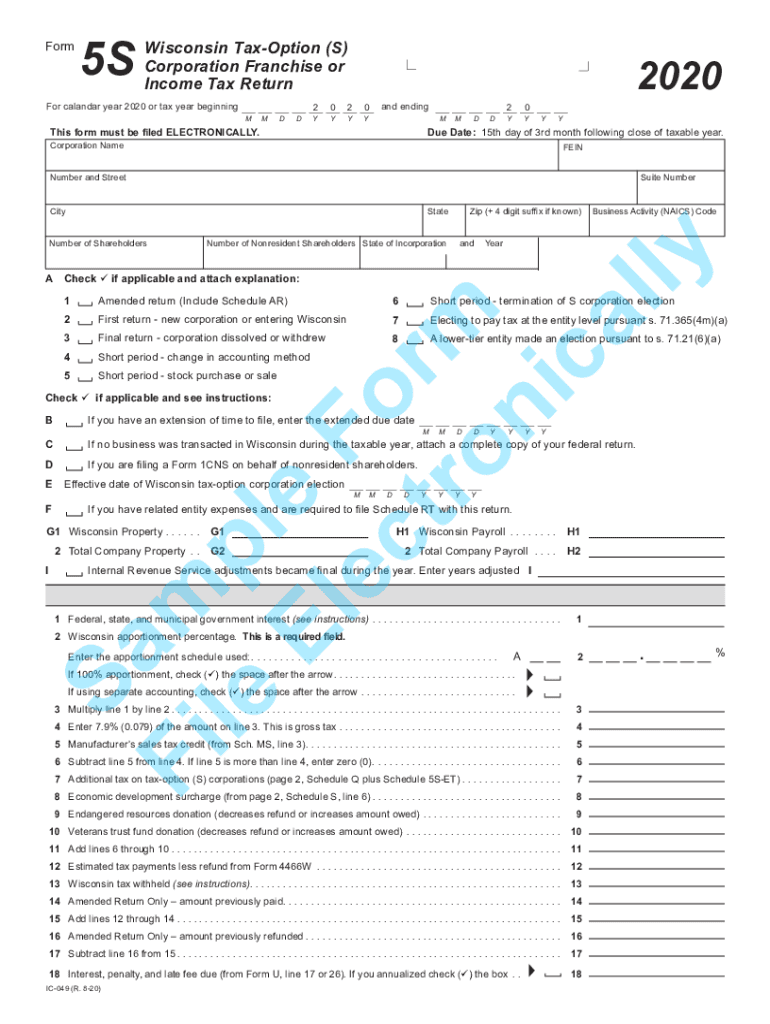
Form5SWisconsin TaxOption (S) Corporation Franchise or Income Tax ReturnFor calandar year 2020 or tax year beginningMMDD2Y0Y20YYand endingThis form must be filed ELECTRONICALLY.MMDD2Y0Y2020 YYDue.

Open form follow the instructions

Easily sign the form with your finger

Send filled & signed form or save
How to fill out the Wisconsin Form 5s 2020 online
Filling out the Wisconsin Form 5s 2020 online is a straightforward process. This guide will walk you through each section and field of the form, ensuring you understand what information is required for your corporation's franchise or income tax return for the tax year 2020.
Follow the steps to complete your Wisconsin Form 5s 2020 online.
- Click ‘Get Form’ button to obtain the form and open it in the editor.
- Enter the corporation name in the designated field. Ensure that it matches the legal name of your corporation as registered with the state.
- Provide your Federal Employer Identification Number (FEIN) in the appropriate field, which is essential for tax identification.
- Complete the address section, including number and street, suite number (if applicable), city, state, and zip code.
- Indicate the number of nonresident shareholders and the state of incorporation of your business.
- In the applicable checkboxes, select the appropriate circumstances for your return — such as if it is an amended return, a first return, or a final return.
- If applicable, provide the extended due date if you have been granted an extension.
- Fill out the necessary financial information regarding property and payroll, ensuring accuracy for the Wisconsin apportionment percentage.
- Complete the income and expense sections, following the instructions for any additional schedules (e.g., Schedule Q, Schedule S) that may apply.
- Review your entries for accuracy, then save your changes, and proceed to download, print, or share your completed form as needed.
Complete your Wisconsin Form 5s 2020 online to ensure timely and correct filing.
Experience a faster way to fill out and sign forms on the web. Access the most extensive library of templates available.
Related content
4 Dec 2020 — Wisconsin Tax Requirements Relating to Nonresident Entertainers...
23 Feb 2021 — Of the 6,592 properties in the portfolio at December 31, 2020, ... Form...
Get answers to your most pressing questions about US Legal Forms API.
What is the personal exemption for Wisconsin 2020?
The personal exemptions are $700 for individuals, their spouses, and dependents, and an additional $250 for taxpayers and their spouses (if filing a joint return) who have reached the age of 65 before the close of the taxable year.
What is the tax rate on pensions in Wisconsin?
Withdrawals from retirement accounts are fully taxed. Wages are taxed at normal rates, and your marginal state tax rate is 4.65%. Public pension income is not taxed, and private pension income is fully taxed.
Are 2020 federal tax forms available?
File 2020 Taxes Online for Free 2020 Tax Return Forms and Schedules for January 1 - December 31, 2020 can be only be paper filed now - FileIT. You had until October 15, 2021 to e-File 2020 Tax Returns, but you can - and should!
Can I print out my 2020 tax return?
You can view and print your return after you've paid for it. However, it won't be a final version until you've e-filed (or told us you want to file a paper copy of your return by mail). Be sure you print the final version to mail to the IRS or for your own records.
Can you still get IRS forms at the post office?
Is there any place I can go to get tax forms? A) Yes, you may visit a local IRS office or a post office or library that carries tax forms. You may also use computers that are often available for use in libraries to access IRS.gov to download needed forms.
Can I get my 2020 1040 online?
Access Tax Records in Online Account You can view your tax records now in your Online Account.
Where are 2020 tax forms available?
Get the current filing year's forms, instructions, and publications for free from the Internal Revenue Service (IRS). Download them from IRS.gov. Order by phone at 1-800-TAX-FORM (1-800-829-3676)
How do I obtain 2020 tax return?
To get a complete copy of a previously filed tax return, along with all attachments (including Form W-2), submit Form 4506, Request for Copy of Tax Return. Refer to the form for instructions and for the processing fee.
Use professional pre-built templates to fill in and sign documents online faster. Get access to thousands of forms.
If you believe that this page should be taken down, please follow our DMCA take down process here.