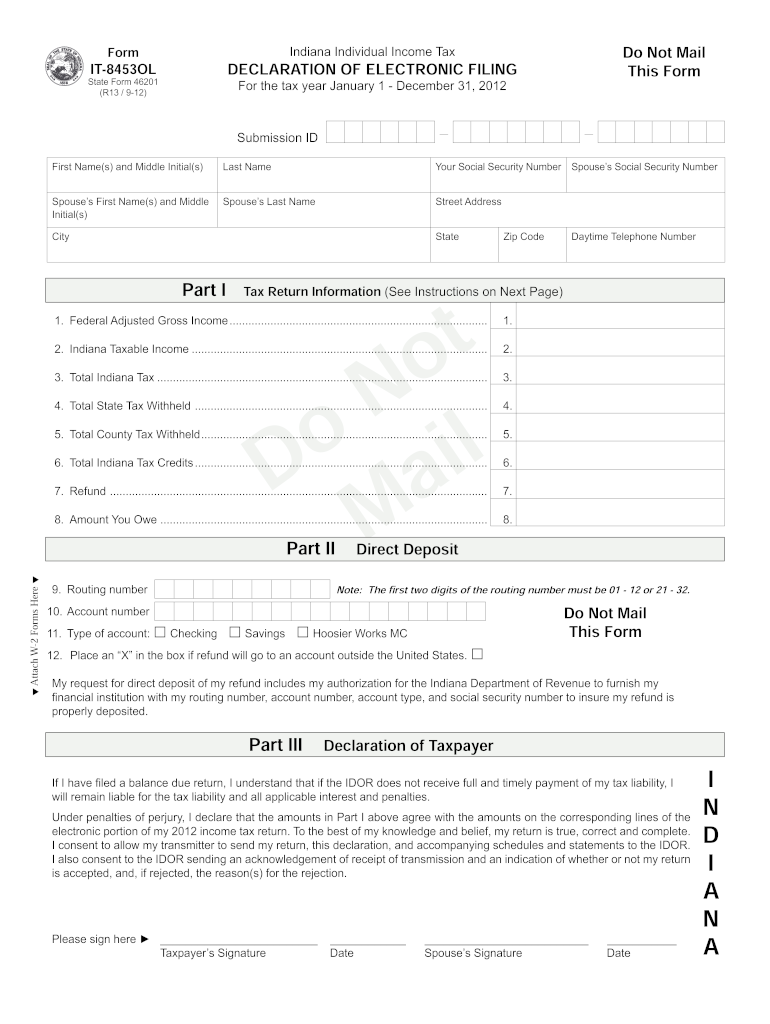
Form Do Not Mail This Form Indiana Individual Income Tax DECLARATION OF ELECTRONIC FILING IT8453OL State Form 46201 (R13 / 912) For the tax year January 1 December 31, 2012 Submission ID First Name(s).
Loading

Open form follow the instructions

Easily sign the form with your finger

Send filled & signed form or save
How to fill out the IT-8453OL online
The IT-8453OL is the declaration of electronic filing for Indiana individual income tax. It is essential for individuals filing their taxes online to complete this form accurately to ensure proper processing of their returns.
Follow the steps to successfully complete the IT-8453OL online.
- Press the ‘Get Form’ button to obtain the IT-8453OL form and open it in your preferred editor.
- Fill in your personal information at the top of the form, including your first name, middle initial, last name, and social security number.
- If applicable, provide your spouse’s first name, middle initial, last name, and social security number.
- Enter your street address, city, state, and zip code in the designated fields.
- Include your daytime telephone number for contact purposes.
- In Part I, input the federal adjusted gross income and Indiana taxable income from the corresponding lines of your tax return.
- Complete line 3 with the total Indiana tax based on your tax return.
- Document the total state tax withheld and total county tax withheld on the form as per the relevant lines from your tax documentation.
- Input total Indiana tax credits, refund amount, and the amount you owe, as relevant from your tax returns.
- In Part II, if you wish to have your refund directly deposited, fill in the routing number and account number, and select the type of account.
- If your refund will go to an account outside the United States, mark the appropriate box.
- In Part III, sign and date the form, affirming the information provided is accurate.
- Once completed, keep the IT-8453OL for your records. You do not need to mail it unless specifically requested.
Start filling out your IT-8453OL online today to ensure a smooth tax filing process.
Experience a faster way to fill out and sign forms on the web. Access the most extensive library of templates available.
Related content
If I have filed a balance due return, I understand that if the DOR does not receive full...
Electronic coverage as of July 24, 2003: 1996; ceased publication. Available also on...
4 TLS, have you transmitted all R text files for this cycle update? I.R.S. SPECIFICATIONS...
Get answers to your most pressing questions about US Legal Forms API.
What address do I send my Indiana state tax payment?
This letter should be sent to Indiana Department of Revenue, Corporate Income Tax, Tax Administration, PO Box 7206, Indianapolis, IN 46207-7206.
How do I mail my income tax payment?
If you choose to mail your tax payment: Make your check, money order or cashier's check payable to U.S. Treasury. ... Enter the amount using all numbers ($###.##). Do not use staples or paper clips to affix your payment to your voucher or return. Make sure your check or money order includes the following information:
How do I pay my Indiana tax bill?
Go to INTIME. Locate the Bill payments section. Select Bank Payment (no fee) or Credit Card (fee). Continue following prompts.
Where do I pay my Indiana state income tax?
The Indiana Taxpayer Information Management Engine, known as INTIME, is the Indiana Department of Revenue's (DOR) e-services portal. INTIME provides access to manage and pay individual income, and various corporate and business tax obligations.
What is the 8453 8453-OL form?
Form FTB 8453-OL, California Online e-file Return Authorization for Individuals, is the signature document for self-prepared individual e-file returns. By signing this form, you declare that the return is true, correct, and complete.
Where do I send my Indiana tax payment?
Indiana Department of Revenue. P.O. Box 7224. Indianapolis, IN 46207-7224.
What is a PFC coupon?
The Post Filing Coupon document contains the current. taxpayer amount due and taxpayer account information.
How do I pay my Indiana state taxes online?
Go to INTIME. Locate the Bill payments section. Select Bank Payment (no fee) or Credit Card (fee). Continue following prompts.
Use professional pre-built templates to fill in and sign documents online faster. Get access to thousands of forms.
If you believe that this page should be taken down, please follow our DMCA take down process here.