On Supplemental Information and Instructions Paperwork Reduction Act Statement: The information collected on this form is necessary to determine applicant eligibility for airman ratings. We estimate it will take 10 minutes to complete this form. The information collected is required to obtain a benefit and becomes part of the Privacy Act system of records DOT/FAA 847, Aviation Records on Individuals. Please note that an agency may not conduct or sponsor, and a person is not required to respond t.
Loading

Open form follow the instructions

Easily sign the form with your finger

Send filled & signed form or save
How to fill out the Ac 8060 71 online
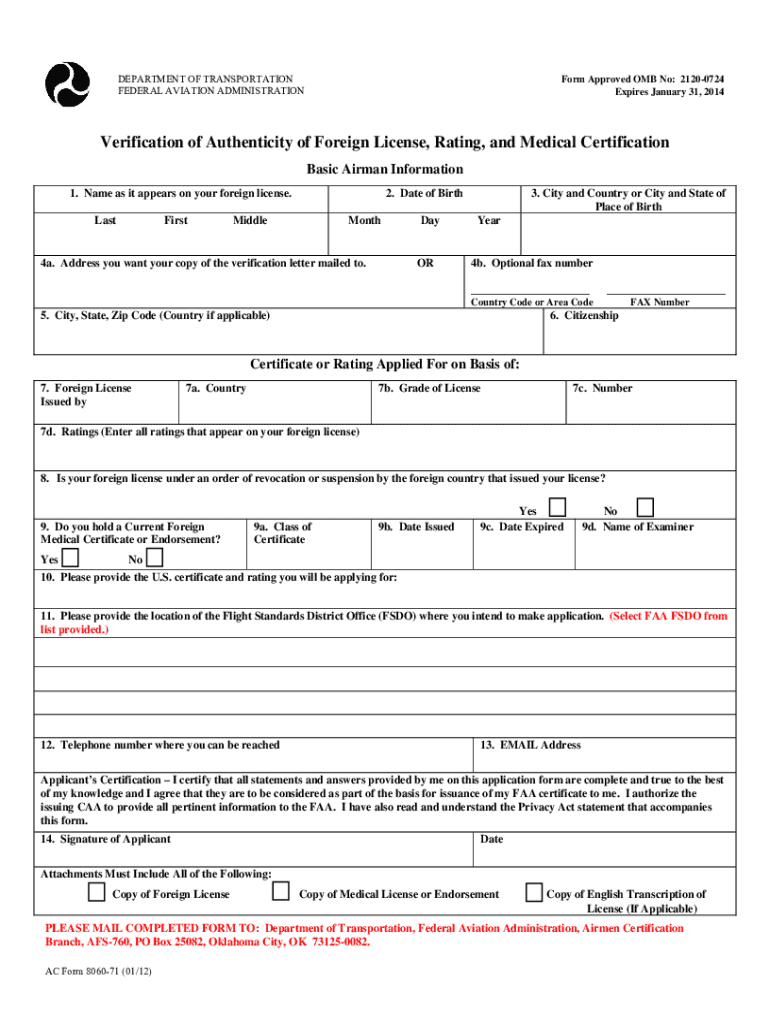
Filling out the Ac 8060 71 form online can seem daunting, but with clear instructions, you can confidently complete this necessary document. This guide will provide step-by-step guidance on how to accurately fill out each section to ensure your application is processed without delays.
Follow the steps to complete the Ac 8060 71 form effectively.
- Click the ‘Get Form’ button to access the Ac 8060 71 document online and open it in your editor.
- In Block 1, enter your last name, first name, and middle name as they appear on your foreign pilot certificate.
- In Block 2, input your date of birth using the eight-digit format in Month, Day, Year (e.g., 07-09-1940).
- For Block 3, provide the name of the city and the country where you were born.
- In Block 4, enter your preferred mailing address. Additionally, specify an optional fax number for the receipt of the completed verification letter.
- In Block 5, include your city, state, zip code, and country if applicable.
- Enter your citizenship in Block 6, specifying the country where you are a citizen.
- In Block 7a, input the name of the International Civil Aviation Organization (ICAO) country that issued your license.
- In Block 7b, specify the grade of the license issued (e.g., private pilot, commercial pilot).
- In Block 7c, input the certificate number that is shown on your license.
- In Block 7d, include all ratings that appear on your foreign license.
- Indicate whether your foreign license is under an order of revocation or suspension by checking yes or no in Block 8.
- In Block 9, record whether you hold a current foreign medical certificate or endorsement by checking yes or no.
- Complete Fields 9a to 9d by entering the class of the foreign medical certificate, the date issued, the date expired, and the name of the examiner.
- In Block 10, provide the U.S. certificate and rating for which you are applying.
- Block 11 requires you to specify the location of the Flight Standards District Office (FSDO) where you will be applying.
- Input your telephone number in Block 12 where you can be reached.
- In Block 13, enter your email address; note that the completed verification letter cannot be sent via email.
- In Block 14, sign your full name and date the application. If your name contains symbols or characters, use the English version.
- Lastly, confirm that you have attached all required documents: a copy of your foreign license, medical license or endorsement, and, if applicable, a copy of the English transcription of your license.
- You can then save changes, download, print, or share the completed Ac 8060 71 form as needed.
Complete your Ac 8060 71 form online to ensure a smooth application process.
Experience a faster way to fill out and sign forms on the web. Access the most extensive library of templates available.
Related content
Jun 22, 2021 — Form AC 8060-71 - VERIFICATION OF AUTHENTICITY OF FOREIGN LICENSE AND...
Copy of Medical License or Endorsement. Copy of English Transcription of. License (If...
Les CM8050 et CM8060 sont des imprimantes de bureau à grand volume qui ... Cela permet à...
Get answers to your most pressing questions about US Legal Forms API.
What disqualifies you from a first class medical certificate?
The neurological standards require that a first-class airman has no history of the following: Epilepsy. Any disturbance of consciousness without satisfactory medical explanation. Loss of control of the nervous system without satisfactory medical explanation.
How do I check the status of my FAA medical certificate?
If the medical dates are incorrect, please contact CAMI at (405) 954-4821. To check the validity of certificates for accident, incident and enforcement information visit https://aie-pa.faa.gov/ to submit your request.
What disqualifies you from a third class medical certificate?
It is not possible for applicants who have aneurysms or high blood pressure to fly because they are prone to sudden death from them while in the air. It is also possible for applicants with diabetes, epilepsy, brain tumors, and epilepsy to not be able to get a 3rd class medical certificate.
How do I convert my foreign pilot license to FAA?
Submit Verification Form & Foreign Documents to FAA 1) Complete FAA Form 8060-71(Verification of Authenticity of Foreign License and Medical Certification Form) 2) Make enlarged copy of Private Pilot License. 3) Make enlarged copy of Medical Certificate. 4) Send Form & Documents to FAA.
What disqualifies you from a FAA medical exam?
These medical conditions include a personality disorder manifested by overt acts, a psychosis, alcoholism, drug dependence, epilepsy, an unexplained disturbance of consciousness, myocardial infarction, angina pectoris, and diabetes requiring medication for its control.
Do I need to fast for an FAA medical exam?
Before Your FAA Medical Examination Drink plenty of water the day of the exam. Avoid foods/beverages with caffeine, sodium or carbohydrates/sugar at least 8 hrs prior to the exam. Avoid eating at least 4 hrs prior to the exam.
Is it hard to get FAA medical certificate?
The process of obtaining a medical certificate is fairly simple. You'll need to complete an application and then undergo a physical examination with an FAA-approved Aviation Medical Examiner. Learn all about medical certificates for pilots, who needs one, how to obtain one and what to expect throughout the process.
How long does it take to get FAA medical certificate?
In the best case, they may issue you a certificate. Frequently, the review and submission process can repeat itself for several iterations. The process generally takes up to six months, but we have heard from a number of pilots who have spent more than a year stuck in the review and submission loop.
Use professional pre-built templates to fill in and sign documents online faster. Get access to thousands of forms.
If you believe that this page should be taken down, please follow our DMCA take down process here.