Se have to draft. Note that there are additional attorney drafted clauses in the Special Clauses available on Xpress Forms. B. Do Not Make Changes. These are attorney prepared clauses. Washington case law permits you to fill in simple blanks in attorney prepared forms and insert attorney prepared clauses. If you change these clauses, they are no longer attorney prepared. If you make changes, you will be held to the standards of an attorney in the wording of the changes, and could be guilty.

Open form follow the instructions

Easily sign the form with your finger

Send filled & signed form or save
How to fill out the Form 22d Real Estate online
Filling out the Form 22d Real Estate online is a straightforward process that ensures important details of your purchase and sale agreement are outlined correctly. This guide will provide you with step-by-step instructions to help you navigate through each section of the form with confidence.
Follow the steps to fill out the Form 22d Real Estate online effectively.
- Click the ‘Get Form’ button to access the form and open it in your preferred editor.
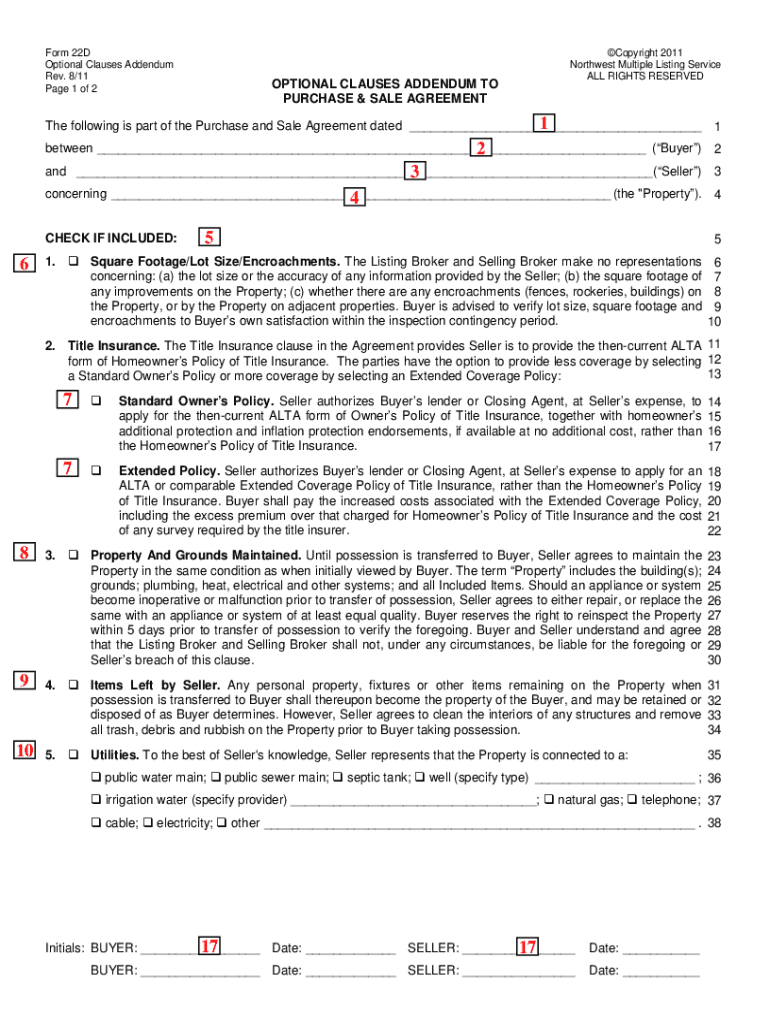
- Enter the date of the purchase and sale agreement as stated at the top of the first page of the agreement.
- Input the buyer's name(s) exactly as listed in the purchase and sale agreement.
- Input the seller's name(s) as listed in the purchase and sale agreement.
- Fill in the property address as it appears in the purchase and sale agreement.
- Check the box next to any clauses that you wish to include in the purchase and sale agreement. It is advisable to mark through any clauses that do not apply.
- For square footage, lot size, and encroachments, you will verify these details and note them within the inspection period as per the form's guidance.
- Complete the title insurance section by indicating whether the seller will provide a Homeowner’s Policy, a Standard Policy, or an Extended Coverage Policy.
- Ensure the section regarding property and grounds maintenance is filled out to confirm that the seller will maintain the property until possession is transferred.
- List any items that are left by the seller and specify that these will become the property of the buyer upon transfer.
- Indicate the utilities the property is connected to by checking the appropriate boxes.
- If applicable, provide required insulation details for new construction.
- Use the leasing clause if the seller leases any personal property that will pass to the buyer upon closing.
- If subject to a homeowners’ association, specify the review period and required documents.
- If there are any excluded items from the sale, list them clearly.
- If you choose e-mail transmission of documents, fill in the relevant e-mail addresses as indicated.
- Lastly, ensure both buyer and seller initial and date the form, noting the date of signing.
Complete your documents online for a smooth real estate transaction.
Experience a faster way to fill out and sign forms on the web. Access the most extensive library of templates available.
Related content
Approval of Commercial Real Estate Contract of Purchase and ... homeowners' association...
Jan 14, 2010 — RESIDENTIAL REAL ESTATE PURCHASE AND SALE AGREEMENT ... pursuant to NWMLS...
Decatur is a city in, and the county seat of, DeKalb County, Georgia, which is part of the...
Get answers to your most pressing questions about US Legal Forms API.
What's the purpose of Form 39 the second buyer's addendum?
Sellers should use Second Buyer's Addendum (Form 39) if the Property is already subject to a contingent Purchase and Sale Agreement (Buyer's Sale of Property Contingency Form 22B) and Seller wants to accept an offer from a Second Buyer with the intention of bumping First Buyer.
What happens if buyer does not sign addendum?
If you have an agreement in place that was signed by both parties, but your buyer has not signed your proposed Addendum, the original purchase agreement is still binding on both sides.
What is a 22AD?
22AD-Appraisal Gap Addendum. The 22AD is basically you pre-negotiating how much extra cash you are willing to bring if the appraisal comes in lower than the amount you offered for the home. Let's say you attach a 22AD to your offer for 5k.
What Does "Addendum" Mean In Real Estate? - Inman
An addendum is an additional document that gets added to the purchase and sale agreement. The document will include any additional information or requests that the buyer did not put into the original purchase and sale agreement.
What is a 22AD real estate?
Increased Down Payment Addendum (Form 22AD) - New Form If the lender's appraised value of the property is less than the purchase price, Form 22AD requires the buyer to pay additional funds, up to a certain amount, towards buyer's down payment.
What is an addendum example?
Examples of an Addendum For example, the seller of a house may agree after the original sales contract has been written to include certain pieces of furniture for an additional specified sum. ... terms or the closing date for the sale are often amended in real estate transactions, with the change noted in an addendum.
What is the purpose of Washington's Form 42 agency disclosure?
AGENCY DISCLOSUREWashington State law requires real estate brokers to disclose to all parties to whom the broker renders real estate brokerage services whether the broker represents the seller (or lessor), the buyer (or lessee), both the seller/lessor and buyer/lessee, or neither.
What addendum creates a contingency?
A "Sale of Other Property by Buyer" addendum creates a contingency contract (the contract is contingent upon buyer receiving funds from their home sale before they can close on the home they wish to purchase).
Did You Realize - \u201cNo Response Deems Acceptance\u201d? - Eleete Real ...
It clearly states in the agreement that buyer's failure to timely reject in writing, shall constitute acceptance . The Townhome / Planned Community Homeowners Association Addendum has a 5-business day response time for buyers upon receipt of all the specified HOA legal documents and minutes.
What is a second buyers addendum?
THIS ADDENDUM CONTROLS. contingencies checked in paragraph 2 of. tinue marketing the Property and provides that if Seller receives another offer on the Property that is acceptable to. Seller, then written notice of Seller's intent to proceed to Closing on the second offer may be given to First Buyer on.
Use professional pre-built templates to fill in and sign documents online faster. Get access to thousands of forms.
If you believe that this page should be taken down, please follow our DMCA take down process here.