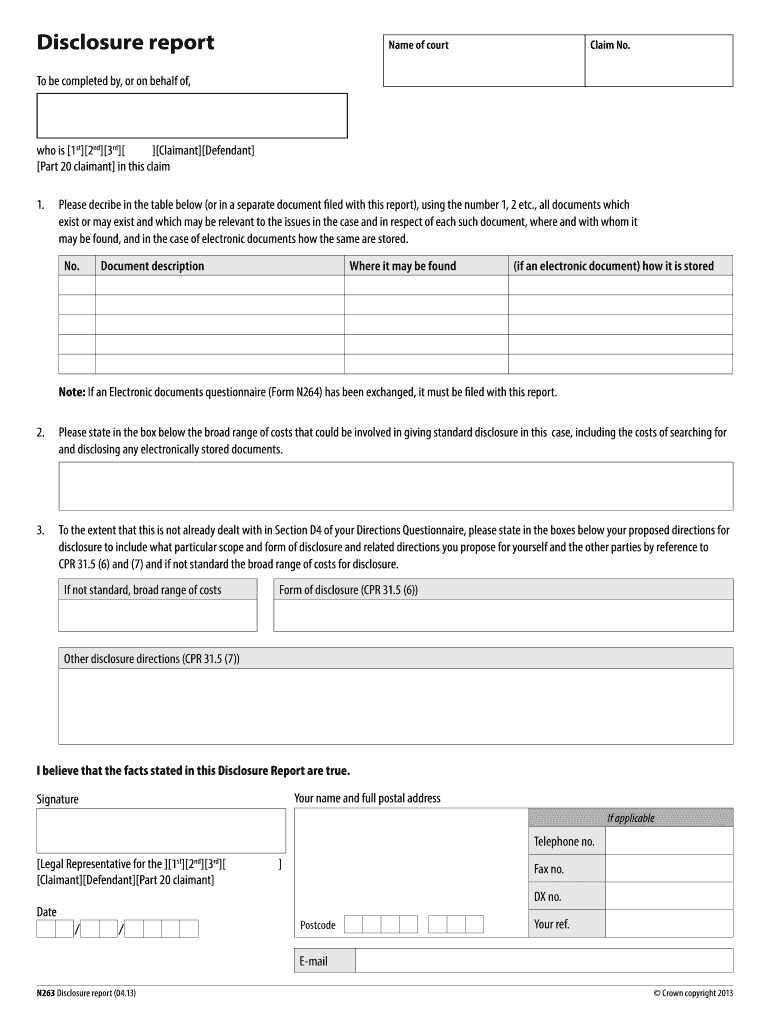
W (or in a separate document filed with this report), using the number 1, 2 etc., all documents which exist or may exist and which may be relevant to the issues in the case and in respect of each such document, where and with whom it may be found, and in the case of electronic documents how the same are stored. No. Document description Where it may be found (if an electronic document) how it is stored Note: If an Electronic documents questionnaire (Form N264) has been exchanged, it must be f.

Open form follow the instructions

Easily sign the form with your finger

Send filled & signed form or save
How to fill out the Form N263 online
Filling out the Form N263 is an important step in managing your legal disclosure obligations. This comprehensive guide will provide you with step-by-step instructions for completing the form online, ensuring you understand each section and field.
Follow the steps to fill out the Form N263 effectively.
- Press the ‘Get Form’ button to obtain the form and open it in the document editor.
- In the first section, provide the name of the court and the claim number. This information is essential for identifying your case.
- Next, indicate who is completing the form by selecting the appropriate role: claimant, defendant, or part 20 claimant.
- In the table provided, describe all documents that may be relevant to the case. Use sequential numbers (1, 2, etc.) for each entry. Specify where each document can be found and, for electronic documents, how they are stored.
- State the broad range of costs that may arise from providing standard disclosure. Include any costs associated with the search for electronically stored documents.
- If not already covered in your Directions Questionnaire, outline your proposed directions for disclosure. Include the form and scope of disclosure and any additional directions needed for you and other parties.
- Finally, affirm that the facts stated in the document are true, and include your name, full postal address, signature, telephone number, and email. Make sure to also provide the date of completion.
- Once you have filled out all necessary information, save your changes, and download, print, or share the completed form as required.
Start filling out your Form N263 online today to ensure compliance and proper documentation.
Experience a faster way to fill out and sign forms on the web. Access the most extensive library of templates available.
Related content
by H Tang · 2004 — [EXAFS study on the stripping mechanism in N263/alkaline cyanide...
Welcome to the Beadle Conference Room Reservation calendar. For more information on how to...
Grantee Code: (First three or five characters of FCCID) Product Code: (Remaining...
Get answers to your most pressing questions about US Legal Forms API.
What is an example of a disclosure report?
Examples of disclosure reports are: Financial statements. Prospectus. Management's discussion and analysis (MD&A) Annual information forms.
Who is the party responsible for completing a seller disclosure statement?
The seller is obligated to complete a disclosure statement in which any possible material defects should be noted. The licensee is responsible for advising the seller of this duty and for providing an appropriate form for the seller's use.
What documents do not need to be disclosed?
Evidence that is considered to be privileged and does not need to be disclosed includes: Documents created about your case by your lawyer (called “lawyer/client privilege”) Documents created by your lawyer to prepare for litigation (called “litigation privilege”)
Who signs the disclosure report?
The Disclosure Statement The list of documents must contain a disclosure statement that is signed by the party (or in the case of a company a senior representative of the company who takes overall responsibility for the search for documents).
What is a disclosure report?
What is a disclosure report? In the simplest of terms, disclosure reports contain information about a company's business activities, financial condition, management compensation, operating performance and future direction.
What is a list of documents standard disclosure?
The rules relating to standard disclosure are contained in Part 31 of the Civil Procedure Rules and Section E of the Commercial Court Guide. A document has or will have been in your control if you have or have had possession, or a right of possession, of it or a right to inspect or take copies of it.
What documents need to be disclosed?
The purpose of “disclosure” is to make sure that both or all parties know of all documents that have a bearing on the case.. Here, “document” means any form of recorded information, not just writing on paper. It includes, for example, pictures, emails, mobile phone texts, social networking messages or video-clips.
What is N263?
Court Form N263: Make a Disclosure Report. This form is used for claimants, defendants, or solicitors to explain the searches they have conducted for documents that must be disclosed in particular cases.
Who signs the natural hazard disclosure statement?
Seller, as transferor, Seller's Agent(s), and Buyer, as transferee are to sign one copy of the Natural Hazard Disclosure Report prior to the close of escrow. It is illegal for agents to require the seller to use a particular natural hazard disclosure company or to give the impression that the seller may not choose.
What type of information must be disclosed to the seller?
Examples of material facts that must be disclosed include structural problems with the house, soil problems, a leaking roof, unpermitted construction, neighborhood noise problems, and anything else that a buyer would deem to be important.
Use professional pre-built templates to fill in and sign documents online faster. Get access to thousands of forms.
If you believe that this page should be taken down, please follow our DMCA take down process here.