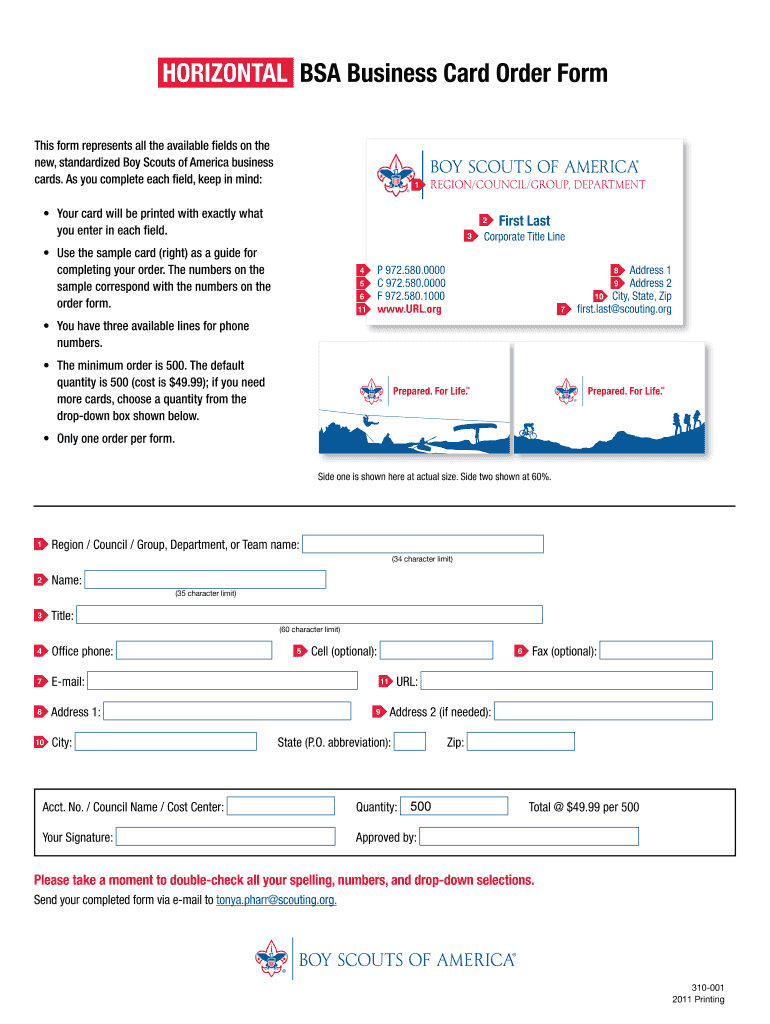
Horizontal BSA Business Card Order Form This form represents all the available fields on the new standardized Boy Scouts of America business cards. As you complete each field keep in mind YOUR COUNCIL NAME HERE Region/Council/Group Department Your card will be printed with exactly what you enter in each field. Use the sample card right as a guide for completing your order. The numbers on the sample correspond with the numbers on the order form* First Last Corporate Title Line P 972. 580. 0000 www. URL*org Address 1 10 City State Zip first. last scouting. org You have three available lines for phone numbers. The minimum order is 500. The default quantity is 500 cost is 49. 99 if you need more cards choose a quantity from the drop-down box shown below. Only one order per form* Side one is shown here at actual size. Side two shown at 60. 34 character limit Name Title Office phone E-mail City Cell optional URL Fax optional Address 2 if needed State P. O. abbreviation Zip Acct* No* / Counci....
Loading

Open form follow the instructions

Easily sign the form with your finger

Send filled & signed form or save
How to fill out the Bsa Business Cards online
Filling out the Bsa Business Cards form online is a straightforward process that ensures your business cards reflect accurate information. This guide will provide you with detailed instructions to navigate the form efficiently and effectively.
Follow the steps to complete your Bsa Business Cards order online:
- Press the ‘Get Form’ button to access the business card order form and open it in your preferred editor.
- Enter your council name in the designated field. Ensure that the information is accurate, as it will appear exactly as submitted.
- Fill in your first and last name in the respective fields provided. Pay attention to the character limits of 35 for each.
- Provide your corporate title in the title section. There is a maximum character limit of 60 for this field.
- Input your office phone number in the phone section. You have space for multiple phone numbers if needed.
- If desired, include your cell phone number in the optional field provided for that purpose.
- Fill in your email address in the specified field, ensuring that it is accurate for proper communication.
- Enter your address in the address fields, ensuring to include Address 1 and Address 2 if necessary.
- Provide the city, state (using postal abbreviations), and zip code in the designated sections.
- Select the quantity of cards you wish to order from the drop-down list. Remember, the minimum order is 500.
- Review all entered information carefully for accuracy to avoid any printing errors.
- After completing the form, you can save the changes. Choose to download, print, or share your completed form as needed.
Start filling out your Bsa Business Cards online to ensure your accurate and professional representation.
Experience a faster way to fill out and sign forms on the web. Access the most extensive library of templates available.
Related content
While prepaid cards are the most well-known and popular products used by ... May be a...
Chair and department support. • Ordering business cards/letterhead. • Seminar and...
Eagle Scout is the highest achievement or rank attainable in the Scouts BSA program of...
Get answers to your most pressing questions about US Legal Forms API.
Is Scouts BSA a 501 C )( 3?
Just follow these steps: Create a Word document. Open a new document and click the Page Layout menu option. ... Insert a table. Click on Insert in the menu and then the Table icon. ... Adjust the properties of your table. In the submenu, click on the table properties section. ... Insert your logo. ... Personalize the text.
How do I make a business card in Word without a template?
Standard Size Business Cards. 3.5" x 2.0"
Is Friends of Scouting tax-deductible?
The Friends of Scouting campaign raises funds from people just like you committed to seeing the Scouting program thrive. Parents, family, friends, peers, employers, and companies alike can make tax-deductible gifts to support youth in our community.
Is Scouts BSA the same as Boy Scouts of America?
The flagship program of Boy Scouts of America, previously known as "Boy Scouting", became known as Scouts BSA on February 1, 2019, when the program opened to girls. Members of Scouts BSA are known as "Scouts".
What type of business is Boy Scouts of America?
The Boy Scouts of America is a youth organization based in the United States. community organizations.
Is a Boy Scout troop a non profit?
The Boy Scouts of America is a non-profit organization incorporated as a 501(c)(3). This means that the Boy Scouts of America does not seek profit in its operation, and receives funds from private donations, membership dues, and other forms of revenue.
What is the scout classification?
Star (6-9 years) Junior (9-12 years old) Senior (12-16 years old) Cadet (16-21 years old)
What is the standard bleed for a business card?
US Business Card Size Bleed is 1/8th of an inch. Make sure you keep all your important information well within the bleed zone to ensure it isn't snipped off after printing. Your finished artwork size with bleed will be 3.75” x 2.25”.
Use professional pre-built templates to fill in and sign documents online faster. Get access to thousands of forms.
If you believe that this page should be taken down, please follow our DMCA take down process here.